I have an ACF Fieldgroup "Seiten FAQs" with a repeater for some FAQs which is attached to pages. In Bricks I render those items using Bricks DD Tags like {acf_page_faqs_frage}. This used to work great and translated faqs would show up on the translated pages. Now for some reason I can't figure out, instead of rendering the dd tags content, it translated the tag itself to something like {acf_page_faqs_question}.
Probably something I messed up but other than enabling automatic translation for the entire site, I can't think of any wpml related change I made recently. I tried switching the field group between the default and expert settings and between translate and copy. Made some smaller changes to the default german page to trigger re-translation etc but can't figure out how to fix this.
Hi there,
Thanks for reaching out to WPML Support.
I’m Prosenjit from the WPML Development Team, and I’ll be happy to help you with this.
From your description, I understand that ACF dynamic tags are being translated when they’re used inside a dynamic field in Bricks Builder. Since Bricks is compatible with WPML, it sends all text found in the editor to translation — including dynamic strings — which is why the tag itself ends up getting translated.
We’ve seen a similar case before, and a code-based fix was shared that should resolve it.
Could you please try the steps mentioned in the link below and let me know if it helps?
I might be doing something wrong but couldn't get it to work with the snippet. Added it to my functions and made some changes to the page in the default language to trigger the page needing translations. Then went through the advanced translation editor again but the {acf..} dd tags still render as translated strings instead of the rendering the actual content.
I'd be happy to share some logins if you're able to take a peek under the hood and let me know what I'm missing 😀
Hope you're doing well! Sorry for the delayed response over the weekend.
I'd be happy to look into this for you! To investigate the issue with the Dynamic ACF field, could you please share the following:
1. Access credentials to your site
2. The URL of the page where the Dynamic ACF field is being used
3. A screenshot of the module where the Dynamic Tag has been applied
I've enabled the private reply box so you can share your access credentials securely. You'll find it available at the bottom of the reply composer when submitting your next response.
Looking forward to hearing from you, and please don't hesitate to reach out if you have any questions in the meantime!
Thank you for sharing the access details and the additional information.
I checked your setup and can see that the code was applied correctly. However, since the issue still persisted, it’s likely related to how the module processes content(nested) or probably the translations were already stored and retrieved before our filter had a chance to run, so the adjustment didn’t take effect as expected.
That said, I’ve found a more reliable solution to ensure the dynamic tag displays and renders contents correctly in each language — and it’s working well. At the moment, both the title and the accordion content are showing properly.
To prevent this dynamic ACF tag from being translated automatically in the future, please follow these steps:
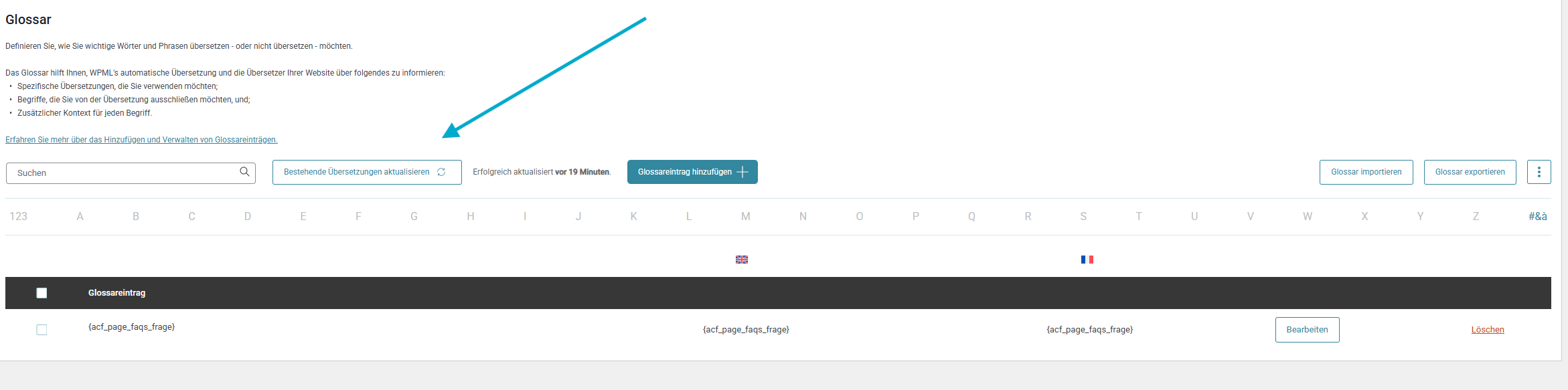
- In the Default term field, add the full dynamic tag:
{acf_page_faqs_frage}
- In the Translation section for each language (e.g., French and English), enter the exact same term:
{acf_page_faqs_frage}
- Save the glossary entry, then click "Update Existing Translations" (as shown in the screenshot).
Once this is done, the translations will render the correct content instead of the dynamic tag. The dynamic tag itself will no longer be translated by automatic translation, and you won’t need to manually update each translation — the “Update Existing Translations” option will handle that for you.
I hope this clarifies everything. Please give it a try and let me know how it goes. I’ll be happy to assist further if needed.
Thank you for raising this. In your case, the scenario could be different and will require a proper investigation. For that reason, I kindly recommend continuing the discussion in the ticket you have already opened. The assigned supporter will review it carefully and guide you on the next steps.
As a general practice, we encourage each client to create and continue their own support thread rather than replying to another one, as separate threads help us avoid confusion and ensure each case receives the attention it deserves. This applies to all cases, not just this one.
Please feel free to open a new thread anytime you need assistance or continue with the one you already create — we’ll be happy to help.