Home›Support›English Support›[Resolved] Elementor Translated header & Footer do not show in translated area.
[Resolved] Elementor Translated header & Footer do not show in translated area.
This thread is resolved. Here is a description of the problem and solution.
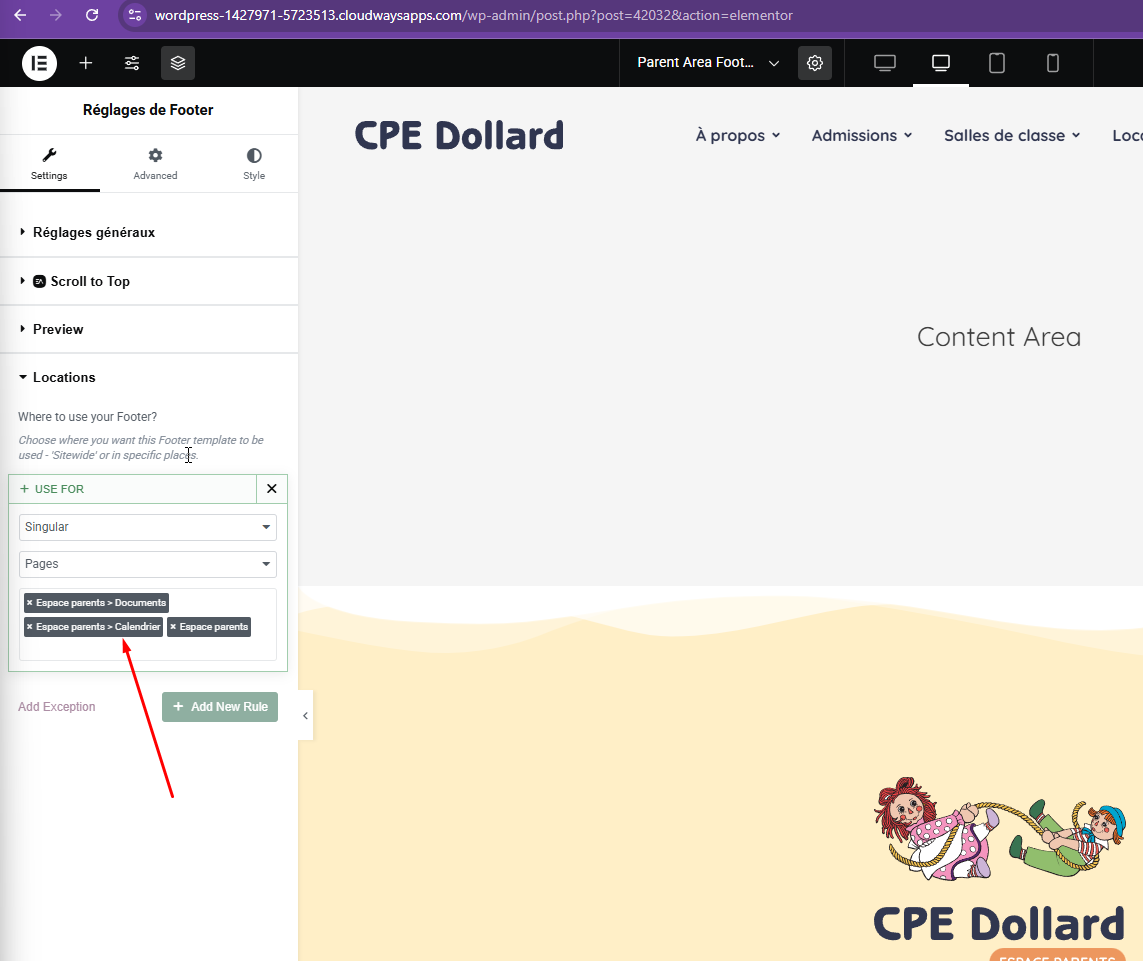
Problem: You are experiencing issues with the custom header and footer not appearing correctly in the translated versions of your site. Instead, the French version of the site-wide header and footer are displayed. Solution: We recommend manually editing the header and footer. Access your site's backend, for example, through Elementor editor. Once there, manually select the correct page for the header or footer as demonstrated in the provided screenshot.
If this solution does not resolve your issue, or if it seems outdated or irrelevant to your case, please check the related known issues and confirm that you have installed the latest versions of themes and plugins. If the problem persists, we highly recommend opening a new support ticket for further assistance.
This is the technical support forum for WPML - the multilingual WordPress plugin.
Everyone can read, but only WPML clients can post here. WPML team is replying on the forum 6 days per week, 22 hours per day.
Background of the issue:
I have a custom header and footer for the 'Parent's Area' on my website hidden link. I am trying to ensure that the translated versions of these elements appear correctly on the French version of the site.
Symptoms:
The translated header and footer do not show in the translated area. Instead, it is showing the French version of the sitewide header.
Questions:
Why are the translated header and footer not appearing in the translated area?
How can I ensure the custom header and footer are displayed correctly in the French version?
I will need to closely examine your website. Therefore, I will require temporary access (WP-Admin and FTP) to a test site where the problem has been replicated, if possible. This will enable me to provide better assistance and determine if any configurations need to be modified.
Please note that it is important to have a backup for security purposes and to prevent any potential data loss. You can use the UpdraftPlus plugin (https://wordpress.org/plugins/updraftplus/) to fulfill your backup requirements.
Your upcoming reply will be treated with confidentiality and will only be visible to you and me.
✙ To resolve the issue, I may need your consent to deactivate and reactivate plugins and the theme, as well as make configuration changes on the site if necessary. This emphasizes the significance of having a backup.
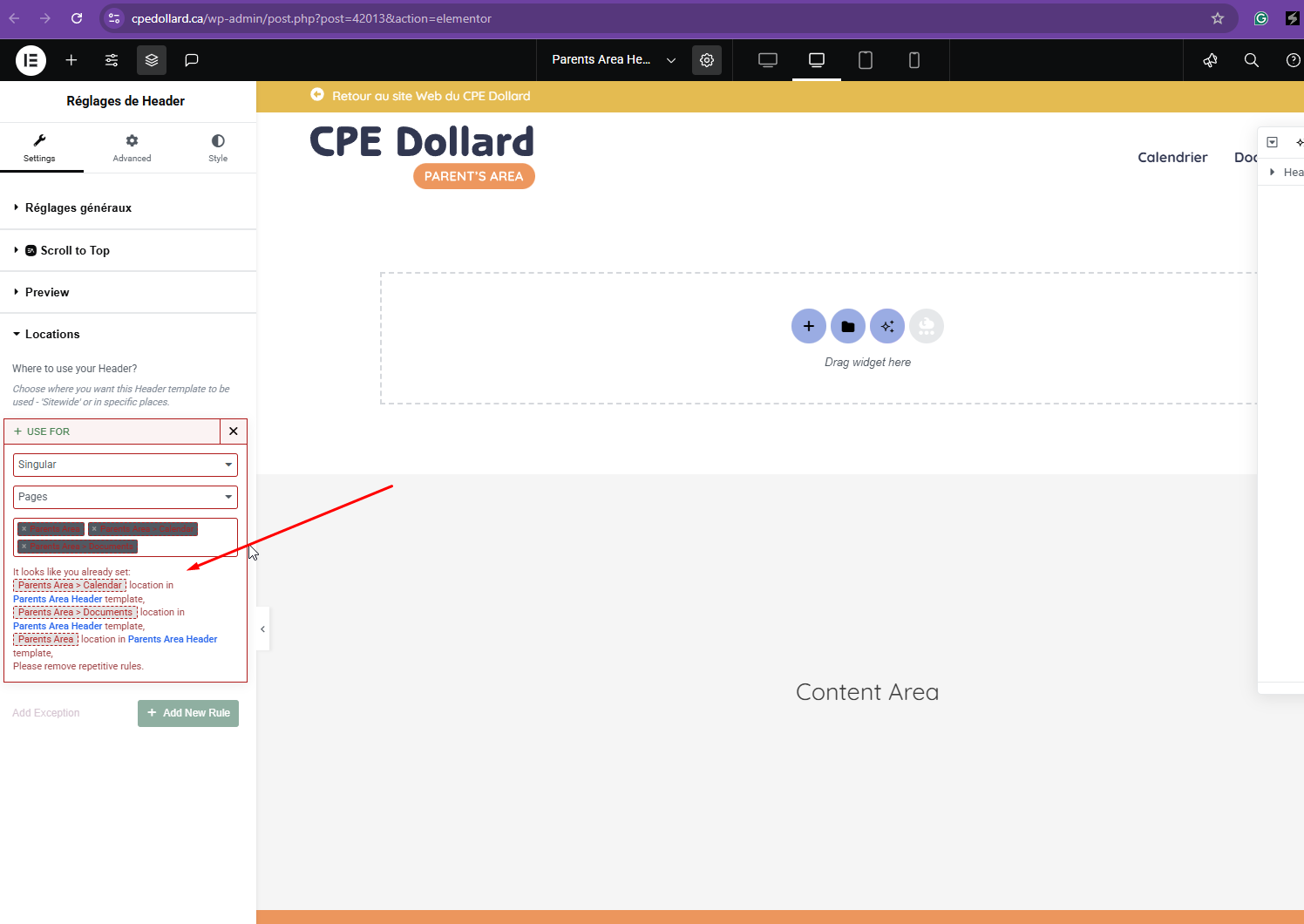
I'll skip the main site since you've fixed it. Regarding the parent page in the French language, I've checked the header and the location is showing invalid, as shown in the attached screenshot. Could you check and make adjustments? Please also check the French parent footer location settings.
Yes, i removed them. Now the headers on all the site is broken...
You are welcome to remove the conditions on your end to find the solution. As i said, i have experimented with this endlessly thats why i am contacting the experts.
Thanks for your reply. Do you have a test or staging site we can use to troubleshoot this issue? Since your website is live and receives visitors, I’d prefer not to risk disrupting it during the debugging process.
Hi Kor,
Thank you for your efforts. Have you found the reason why the header and footer in the parents section is not showing up properly? This matter is urgent I need to take the website live and it's the only issue holding back. Thank you.
Thanks for your patience. I found the solution, you need to manually edit the footer/header, for example, here hidden link . Then, manually select the correct page as shown in the attached screenshot.
Hi, the headers on all the website are now skrewed up.
Please can you take a deeper look and implement the changes 100% before saying it is fixed.
I did exactly what you suggested before contacting you here in WPML. Doing what you suggested does not fix the issue, and causes issues on the whole website.
I have tried to select the pages to show the French header and footer, and this causes issues with all headers and footers on website. I then go and do a minor change and save the English version, and everything resets again. It shows the Main site header and footer in the French Area. Its a loop.
Please take a deeper more detailed look because the issue is not solved, and its more difficult than the changes you are implementing.
Instead of putting 'SITEWIDE' for the main header and footer, i will manually select all the pages that i want it to show. And i will do the same for the parents area header and footer.
I believe the sitewide setting is interfering somewhere