
This thread is resolved. Here is a description of the problem and solution.
Problem:
When saving a page's CSS in a translated page using Cornerstone, the function
copy_meta_fields
does not properly handle the slashing of values before passing them to
update_post_meta
. This results in incorrect unslashing of characters like '\n' to 'n', causing data corruption.
Solution:
The issue stems from the Cornerstone save routine, not WPML. The correct fix should be implemented in Cornerstone's translation layer. Modify the function
cs_update_serialized_post_meta
in the file
\wp-content\themes\pro\cornerstone\includes\functions\helpers.php
. Here is the corrected function:
function cs_update_serialized_post_meta( $post_id, $meta_key, $meta_value, $prev_value = '', $allow_revision_updates = false, $filter = '' ) {

    if ( is_array( $meta_value ) && apply_filters( 'cornerstone_store_as_json', true ) ) {
        $meta_value = cs_json_encode( $meta_value );
    }

    $meta_value = wp_slash( $meta_value );

  if ( $filter ) {
    $meta_value = apply_filters( $filter, $meta_value );
  }

  if ( $allow_revision_updates ) {
    return update_metadata('post', $post_id, $meta_key, $meta_value, $prev_value );
  }

    return update_post_meta( $post_id, $meta_key, $meta_value, $prev_value );

}
This modification ensures that values are properly slashed before being saved, preventing data corruption. This issue needs to be solved by the Cornerstone Team, a future update would overwrite such a patch. If this solution does not resolve your issue or seems irrelevant due to updates or different circumstances, please check related known issues at https://wpml.org/known-issues/, verify the version of the permanent fix, and confirm that you have installed the latest versions of themes and plugins. If issues persist, we highly recommend opening a new support ticket at WPML support forum.
This is the technical support forum for WPML - the multilingual WordPress plugin.
Everyone can read, but only WPML clients can post here. WPML team is replying on the forum 6 days per week, 22 hours per day.
Tagged: Compatibility, Exception
This topic contains 15 replies, has 0 voices.
Last updated by Andreas W. 1 month, 2 weeks ago.
Assisted by: Andreas W..
| Author | Posts |
|---|---|
| January 23, 2026 at 10:00 pm #17758365 | |
 vincentP-19 |
The file sitepress-multilingual-cms\addons\wpml-page-builders\classes\Shared\st\compatibility\class-wpml-page-builders-update.php Saving a page's CSS (doc-css) in a translated page would trigger the copy_meta_fields function to be used, but that function does not wp_slash values before passing it to update_post_meta. It causes "\\n" to be unslashed when being fetched: "\n" and then WP Core uses unslash again the update_post_meta flow: "n" Before: After (now works, WP-Compliant way): Let us know if this makes sense and if we should mu-plugin patch it (if your next update doesn't include it). We edited the file directly for now to confirm that the fix works. 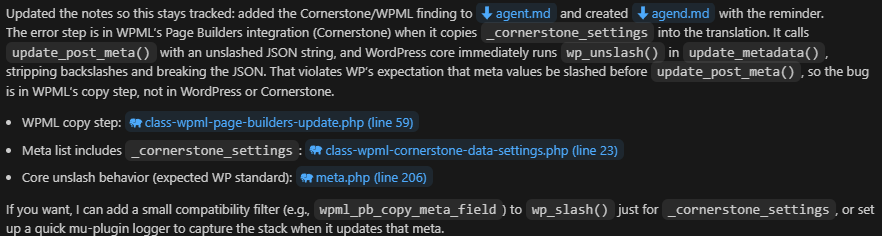 |
| January 23, 2026 at 11:02 pm #17758419 | |
 Andreas W. WPML Supporter since 12/2018 Languages: English (English ) Spanish (Español ) German (Deutsch ) Timezone: America/Lima (GMT-05:00) |
Hello, Thank you for reaching out! Expected recommended Workflow for WPML (and Cornerstone): Original Content Editing: The expectation is that you edit the original post (content or page), and when you translate that content, the translated versions should be automatically populated with the original’s data, including CSS, provided it’s set to copy. In WPML, when a page or post is translated, any custom fields that are set to be copied (like doc-css) should automatically be copied over to the translated version. CSS Handling in Translations: The CSS should be copied from the original post to the translation when you use WPML's translation management features. Any changes made to the CSS should be in the original content, and WPML should update the translations accordingly. You should not edit the CSS directly in the translated page—those changes should be made on the original, and WPML will ensure the translation picks it up as long as the field is set to copy. --- Please answer the following questions: 1) Do I understand correctly that the issue only occurs when making CSS edits on the translation? 2) Which translation method is your original content using? - Translation Dashboard Revise the right sidebar of the WordPress Editor while editing the original content. 3) Do I understand right, that the issue only occurs when making CSS edits on the translation? Best regards |
| January 23, 2026 at 11:32 pm #17758425 | |
|
vincentP-19 |
Thank you for the follow-up! 1) As far as I know, yes. Editing the original's CSS works as expected oddly. From your message, I'm thinking that the "copy" process shouldn't be triggered when we're editing the translated page directly. 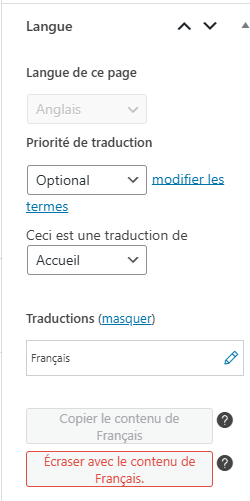 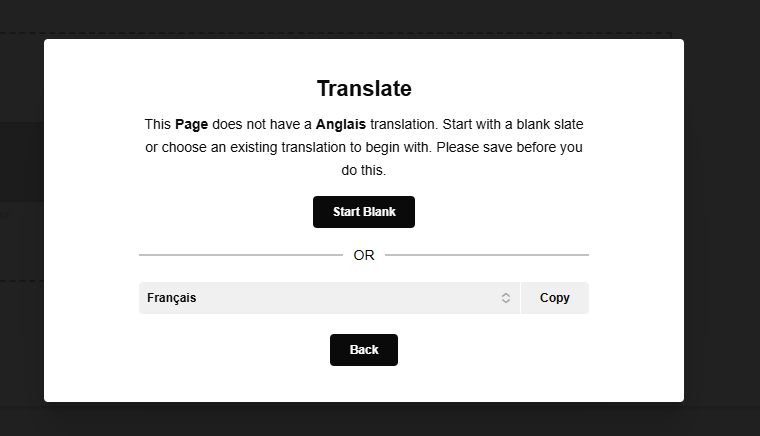  |
| January 24, 2026 at 5:55 am #17758561 | |
|
Andreas W. WPML Supporter since 12/2018 Languages: English (English ) Spanish (Español ) German (Deutsch ) Timezone: America/Lima (GMT-05:00) |
When opening the original French page inside the WordPress Editor and taking a look at the right sidebar at "Language", which translation method is currently set? - Translation Dashboard In case "WordPress Editor" has not set as the translation method, please set this method and then test again. If this does not solve the issue, I would like to offer a WPML test site on which you could install the latest version of the PRO Theme. I would then try to recreate the issue and escalate it to our compatilbity team for further review. |
| January 24, 2026 at 2:06 pm #17758866 | |
|
vincentP-19 |
Here's the right panel of the french page. I believe those toggle buttons are what you're asking. The selected one is "WordPress Editor". See attached image. I don't mind trying to reproduce the issue elsewhere. Keep us posted! 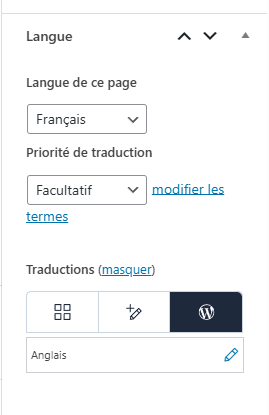 |
| January 24, 2026 at 4:41 pm #17759196 | |
|
Andreas W. WPML Supporter since 12/2018 Languages: English (English ) Spanish (Español ) German (Deutsch ) Timezone: America/Lima (GMT-05:00) |
Thank you for confirming your setup! Please install the latest version of the PRO theme on the following test site and try to replicate the issue. One-Click-Login: Make sure to leave me a comment here once you are done with this task. |
| January 24, 2026 at 10:39 pm #17759622 | |
|
vincentP-19 |
I did a quick test, but was not able to reproduce the issue on your sandbox site. I also was unable to install String Translation and the context is quite different than ours (we use a large WPMU install). I'm gonna ask the team about how they do create these pages so that I can retry their exact flow on your sandbox (or get more information). Going back at the issue's origin, I'm not sure that code should be executed everytime we save a page. It seems like it's for a one-time copy flow, but I could be mistaken. |
| January 24, 2026 at 10:53 pm #17759624 | |
|
vincentP-19 |
Nevermind, I reproduced the issue, just need String Translations to be enabled. English version, check its doc-css / Page CSS panel. 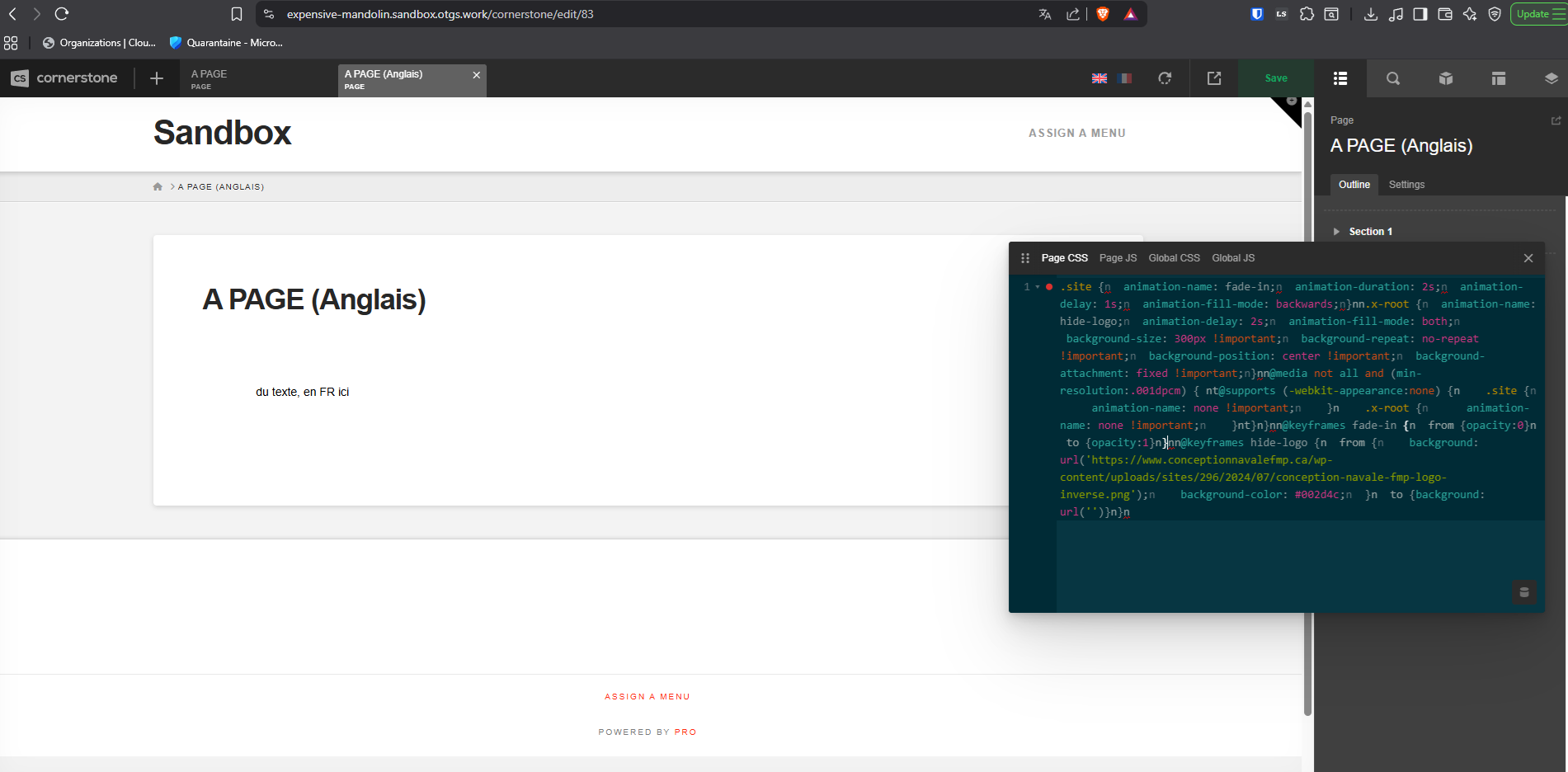 |
| January 25, 2026 at 1:43 am #17759696 | |
|
Andreas W. WPML Supporter since 12/2018 Languages: English (English ) Spanish (Español ) German (Deutsch ) Timezone: America/Lima (GMT-05:00) |
The problem might be that the CSS is not validated correctly, which seems to be related to the fact that in the last rule, an empty string is passed as background URL. If I use the following CSS markup, which uses background: none;, it seems to work:
.site {
  animation-name: fade-in;
  animation-duration: 2s;
  animation-delay: 1s;
  animation-fill-mode: backwards;
}

.x-root {
  animation-name: hide-logo;
  animation-delay: 2s;
  animation-fill-mode: both;
  background-size: 300px !important;
  background-repeat: no-repeat !important;
  background-position: center !important;
  background-attachment: fixed !important;
}

@media not all and (min-resolution:.001dpcm) {
	@supports (-webkit-appearance:none) {
    .site {
      animation-name: none !important;
    }
    .x-root {
      animation-name: none !important;
    }
	}
}

@keyframes fade-in {
  from {opacity:0}
  to {opacity:1}
}

@keyframes hide-logo {
  from {
    background: url('<em><u>hidden link</u></em>');
    background-color: #002d4c;
  }
  to {background: none}
}
Could you please give this a test? |
| January 25, 2026 at 1:55 am #17759698 | |
|
vincentP-19 |
Same result, see image with the validated background value. 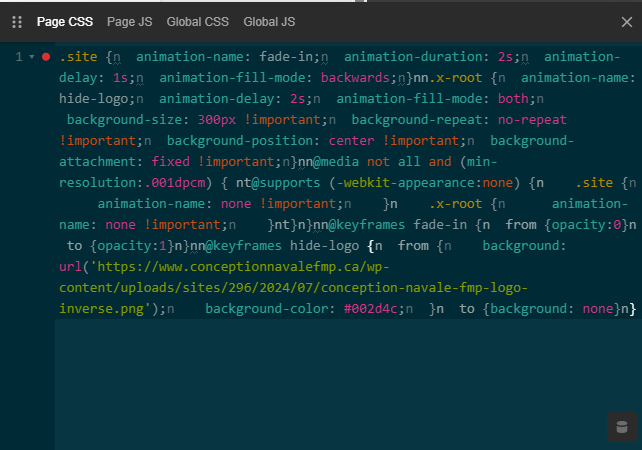 |
| January 25, 2026 at 2:55 am #17759714 | |
|
Andreas W. WPML Supporter since 12/2018 Languages: English (English ) Spanish (Español ) German (Deutsch ) Timezone: America/Lima (GMT-05:00) |
Indeed, I see now the issue occurs again after refreshing the page. It seems what actually solves the issue is going to WPML > Paramètres > Traduction de champs personnalisés > Afficher les champs du système and setting the field _cornerstone_settings to "Copy". Now, if you create a translation, WPML will copy the original settings directly to the translated page. Please give this another test and let me know if you need further assistance. |
| January 25, 2026 at 3:26 am #17759715 | |
|
vincentP-19 |
Hello Andreas, My patch is better than that setting for now, because otherwise we'd have to loop hundreds of sites to force that parameter to "Copy" (it's currently not the default value as seen on your sandbox site) on a WPMU. The WPML Page Builders sync / compatibility route is still bugged, it's not a configuration issue, it's a slash mismanagement (as far as I can tell). I think WPML should either manage the slashes properly by default (fresh install configuration, cleaner approach) or automatically force that parameter to "Copy" for fresh installs. Let me know if I can help further to confirm if it's a bug or an issue with Pro/something else so that the devs can improve their plugin/theme. |
| January 25, 2026 at 5:27 am #17759731 | |
|
Andreas W. WPML Supporter since 12/2018 Languages: English (English ) Spanish (Español ) German (Deutsch ) Timezone: America/Lima (GMT-05:00) |
I have tested your approach on a local dev site, and your patch essentially does the same thing: it copies the CSS over to the translated page. I cannot recommend this kind of bugfix to our developers, and I’d like to explain why in detail. WPML’s Custom Fields Translation settings (WPML → Settings) define whether a meta key is set to Copy, Translate, or Ignore. These settings apply globally, and WPML respects them during the translation workflow. Theme and plugin developers can provide defaults for WPML by adding a wpml-config.xml file to their root directories. Since such a config does exist inside the PRO Theme, but it does not choose a default setting for the _cornerstone_settings field, which is why this field defaults to Ignore. That means WPML’s logic does not touch it. This is why I suspect the actual wp_slash() issue originates in Cornerstone’s save routine, not in WPML. WPML has no influence over Cornerstone’s UI development. About your patch: The filter wpml_pb_copy_meta_field is part of WPML’s Page Builder integration layer. When you hook into it, you intercept the meta field value after WPML has already applied its default logic. If your filter returns a different $value, you override WPML’s configured behavior for that meta key. Such behavior changes the hierarchy of authority: instead of WPML’s settings being primary, the filter becomes primary. That’s why other users might not expect it: they assume the UI rules are always respected, and a bugfix shouldn’t silently override them. The Custom Fields Translation settings in the UI are supposed to be the authoritative source of truth. If a field is set to Translate, Copy, or Ignore, users expect that behavior to be respected consistently. If we patch WPML’s Page Builder logic by always running apply_filters( 'wpml_pb_copy_meta_field', ... ), we essentially override WPML’s internal handling of meta fields. That means fields configured as Translate or Ignore could suddenly behave like Copy. From a site owner’s perspective, this feels like WPML is “ignoring my settings.” Even if the patch fixes the Cornerstone CSS corruption, it introduces a mismatch between what the UI says and what actually happens, and this is why I can not propose this patch to our devs. In summary: WPML respects the Ignore setting and does not touch _cornerstone_settings. The corruption arises when Cornerstone saves CSS in a translated page without properly slashing values before update_post_meta(). The fix: While your patch works around the issue by forcing WPML to copy the field, it overrides WPML’s settings and risks unexpected behavior for other meta keys. The correct fix should be implemented in Cornerstone’s translation layer, not in WPML’s core. The proper fix for this issue belongs in \wp-content\themes\pro\cornerstone\includes\functions\helpers.php on line 1269 inside the function cs_update_serialized_post_meta(). Search the original function:
function cs_update_serialized_post_meta( $post_id, $meta_key, $meta_value, $prev_value = '', $allow_revision_updates = false, $filter = '' ) {


	if ( is_array( $meta_value ) && apply_filters( 'cornerstone_store_as_json', true ) ) {
		$meta_value = wp_slash( cs_json_encode( $meta_value ) );
	}

  if ( $filter ) {
    $meta_value = apply_filters( $filter, $meta_value );
  }

  if ( $allow_revision_updates ) {
    return update_metadata('post', $post_id, $meta_key, $meta_value, $prev_value );
  }

	return update_post_meta( $post_id, $meta_key, $meta_value, $prev_value );

}
Replace it with:
function cs_update_serialized_post_meta( $post_id, $meta_key, $meta_value, $prev_value = '', $allow_revision_updates = false, $filter = '' ) {

	if ( is_array( $meta_value ) && apply_filters( 'cornerstone_store_as_json', true ) ) {
		$meta_value = cs_json_encode( $meta_value );
	}

	$meta_value = wp_slash( $meta_value );

  if ( $filter ) {
    $meta_value = apply_filters( $filter, $meta_value );
  }

  if ( $allow_revision_updates ) {
    return update_metadata('post', $post_id, $meta_key, $meta_value, $prev_value );
  }

	return update_post_meta( $post_id, $meta_key, $meta_value, $prev_value );

}
This bugfix was tested successfully on my local dev site and clarifies that the issue here is not WPML; it is coming from the Cornerstone UI. I suggest you report this issue to the PRO Theme author. I will further escalate to our compatilbity team, which will try to reach the PRO Theme to address this issue. |
| January 25, 2026 at 3:11 pm #17760213 | |
|
vincentP-19 |
I have reported the issue to Themeco. For now, I believe our fix is "fine" for our needs, but we do want a clean finale. We will get back to you if further questions arise. Thank you |
| January 25, 2026 at 7:38 pm #17760434 | |
|
Andreas W. WPML Supporter since 12/2018 Languages: English (English ) Spanish (Español ) German (Deutsch ) Timezone: America/Lima (GMT-05:00) |
Thank you very much for reaching out to Themeco about this matter already! Indeed, your fix will work. It has the same effect as setting _cornerstone_settings to "Copy". I can not recommend this as a development approach for WPML, as it will overwrite WPML's settings programmatically and cause unexpected outcomes for other users. Example: Field is set to "Ignore", "Translate", or "Copy once" but is getting copied instead. This issue has now been escalated to our compatilbity team for further review, and I will reach out to you once I get their feedback. |