Skip to content Skip to sidebar

This thread is resolved. Here is a description of the problem and solution.

Problem:
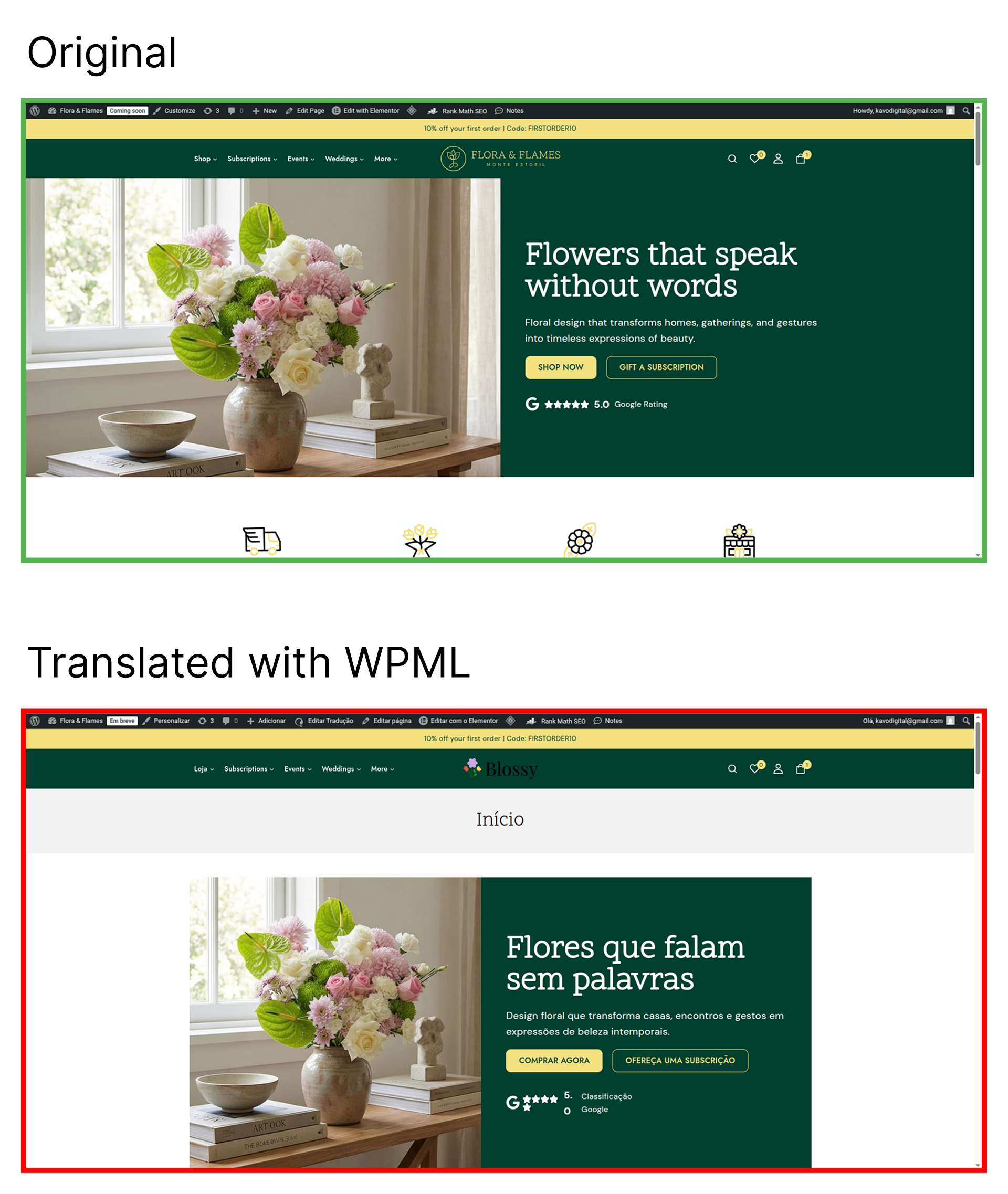
You've translated several pages into Portuguese using Elementor, but the Portuguese versions are loading with a different template, which is breaking the layout.
Solution:
If you're experiencing this issue, we recommend you try the following steps:
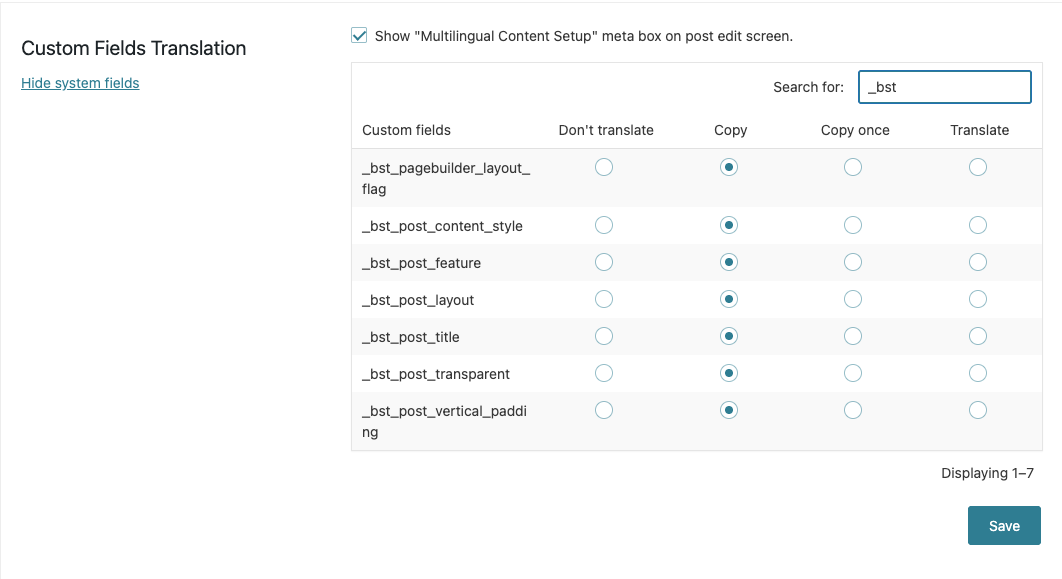
1. Go to WPML-> Settings-> Custom Fields Translation section.
2. Click Show Systems Fields.
3. Search for

_bst

.
4. Set the 7 custom fields to Copy.
5. Click Save.
6. Edit the page in the default language, make a minor edit, and update it.
7. Update the translation.
After these steps, the translated page should work correctly.

Please note that this solution might be irrelevant if it’s outdated or not applicable to your case. We highly recommend checking related known issues at https://wpml.org/known-issues/, verifying the version of the permanent fix, and confirming that you have installed the latest versions of themes and plugins. If the issue persists, please open a new support ticket at WPML support forum.

This is the technical support forum for WPML - the multilingual WordPress plugin.

Everyone can read, but only WPML clients can post here. WPML team is replying on the forum 6 days per week, 22 hours per day.

Tagged: 

This topic contains 5 replies, has 0 voices.

Last updated by KAVO DIGITAL 1 day ago.

Assisted by: Osama Mersal.

Author Posts
February 2, 2026 at 12:38 pm

KAVO DIGITAL

I’ve translated several pages into Portuguese, but the Portuguese versions are loading with a different template, which is breaking the layout. I’ve attached screenshots for reference.

I’ve tried republishing the pages with the default layout, but the issue persists. Also tried to clear Elementor/Website cache. Please note that the affected pages were originally built with Elementor.

Could you advise on how to fix this?

February 2, 2026 at 2:10 pm #17784179

Osama Mersal
WPML Supporter since 02/2020

Languages: English (English )

Timezone: Africa/Cairo (GMT+02:00)

Hi,

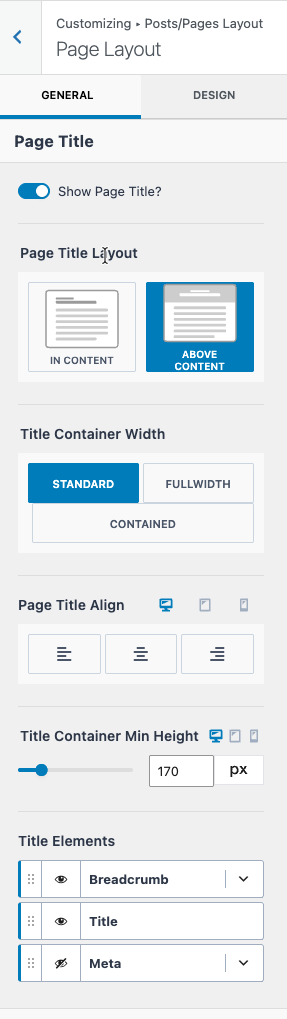
I installed a local copy of your site and checked the theme settings, and found an active option to set the page title and content width. (Kindly check the attached screenshot)

Please let me know how you override these settings for English pages, such as the homepage.

Best regards,
Osama

2026-02-02_16-05-04.png
February 2, 2026 at 4:17 pm #17784709

KAVO DIGITAL

Hi, the English pages override the settings by default in Elementor, there is no additional setting for this.

February 3, 2026 at 9:07 am #17786232

Osama Mersal
WPML Supporter since 02/2020

Languages: English (English )

Timezone: Africa/Cairo (GMT+02:00)

Hi,

Thanks for your reply. Please log in to this hidden link">sandbox and create a test home page to replicate the issue.

If the issue is reproducible, please let me know so I can check it and consult our compatibility team.

Note: The sandbox has WPML, Elementor, and your theme activated.

Best regards,
Osama

February 3, 2026 at 10:54 am #17787057

KAVO DIGITAL

Hi Osama,

I've added a homepage. Translated it manually, the layout issue is still present.

February 3, 2026 at 12:05 pm #17787397

Osama Mersal
WPML Supporter since 02/2020

Languages: English (English )

Timezone: Africa/Cairo (GMT+02:00)

Hi,

Thanks for replicating the issue. I debugged the issue further and was able to fix it on the sandbox site by following these steps:

1- Go to WPML-> Settings-> Custom Fields Translation section
2- Click "Show Systems Fields"
3- Search for "_bst"
4- Set the 7 custom fields to "Copy"
5- Click "Save"
6- Edit the page in the default language, make a minor edit, and update it
7- Update the translation

After that, the translated page worked correctly on the hidden link">front end.

Best regards,
Osama

2026-02-03_13-55-59.png
February 3, 2026 at 1:18 pm #17787969

KAVO DIGITAL

Thank you, Osama! This did indeed fix the issue. Much appreciated!