Skip to content Skip to sidebar

This thread is resolved. Here is a description of the problem and solution.

Problem:
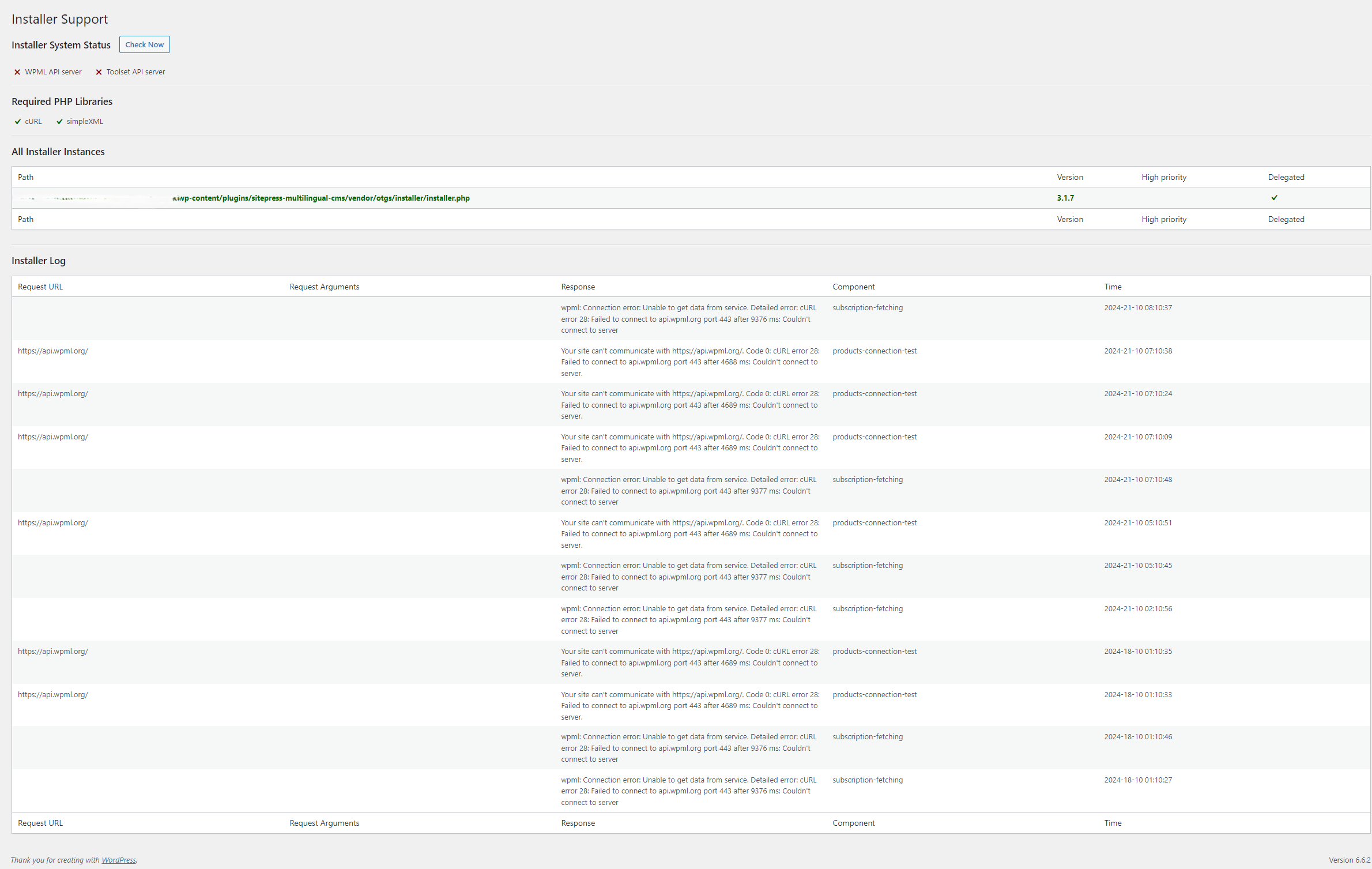
The client is unable to complete the WPML Setup due to a registration step failure, receiving a 'Connection error: Unable to get data from service. Detailed error: cURL error 28: Failed to connect to api.wpml.org port 443 after 9376 ms: Couldn't connect to server.' Despite having the necessary domains whitelisted with their hosting provider.
Solution:
We investigated the issue and confirmed that there are no blocks from our end. We recommend checking the connection status in WPML > Support > Installer support by clicking the 'check' button. If any red X-ses appear, it indicates that the domains might still be blocked by the hosting provider. The client should contact their hosting provider to ensure that the following domains are not blocked:

  • wpml.org
  • cdn.wpml.org
  • api.wpml.org
  • api.toolset.com
  • cloudfront.net

Further details on this error can be found in our documentation here: https://wpml.org/faq/wpml-plugin-cannot-connect-to-wpml-org/
If this solution does not resolve the issue or seems irrelevant due to being outdated or not applicable to your case, we highly recommend checking related known issues at https://wpml.org/known-issues/, verifying the version of the permanent fix, and confirming that you have installed the latest versions of themes and plugins. If further assistance is needed, please open a new support ticket at our support forum.

This is the technical support forum for WPML - the multilingual WordPress plugin.

Everyone can read, but only WPML clients can post here. WPML team is replying on the forum 6 days per week, 22 hours per day.

Tagged: 

This topic contains 3 replies, has 2 voices.

Last updated by Mihai Apetrei 1 year, 2 months ago.

Assisted by: Mihai Apetrei.

Author Posts
October 21, 2024 at 9:25 pm #16314492

Yamil

Background of the issue:
I've been trying to activate a new website so we can finish the WPML Setup and I'm stuck in the Register WPML step.
Already verified with the host and the following domains are whitelisted: wpml.org, cdn.wpml.org, api.wpml.org, api.toolset.com, cloudfront.net.
We have installed WPML successfully in over 60 sites and this is the first time we run into this issue.
Have followed all the steps in https://wpml.org/faq/wpml-plugin-cannot-connect-to-wpml-org/

Symptoms:
Connection error: Unable to get data from service. Detailed error: cURL error 28: Failed to connect to api.wpml.org port 443 after 9376 ms: Couldn't connect to server.

Questions:
Is there a way to manually validate the license key?
Can we bypass the key validation step so we can keep developing and translating?

October 21, 2024 at 10:42 pm #16314573

Mihai Apetrei
WPML Supporter since 03/2018

Languages: English (English )

Timezone: Europe/Bucharest (GMT+02:00)

Hi there.

I will need to contact the systems team to see if anything can be done from our end to make the connection.

Currently, your site doesn't seem able to connect to our API.

I will get back to you as soon as I have news.

Mihai Apetrei

October 22, 2024 at 10:03 pm #16319492

Mihai Apetrei
WPML Supporter since 03/2018

Languages: English (English )

Timezone: Europe/Bucharest (GMT+02:00)

Hi there.

We are still investigating, and I will update you as promised as soon as I have news.

I'm leaving the ticket assigned to myself for now.

October 23, 2024 at 1:36 pm #16322150

Mihai Apetrei
WPML Supporter since 03/2018

Languages: English (English )

Timezone: Europe/Bucharest (GMT+02:00)

Hi there.

Our Systems team confirmed that there are no blocks on our end regarding this URL.

On WPML > Support > Installer support > can you please let us know if you see two green check icons at the top after you click the "check" button? Or are there any red X-ses instead of the green check icons?

If there are any red X-ses, can you please contact your hosting provider to ensure that these domains are not blocked?

– wpml.org
– cdn.wpml.org
– api.wpml.org
– api.toolset.com
– cloudfront.net

Curl error 28 is also mentioned in our documentation here:
https://wpml.org/faq/wpml-plugin-cannot-connect-to-wpml-org/

I can see that your site is hosted on GoDaddy. We had multiple clients who said GoDaddy support told them everything was fine, but we encouraged them to insist on requests until they resolved the issue because that error was coming from the hosting provider.

There's a block there, and the hosting provider needs to resolve this.

Please let me know how things go.

Mihai