
This is the technical support forum for WPML - the multilingual WordPress plugin.
Everyone can read, but only WPML clients can post here. WPML team is replying on the forum 6 days per week, 22 hours per day.
| Sun | Mon | Tue | Wed | Thu | Fri | Sat |
|---|---|---|---|---|---|---|
| - | 8:00 – 12:00 | 8:00 – 12:00 | 8:00 – 12:00 | 8:00 – 12:00 | 8:00 – 12:00 | - |
| - | 12:00 – 16:00 | 12:00 – 16:00 | 12:00 – 16:00 | 12:00 – 16:00 | 12:00 – 16:00 | - |
Supporter timezone: Europe/Zagreb (GMT+02:00)
Tagged: ATE, Large Sites
This topic contains 14 replies, has 0 voices.
Last updated by Dražen 4 hours, 48 minutes ago.
Assisted by: Dražen.
| Author | Posts |
|---|---|
| November 11, 2025 at 12:10 pm #17566061 | |
 M |
Background of the issue: Symptoms: Questions:   |
| November 11, 2025 at 12:44 pm #17566413 | |
 Dražen Supporter Languages: English (English ) Timezone: Europe/Zagreb (GMT+02:00) |
Hello, here is the ticket. I have shared the info with our 2nd tier and lets wait for an update from our devs. Note it may take a day or two. I will update when I have some news. Regards, |
| November 12, 2025 at 6:51 am #17568761 | |
|
Dražen Supporter Languages: English (English ) Timezone: Europe/Zagreb (GMT+02:00) |
Hello, just to update you. I checked with the devs and they told we need to wait a bit longer. Apparently there were many edge cases that need handling and it seems it may take few more days before any update or fix. Regards, |
| November 12, 2025 at 10:20 am #17569701 | |
|
M |
Thanks for your update, Drazen. I just wanted to ask if you think it is safe to keep working on the (copied) staging site. Just on the original language posts, we need to make some adjustments to adapt the contents to the new template. Thanks in advance Marc |
| November 12, 2025 at 10:29 am #17569767 | |
|
Dražen Supporter Languages: English (English ) Timezone: Europe/Zagreb (GMT+02:00) |
Hello Marc, sure, you can make changes to original language and for translation we might need to wait for a fix from our side so you can translate it. Regards, |
| November 18, 2025 at 10:42 am #17587461 | |
|
Dražen Supporter Languages: English (English ) Timezone: Europe/Zagreb (GMT+02:00) |
Hello, Our team has resolved the issue, and the “flag for later” problem is now fixed. You can resend the jobs for translation — you should no longer encounter the issue and will be able to translate and save the jobs without any problems. Unfortunately, the issue with segments reverting to the original language is a separate problem, and our team is currently working on it. In the meantime, the best we can do is offer some credits so you can move forward and re-translate the affected content. Since I’m not sure how many pages you need to re-translate, could you please provide an estimate? Once I have that, I’ll check with my team. Regards, |
| November 19, 2025 at 12:38 pm #17591729 | |
|
M |
Hi Drazen, thanks for your update. I'm glad to hear the "flag for later" issue is solved, but I 'd like to exhaust all possibilities of recovering the translations. If lost, many hours of translation and revision work would be wasted. If there were no other option, the credits would be a good alternative, but only as a last resort. Thanks again for your strong support. All the best, |
| November 19, 2025 at 2:31 pm #17592301 | |
|
Dražen Supporter Languages: English (English ) Timezone: Europe/Zagreb (GMT+02:00) |
Hello M, Sure, that makes total sense, and I understand your point. Let me check again with my team to confirm when the fix will be included and whether there are any options for restoring the translation, as well as to get an expected ETA. Once I have more information, you and your team can decide whether it’s worth waiting or if you should proceed with credits option. Best regards, |
| November 19, 2025 at 3:56 pm #17592645 | |
|
Dražen Supporter Languages: English (English ) Timezone: Europe/Zagreb (GMT+02:00) |
Hello, I checked, and at the moment it seems there’s no way to recover the lost translation. The best we can do is offer you translation credits so you can automatically re-translate the content and save some time. On this website I see around 34k credits used, but I’m not sure if that will be enough for the re-translation — depending on the impact, the amount needed may be significantly higher. Please review and let me know. Regards, |
| November 24, 2025 at 3:26 pm #17605431 | |
|
M |
Dear Drazen, Thanks for your feedback. Is there a way to calculate the amount of credits needed to translate the site? This is not the expected result but it is better to review an automatic translation rather than translating from 0. Again, thanks for you support. M |
| November 25, 2025 at 9:39 am #17607202 | |
 Lucas Vidal de Andrade WPML Supporter since 11/2023 Languages: English (English ) Timezone: Europe/Vienna (GMT+01:00) |
Hey there, Drazen is not available now, so I'll be handling this ticket while he's away. To have a word count and credit consumption estimate, you can go to WPML > Translation Dashboard and select the all the untranslated items from the list. After selecting, you can see the estimate at the bottom of the page. Please note that this word count does not consider already translated segments saved in memory, so it's a "worst case scenario". It will cost that amount, or less. Let me know if that answers your question. |
| November 27, 2025 at 11:20 am #17614664 | |
|
M |
Dear Lucas, thanks for your feedback. I'm not sure if you are aware of the issue we are facing. I was wondering if maybe the problem is that we used the legacy translation editor on most of the affected posts. While reviewing again the issue, I noticed a change on the WPML settings page design, especially on the translation editor set up, that now includes a check to use legacy editor translations on the new ate. Could be this the issue? In our case, this setting is not checked. I'd like to know if it is worth/safe to try, and the consequences it might have, obviously after a full db backup. Thanks in advance, Cheers M |
| December 1, 2025 at 8:04 am #17621518 | |
|
Dražen Supporter Languages: English (English ) Timezone: Europe/Zagreb (GMT+02:00) |
Hello M, 1) I’m not entirely sure which settings you currently have on your side. Could you please share a screenshot so I can better understand your configuration and what change you would like to make? 2) You mentioned: "I was wondering if maybe the problem is that we used the legacy translation editor on most of the affected posts." If that is the case, then this behavior is expected. The legacy translation editor and the new editor do not share translation memory, so translations created in the old editor will not appear in the new one. If the affected content was translated using the legacy editor, the best options are either to continue using the legacy editor or switch to the new one, but in that case you’ll need to re-translate the content in the new editor. The same applies in the opposite direction — if you move from the new editor back to the legacy one, some content may need to be re-translated. Regards, |
| December 4, 2025 at 11:40 am #17633837 | |
| M |
Dear Drazen, Here you have the requestes screenshot. I guess by not checking the "Use also for old translations created with the classic editor" checkbox, the translations made with the legacy translation editor should still be editable (via this legacy editor), but even on these cases, the translations are loaded trough the new advanced editor (e.ate.wpml.org). Older posts date back to 2021, when I think there wasn't an advanced editor available. Thanks in advance M New threads created by Dražen and linked to this one are listed below: https://wpml.org/forums/topic/split-translation-done-in-cte-open-in-ate/ 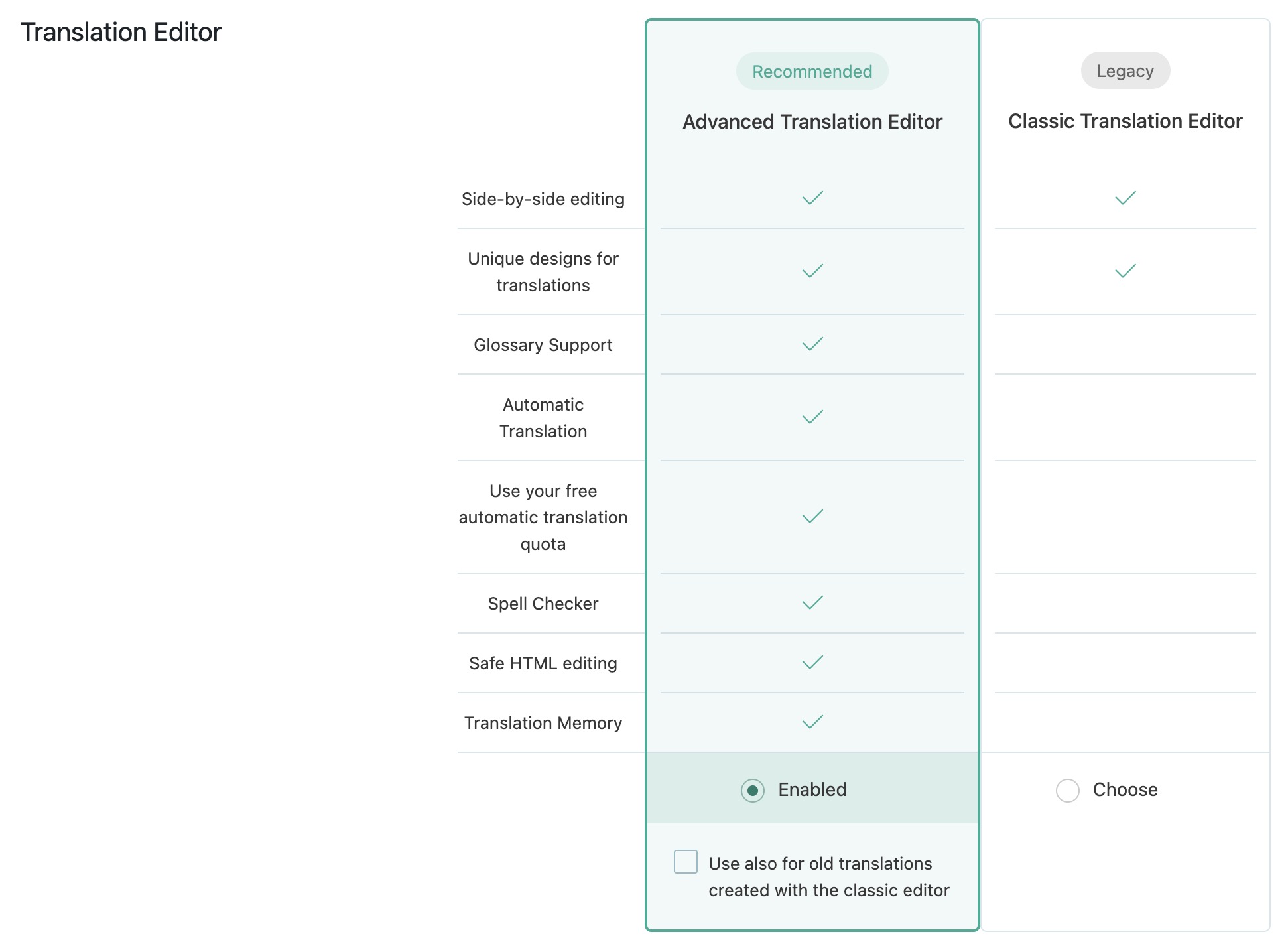 |
| December 4, 2025 at 11:54 am #17633921 | |
|
Dražen Supporter Languages: English (English ) Timezone: Europe/Zagreb (GMT+02:00) |
Hello M, Thanks for getting back to me — this information is very helpful. As you’ve already noticed, translations originally created in the legacy editor are now opening in the new Advanced Translation Editor, which is incorrect. This is why the translation fields appear empty. These translations should open in the old Classic Editor, where you would see the original translations exactly as they appear on the frontend. Since this is a different issue from the one we initially discussed in this ticket, I will create a new ticket so we can continue there. It seems both you and I were led in the wrong direction regarding the original cause. - https://wpml.org/forums/topic/split-translation-done-in-cte-open-in-ate/ I will try to escalate the new ticket immediately so our second-tier/development team can review it and assist further quickly. Regards, |






