Skip to content Skip to sidebar

This thread is resolved. Here is a description of the problem and solution.

Problem:
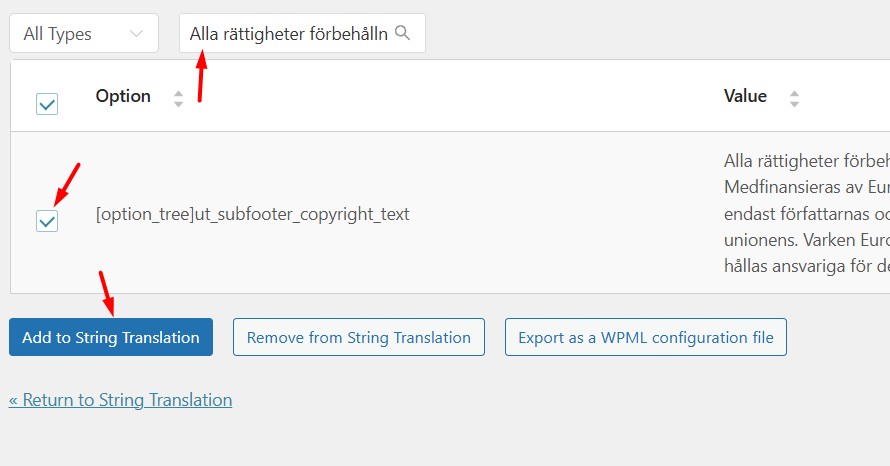
The client is unable to translate the text in 'Theme Options ut_subfooter_copyright_text' using WPML.
Solution:
If you're experiencing this issue, we recommend following these steps:
1. Navigate to WPML >> String Translation page.
2. Click on the 'Not seeing strings that you are looking for?' section and then click the Admin texts translation link.
3. Search for the string and enable its translation.
4. Return to the WPML >> String Translation page and add the translation.
This should display the correct translation on the frontend. You can update the translation as needed from the WPML String Translation page.

Please note that this solution might be outdated or not applicable to your specific case. If this does not resolve your issue, we highly recommend checking related known issues, verifying the version of the permanent fix, and confirming that you have installed the latest versions of themes and plugins. If you still need assistance, please open a new support ticket.

This is the technical support forum for WPML - the multilingual WordPress plugin.

Everyone can read, but only WPML clients can post here. WPML team is replying on the forum 6 days per week, 22 hours per day.

Tagged: 

This topic contains 6 replies, has 2 voices.

Last updated by mathiasA-11 11 months, 3 weeks ago.

Assisted by: Noman.

Author Posts
April 4, 2025 at 9:24 am #16896224

mathiasA-11

Background of the issue:
I am trying to translate the text in 'Theme Options ut_subfooter_copyright_text' on my site hidden link.

Symptoms:
The text in 'Theme Options ut_subfooter_copyright_text' will not translate.

Questions:
Can you figure out why the text in 'Theme Options ut_subfooter_copyright_text' will not translate?

April 6, 2025 at 9:38 am #16901008

Noman

Hi,

Thank you for contacting WPML Support. Sorry for the delay due to high workload and the reply time will be shorter from now.

To take a closer look at this issue, please provide temporary access (WP-Admin and FTP Login info) to your site (preferably staging site), so that I can look into your setup and debug the issue.

Your next answer will be private, meaning only you and I can access it.

=== Please backup your database and website ===

✙ I would additionally need your permission to deactivate and reactivate Plugins and the Theme and to change configurations on the site. This is also a reason the backup is essential.

Thank you

April 8, 2025 at 11:50 am #16908926

Noman

Thanks for providing the login details. I followed the below steps:

1. Went to WPML >> String Translation page.
2. Opened the “Not seeing strings that you are looking for?” section and press the “Admin texts translation” link.
3. Searched for the string and enabled its translation as you can see in the attached screenshot.
4. Went to the WPML >> String Translation page again and added it’s translation and now it seems to show the correct translation at frontend(screenshot attached).

You should be able to update the translation from here if needed:
hidden link

Could you please check and confirm?

Thank you for your cooperation.

Enable translation 1.jpg
EN translation.jpg
April 8, 2025 at 11:52 am #16909003

mathiasA-11

Yes I know but the text doesnt not transate into English. Thats the problem.

April 8, 2025 at 11:53 am #16909060

mathiasA-11

Sorry now it worked - what did you do?

April 8, 2025 at 11:59 am #16909150

Noman

No worries! I just followed the steps I shared above and didn’t make any other changes after that. It might have been a browser cache issue because the translation was already working correctly on my side when I sent you the previous message.

Glad to hear it’s working now! Let me know if you need any further help.

Thank you

April 8, 2025 at 12:00 pm #16909157

mathiasA-11

OK thanx!