giannisF
Hello,
We have a persistent issue related specifically to WPML.
The endpoint:
/wp-json/wpml/v1/wpml-content-stats
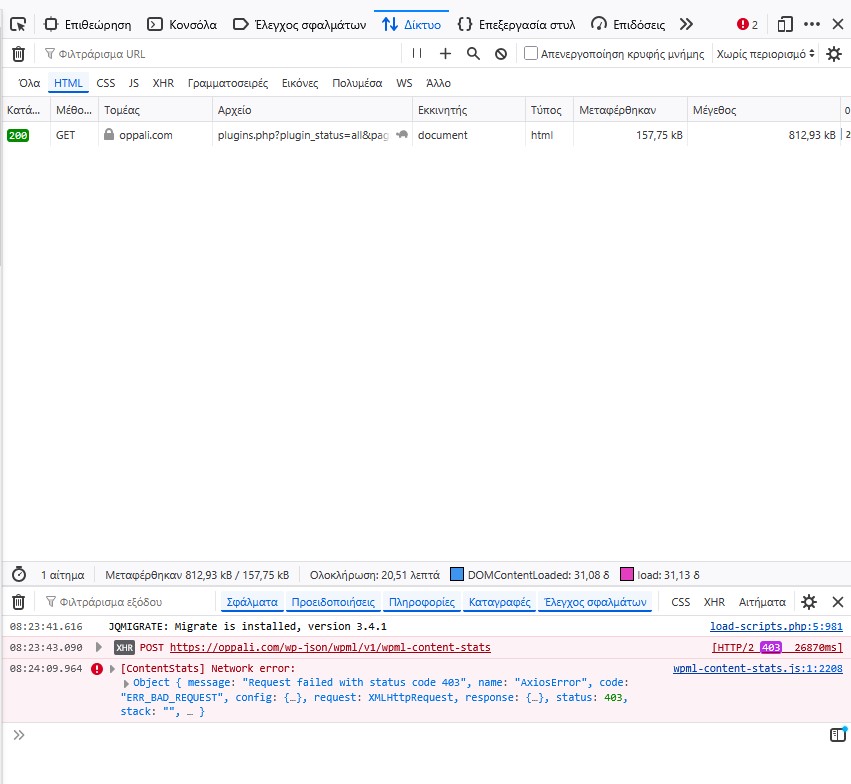
returns HTTP 403 from wp-admin pages such as Plugins, and this causes severe slowdown in the admin area.
Important details:
This issue existed before any database restore
The general WordPress REST API works correctly (/wp-json/ loads normally)
The problem appears isolated to the WPML endpoint
In browser dev tools, the request to wpml-content-stats returns 403 from the origin
This is often accompanied by the WPML admin notice: “Your site doesn't meet WPML's minimum requirements”
Admin speed improves significantly when this WPML request is not triggered
We tested without CleanTalk and the behavior is the same
We also tested custom snippets to intercept/remove the endpoint, but the WPML request still returns 403
WPML version: 4.9.2
WooCommerce Multilingual is active
Could you please advise:
what internal WPML permission/state check can make wpml-content-stats return 403,
how to reset or reinitialize that WPML check safely,
whether this is a known issue with the WPML content stats endpoint.
Bobby WPML Supporter since 04/2015
Languages:
English (English )
Timezone:
America/Los_Angeles (GMT-07:00)
Hi there,
The issue you're experiencing appears to match a known problem that our team has documented in the following errata:
https://wpml.org/errata/403-error-for-non-admin-users-in-wpml/
Please take a moment to review the article and try the suggested workaround. Let me know how it goes or if you need any further assistance.
giannisF
Hello,
I checked the errata page you shared and applied the workaround in:
`wp-content/plugins/sitepress-multilingual-cms/classes/ATE/Loader.php`
However, it did not change the behavior.
From what I can see, that errata refers to:
* **non-admin users**
In my case, the remaining issue is different:
* it happens while logged in as **admin**
So this appears to be a different issue from the errata you linked.
Could you please investigate specifically the `wpml-content-stats` REST endpoint for authenticated admin users?
Thank you.
Bobby WPML Supporter since 04/2015
Languages:
English (English )
Timezone:
America/Los_Angeles (GMT-07:00)
Thank you for updating me!
WP Rest API is enabled and working, and it looks like wp-json/wpml/v1 is working as well.
Typically such issues tend to be caused due to not whitelisting the following domains OR a third party plugin (we test by deactivating third party plugins and using a minimal environment-- if the issue is resolved then activate plugins one by one until the issue is triggered.)
- wpml.org
While this is not a common issue I did locate a similar thread that was recently handled by our team, which seems very similar to the 403 you are receiving.
Please review the following https://wpml.org/forums/topic/critical-rest-api-500-error-in-gettranslationstatus-after-latest-update-php-fatal-error/#post-17877628
If you have a staging site, I'd invite you to try the plugin shared by the user (of course after having a backup in place).
In the case that the issue is confirmed to be the same, our team is gearing for a permanent fix for the 4.9.3 release of WPML.
elenaP-6
Hi I am having the same problem on my website. It didn't happen on my staging website, but when I moved the installation to the production hosting server (I used Duplicator Pro), the same error appeared in the debugging console.
I deactivated the security plugin (Solid Security Basic) but it persists. I didn't add any more plugin after the migration.