Skip to content Skip to sidebar

This is the technical support forum for WPML - the multilingual WordPress plugin.

Everyone can read, but only WPML clients can post here. WPML team is replying on the forum 6 days per week, 22 hours per day.

Sun Mon Tue Wed Thu Fri Sat
- 10:00 – 17:00 10:00 – 17:00 10:00 – 17:00 10:00 – 17:00 10:00 – 17:00 -
- 18:00 – 19:00 18:00 – 19:00 18:00 – 19:00 18:00 – 19:00 18:00 – 19:00 -

Supporter timezone: Asia/Kathmandu (GMT+05:45)

This topic contains 8 replies, has 0 voices.

Last updated by Shekhar Bhandari 6 days, 3 hours ago.

Assisted by: Shekhar Bhandari.

Author Posts
March 23, 2026 at 9:25 pm #17919912

nickK-27

Wpml opens randomly multiple database connections. Server overloads and eventually site throws 503 errors or it is too slow

March 26, 2026 at 5:05 am #17927795

Shekhar Bhandari
WPML Supporter since 03/2015

Languages: English (English )

Timezone: Asia/Kathmandu (GMT+05:45)

Hello,

Thank you for contacting WPML support. I’d be happy to assist you with this issue.

Could you let us know if there is a specific set of actions that triggers the error, or if it occurs randomly?

Also, have you tried disabling all non-WPML plugins, switching to a default theme, and then checking whether the issue still persists?

Please make sure to create a full backup of your site (both files and database) before making any changes, as this is always recommended.

Additionally, since this is a 503 error, I suggest reaching out to your hosting provider to check if there are any relevant server logs available. These logs can help us identify the issue more quickly.

I look forward to your reply.

Thanks

March 26, 2026 at 4:37 pm #17930106

nickK-27

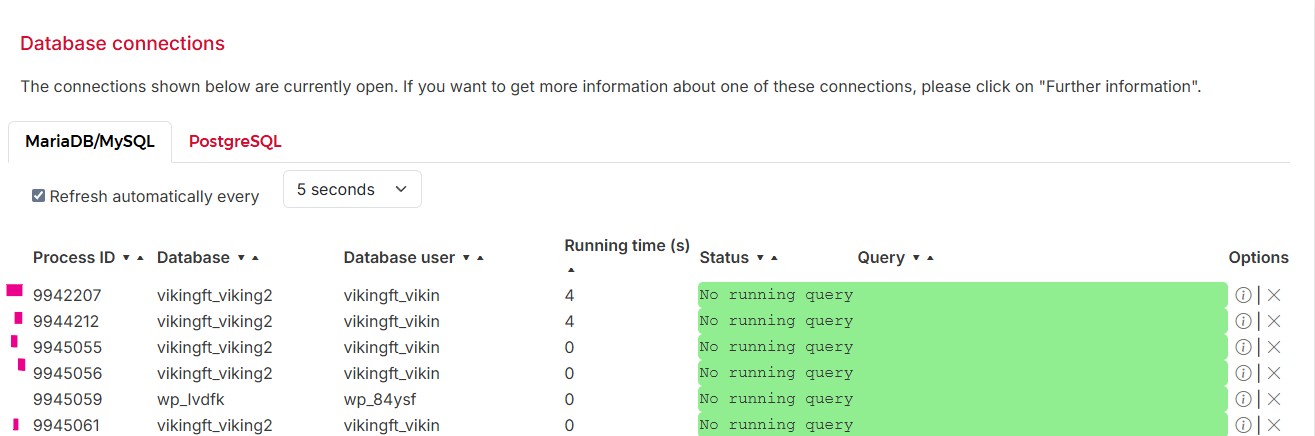
When the problem occurred, i disabled and enabled the plugins one by one. It is a woocommerce site. When i disabled the 3 wpml plugins, multiple and continuously database connections stopped.

Screenshot shows an example. These connections can be 15-20 randomly and never goes away.
Server logs, php logs shows nothing specific.

wpml.jpg
March 27, 2026 at 8:11 am #17931036

Shekhar Bhandari
WPML Supporter since 03/2015

Languages: English (English )

Timezone: Asia/Kathmandu (GMT+05:45)

Hello there,

To debug this issue further, I would need to check your site settings once, for this I would need temporary access (wp-admin and ftp) to your site.

So could you please provide me with those details, you will find the needed fields for this below the comment area when you log in to leave your next reply.
hidden link

This info is private and available to you and WPML supporters only.
Read more about this: https://wpml.org/purchase/support-policy/privacy-and-security-when-providing-debug-information-for-support/

Note:
Backup your sites before providing the credentials or if possible provide credentials for the test site

Look forward to your reply.

Thanks

March 27, 2026 at 11:55 am #17932123

Shekhar Bhandari
WPML Supporter since 03/2015

Languages: English (English )

Timezone: Asia/Kathmandu (GMT+05:45)

Hello,

Could you please confirm whether it’s permitted to install or deactivate plugins and themes on the provided site? Additionally, is the 503 error occurring across the entire site or only on certain pages?

I look forward to your response.

Thank you.

March 27, 2026 at 10:15 pm #17933323

nickK-27

You can, but it will be better to activate the coming soon page and do it if it is possible late at night. I would prefer not to switch themes. Not sure how the Flatsome theme will react.

503 errors seems total random, it could be at homepage or when you trying to login, on single product page etc.

After deactivating wpml, around 12 hours ago, i had no issues, delays, or overload.

March 30, 2026 at 7:43 am #17935341

Shekhar Bhandari
WPML Supporter since 03/2015

Languages: English (English )

Timezone: Asia/Kathmandu (GMT+05:45)

Hello there,

It will be better to activate the coming soon page and do it if it is possible late at night

It will be very hard to follow this way, so can you create a staging site where we can debug test this without this restrictions?

Look forward to your reply.

Thanks

March 30, 2026 at 8:36 am #17935545

nickK-27

Create a staging site that will cause the same problems on the server, will affect the other domains that are hosted there.
I can create a cloud instance and duplicated there. It will be less powerful than the original server, and some cron-jobs may not working. If this is ok with you let me know, I will need some days to do it.

March 30, 2026 at 12:56 pm #17936562

Shekhar Bhandari
WPML Supporter since 03/2015

Languages: English (English )

Timezone: Asia/Kathmandu (GMT+05:45)

Sure, that will work.