
This is the technical support forum for WPML - the multilingual WordPress plugin.
Everyone can read, but only WPML clients can post here. WPML team is replying on the forum 6 days per week, 22 hours per day.
| Sun | Mon | Tue | Wed | Thu | Fri | Sat |
|---|---|---|---|---|---|---|
| - | 7:00 – 16:00 | 7:00 – 16:00 | 7:00 – 16:00 | 7:00 – 16:00 | 7:00 – 16:00 | - |
| - | - | - | - | - | - | - |
Supporter timezone: America/Managua (GMT-06:00)
Tagged: Exception
This topic contains 26 replies, has 0 voices.
Last updated by David Gaitan 6 hours, 50 minutes ago.
Assisted by: David Gaitan.
| Author | Posts |
|---|---|
| January 13, 2026 at 4:59 pm #17726763 | |
 rogelioP-4 |
Hi WPML Support Team, I need urgent assistance with two critical issues affecting our website (plalla.com). 1. Fatal Error & Server Performance We need your help to: -Identify and resolve the root cause of the MySQL query spikes. 2. Disappearing Translated Images Original Pages Translated Pages Affected: Please let me know what information you need to proceed. Thank you for your prompt attention. 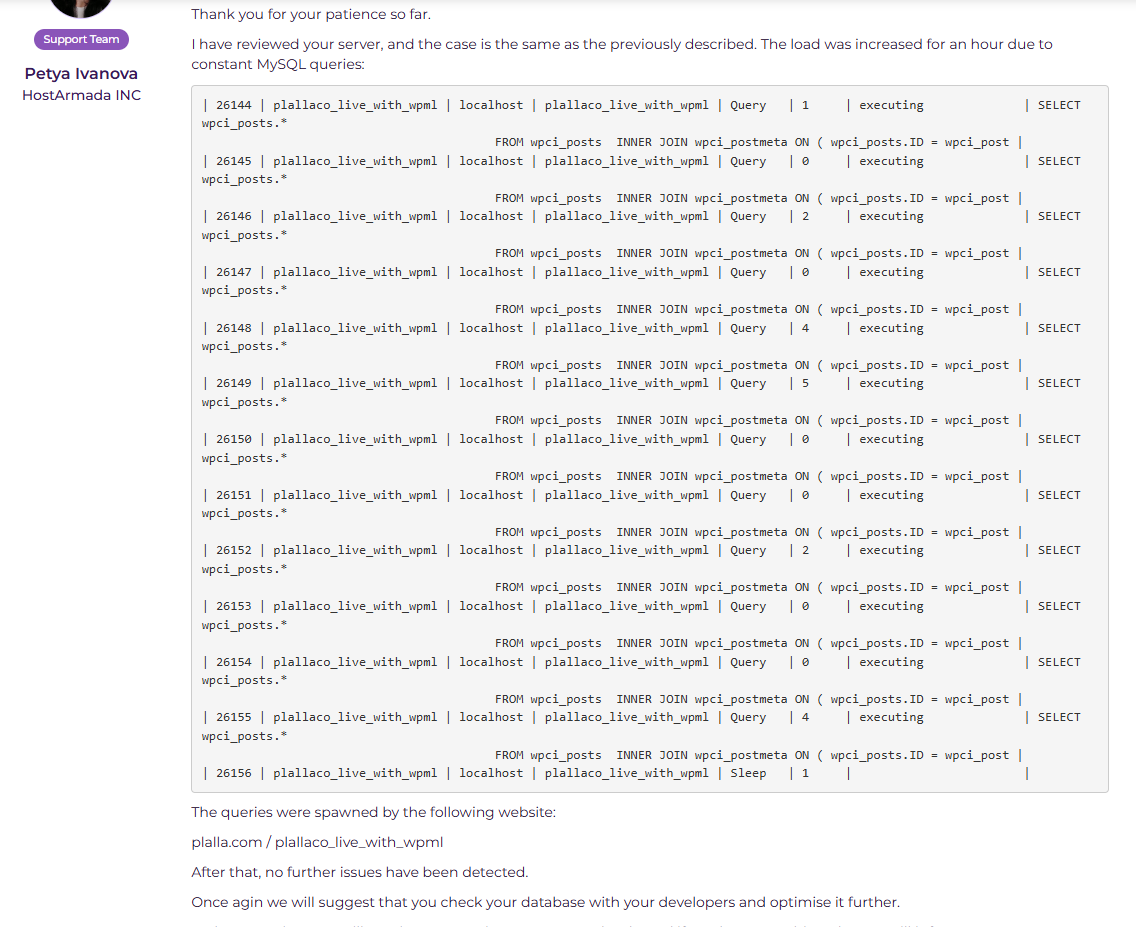 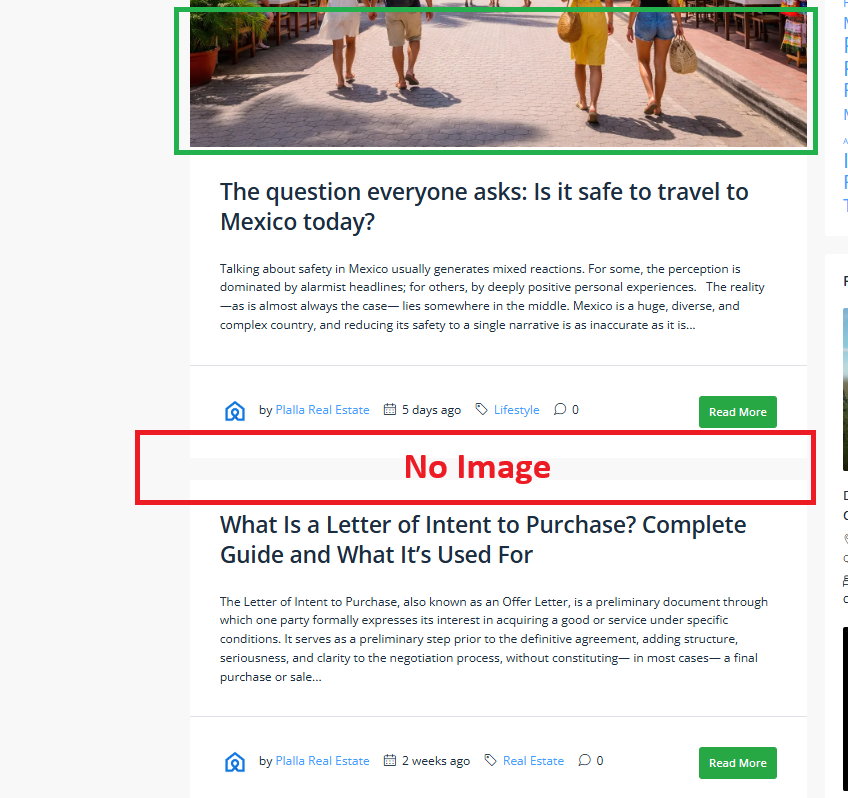  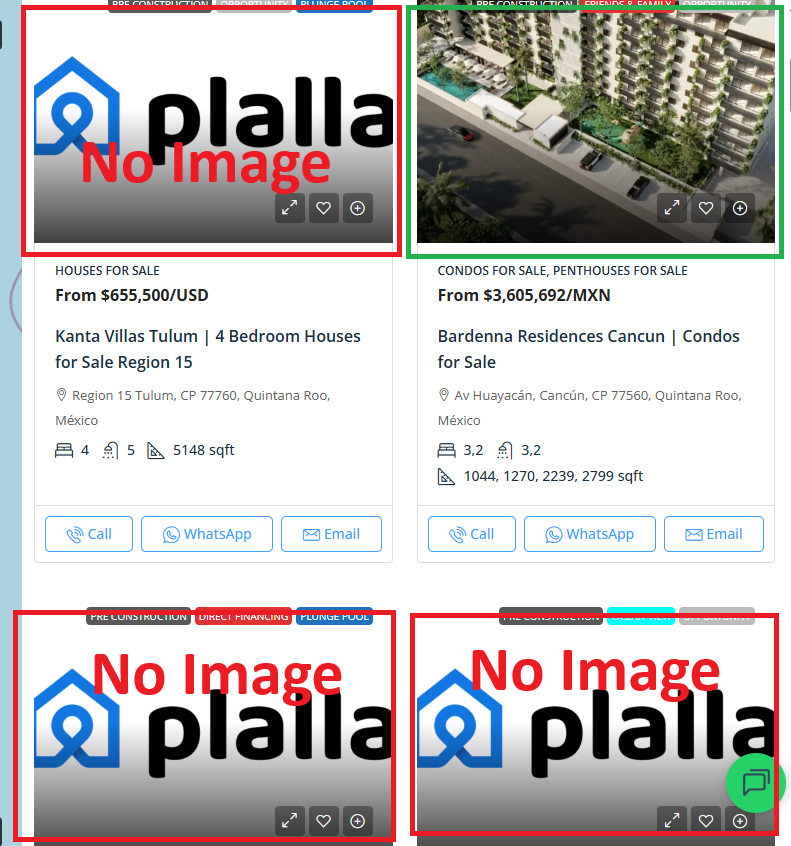 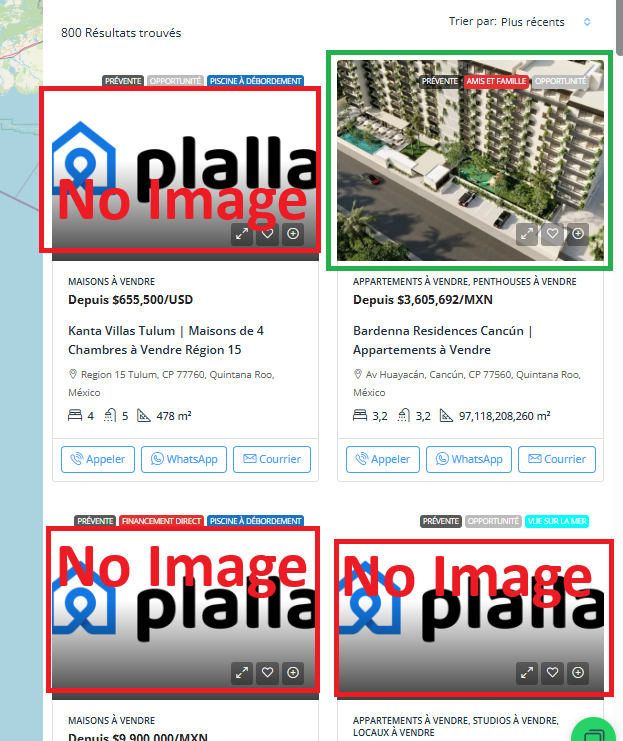 |
| January 13, 2026 at 5:36 pm #17726924 | |
 Lauren |
I would like to request temporary access (wp-admin and FTP) to your site to take better look at the issue. You will find the needed fields for this below the comment area when you log in to leave your next reply. The information you will enter is private which means only you and I can see and have access to it. Our Debugging Procedures I will be checking various settings in the backend to see if the issue can be resolved. Although I won't be making changes that affect the live site, it is still good practice to backup the site before providing us access. In the event that we do need to debug the site further, I will duplicate the site and work in a separate, local development environment to avoid affecting the live site. Privacy and Security Policy We have strict policies regarding privacy and access to your information. Please see: **IMPORTANT** - Please make a backup of site files and database before providing us access. - If you do not see the wp-admin/FTP fields this means your post & website login details will be made PUBLIC. DO NOT post your website details unless you see the required wp-admin/FTP fields. If you do not, please ask me to enable the private box. The private box looks like this: hidden link |
| January 22, 2026 at 7:11 pm #17755235 | |
|
Lauren |
I ran through some of the clean up steps in WPML -> Support -> Troubleshooting (Set Language information, synchronize taxonomies, and clear WP cache). I then updated the original post that showed up in the error, and updated the translations. I did not come across any errors. Are you still seeing any errors on your side? If so, please let me know the exact steps. Otherwise, I think those clean up steps resolved the issue. |
| January 26, 2026 at 3:21 pm #17763276 | |
|
rogelioP-4 |
Hello, Quick update on two issues: MySQL query spikes Disappearing images on translated pages Affected translated pages: ENGLISH FRENCH Please let me know if you need any other information from my side to help find a permanent solution for the images. |
| January 26, 2026 at 6:09 pm #17763984 | |
|
Lauren |
Please let me know when the images disappear again, and leave one not reposted so that I can take a look at it please. Als, I suggest enabling the debug log so that we can cehck for any background errors. |
| January 28, 2026 at 2:31 pm #17770829 | |
|
rogelioP-4 |
Hello, Thanks, the images are still showing for now. Also, we just received another alert from our hosting provider about a new MySQL spike. Their messages were: “This reply has been automatically generated by our system and its purpose is to notify you that your server has load average of 25.47 for the past 15 minutes, which is more than the optimal load average of your current server. Once the load average is above the optimal value, it causes a bottleneck of the system. If left unchecked and the load averages keep going up, then eventually it can cause unnecessary downtime for your websites or performance degradation, and we would like to avoid this at all costs. “The reason for the server load today is the same one, as explained in my reply on 20/01/2026, so please refer to it. The host previously reported constant MySQL query spikes coming from the plallaco_live_with_wpml database tables, which causes high server load and performance degradation — so this looks like the same issue recurring. Could you help me take another look at this, please? |
| January 28, 2026 at 5:20 pm #17771519 | |
|
Lauren |
Thanks for the details — the key point is that “MySQL spike” is a symptom, not a diagnosis. WPML tables (e.g. icl_* and language-related joins) will show up in the queries, but the root trigger is usually one of these: -a recurring WP-Cron job (imports, sync jobs, background translations, WooCommerce lookups) To move from “it spikes” to “this exact query causes it”, we need one concrete artifact from the host. 1) Please ask your host for the exact slow query sample(s) At the time of the spike (same time window as their alert), please request either: -the top 5–10 slow queries from the MySQL slow query log (with query text + duration), or
Without the actual query text, we can’t safely recommend a fix (because “WPML tables involved” doesn’t tell us whether this is WPML, an import, theme, WooCommerce filters, search, etc.). 2) Quick isolation steps you can do immediately (low risk) A) Temporarily disable WP-Cron for testing (optional, short window) Add to wp-config.php: define('DISABLE_WP_CRON', true);
Monitor for a day (or through the usual spike window). If spikes stop, the cause is almost certainly a scheduled task (import/sync/translation/etc.). Re-enable afterward (or replace with a real server cron). B) Check if spikes correlate to specific actions If they can provide “this happens when X runs” (even anecdotal), it helps. 3) WPML-specific maintenance checks (safe) -Clear WPML cache Also confirm WPML + add-ons are fully updated. 4) Once we have the slow query, we can advise precisely With the query text, we can determine whether the fix is: -WPML setting adjustment (e.g., how queries join translation tables) Thank you, I look forward to more information so that I can further look into this for you. |
| February 3, 2026 at 1:52 pm #17788185 | |
|
rogelioP-4 |
I have an update regarding the MySQL query spikes. My hosting provider was able to export a report of the slow queries to help identify the root cause. You can view the logs here: hidden link Note from the host regarding the data: Please let me know if you can identify the issue from this file or if you need me to take any further steps on my end. |
| February 4, 2026 at 5:39 pm #17793639 | |
|
Lauren |
Thanks for sharing the dump. The top slow queries are WordPress “listings/filter” style queries that join wp_posts + multiple wp_postmeta rows, and WPML’s icl_translations join is applied for language filtering. These queries are running thousands of times and averaging several seconds each, which explains the MySQL spikes. However, the file provided is a mysqldumpslow summary and it replaces the real values (post type, meta keys, taxonomy slugs, language code) with placeholders, so we still can’t identify which page/plugin is triggering them. Could you please ask the host to provide a raw slow-query excerpt (full SQL with real values) or pt-query-digest output, ideally with an EXPLAIN plan for the top query? Also, please ask the host to correlate the spike timestamps with the top requested URLs and user agents/IPs (often a filter/search page or bots hitting admin-ajax.php/REST). Once we have the raw query (or the triggering URL), we can better determine what is actualy going on. Thanks! |
| February 8, 2026 at 5:11 pm #17803273 | |
|
rogelioP-4 |
Here is the response I received from the host provider. I hope it helps: "You can find a copy of the MySQL slow query log here: /home/plallane/mysql_slow.log As for the other information, there haven't been any kind of spikes in the load for the past couple of days and it's hard to provide you with accurate data. My recommendation would be to wait and monitor the server and in case the load spikes again, we can then see more information and provide you with better reasons for it." Let me know what you'd like to do next or if we need to wait and monitor the server for when the load spikes again. |
| February 9, 2026 at 7:23 pm #17806774 | |
|
Lauren |
Thanks for this additional information. Since the slow log is on the server (https://cdn.wpml.org/home/plallane/mysql_slow.log), could you please ask your host to export the relevant entries for us? I wasn't able to access the link to view the log. Specifically, we need either: The earlier mysqldumpslow report confirms these are WordPress queries involving wp_posts + multiple wp_postmeta joins and WPML language joins, but the summary replaces key details (post type/meta keys), so we can’t identify the trigger without the raw query text. Also, please ask the host to correlate the spike timestamp with the top requested URLs / IPs / user agents (often a filter/search page or bot traffic). Once we have one raw slow query (and ideally an EXPLAIN), we can pinpoint the source and recommend the correct fix. |
| February 10, 2026 at 1:58 pm #17809475 | |
|
rogelioP-4 |
Hello, Thank you for your patience so far. These are the queries which were recorded by the server at that moment: | 86987 | plallaco_live_with_wpml | localhost | plallaco_live_with_wpml | Query | 8 | executing | SELECT wpci_posts.* I have also exported the top 10 heavy/slow queries, and you can check them here: hidden link At that moment, (plalla.com) received more hits, from the following top 20 IPs: 214 172.71.167.173 and I strongly believe the access and the queries are related, and both have contributed to the load. |
| February 10, 2026 at 2:44 pm #17809680 | |
|
Lauren |
Thanks for sharing this — it confirms that the spike was caused by a large number of expensive WordPress queries (posts + multiple postmeta joins, and on the multilingual site also WPML’s language join). This type of query pattern is typical for front-end listing/filter/search pages or AJAX-based filtering, and WPML’s involvement here is expected because language filtering is applied, but it is not the root trigger. While we continue investigating, there are a couple of safe, immediate steps you can take to reduce the impact if this happens again: - If the site is behind Cloudflare (which the IP list suggests), temporarily enable rate-limiting or caching for heavy endpoints such as admin-ajax.php, /wp-json/, or the specific listing/filter pages that receive a lot of traffic. To identify the exact source, the next required step is still to obtain a few raw slow-query entries from /home/plallane/mysql_slow.log (full SQL, not summarized), ideally for queries with Query_time > 5s. In parallel, correlating the spike timestamp with the top requested URLs (via Cloudflare analytics or access logs that include the real client IP) will usually pinpoint which page or endpoint is triggering these queries. Once we have either the raw query or the triggering URL, we can advise the specific fix (query adjustment, plugin configuration, or targeted caching/rate-limiting). |
| February 13, 2026 at 11:22 am #17820168 | |
|
rogelioP-4 |
I received this message from my host provider: I have generated a log file for the specific request (full SQL, not summarized), ideally for queries with Query_time > 5s, about 20 most recent records and can be found in public_html/slow_queries_over5s_recent20.log or by accessing the URL: hidden link These are the IP address recorded accessing the site in relation to the log with Query_time: 72.953276 69 172.71.167.174 hidden link |
| February 13, 2026 at 6:46 pm #17821583 | |
|
Lauren |
Thanks for the raw slow log — this confirms the spike was caused by high volumes of expensive WordPress listing/filter queries under traffic. The IPs recorded are Cloudflare edge IPs, which means the traffic came through Cloudflare and triggered heavy front-end database queries. While we continue analyzing the exact query origin, here are immediate steps that can significantly reduce the risk of recurrence: 1. Enable or verify full page caching for non-logged-in users. 2. Add Cloudflare rate limiting for: 3. If available, enable Redis or Memcached object caching on the server. This dramatically reduces repeated meta_query load. 4. If the site has a faceted filter or directory plugin, enable its performance/indexing mode (many support this). 5. Temporarily reduce or remove “Sort by Title” on large listing pages — alphabetical sorting on large datasets forces expensive operations. We still need one more thing: That will tell us exactly which page/plugin is generating the query. If you can paste one full query block from the log here (just one with Query_time ~70s), I can try to determine: -Which WP feature is causing it |