
Skip to content Skip to sidebar

This is the technical support forum for WPML - the multilingual WordPress plugin.

Everyone can read, but only WPML clients can post here. WPML team is replying on the forum 6 days per week, 22 hours per day.

Sun Mon Tue Wed Thu Fri Sat
13:00 – 17:00 8:00 – 12:00 8:00 – 12:00 8:00 – 12:00 8:00 – 12:00 8:00 – 12:00 -
- 13:00 – 17:00 13:00 – 17:00 13:00 – 17:00 13:00 – 17:00 - -

Supporter timezone: Asia/Jerusalem (GMT+02:00)

This topic contains 1 reply, has 2 voices.

Last updated by Eran Helzer 2 years, 7 months ago.

Assisted by: Eran Helzer.
Author Posts
May 24, 2023 at 9:27 am #13705305

andersP-11

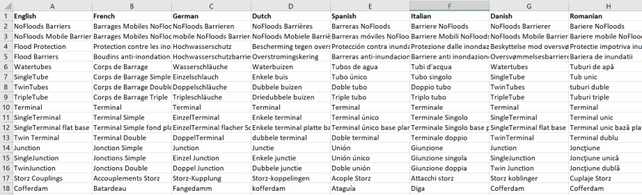
I like to add new terms to the glossary.
I have about 40 terms translated into 7 languages.
How do I easily upload these? Entering each term manually takes a long time.

Terms.jpg
May 25, 2023 at 11:12 am #13715613

Eran Helzer
Supporter

Languages: English (English ) Hebrew (עברית )

Timezone: Asia/Jerusalem (GMT+02:00)

Hi,

Thank you for contacting support.

Unfortunately this is not possible at the moment. You can only add and manage glossaries one by one as stated in this guide https://wpml.org/documentation/translating-your-contents/advanced-translation-editor/how-to-create-and-manage-glossary-entries/.

I have also escalated this as feature suggestion further and we may improve and implement it in the future, but I can not guarantee anything. I will update on any news from our side.

Regards.
