
This is the technical support forum for WPML - the multilingual WordPress plugin.
Everyone can read, but only WPML clients can post here. WPML team is replying on the forum 6 days per week, 22 hours per day.
| Sun | Mon | Tue | Wed | Thu | Fri | Sat |
|---|---|---|---|---|---|---|
| - | 11:00 – 16:00 | 11:00 – 16:00 | 11:00 – 16:00 | 11:00 – 16:00 | 11:00 – 16:00 | - |
| - | - | - | - | - | - | - |
Supporter timezone: Europe/Riga (GMT+03:00)
Tagged: ATE
This topic contains 14 replies, has 0 voices.
Last updated by Eduard Pleh 4 days, 16 hours ago.
Assisted by: Eduard Pleh.
| Author | Posts |
|---|---|
| April 8, 2026 at 4:34 am #17955467 | |
 ahmedH-37 |
not able to open advanced editor. this is the URL i'm getting when i try editing the translation hidden link |
| April 8, 2026 at 10:11 am #17956398 | |
 Vitaly Tarasenko Supporter |
Hello! My name is Vitaly. Our dev team is investigating your issue. Thanks. |
| April 8, 2026 at 11:48 am #17956715 | |
|
ahmedH-37 |
It's been almost 24 hours and the issue is not fixed yet, can't we have a live support of some sort ? the client's home page is not working.... |
| April 8, 2026 at 11:51 am #17956736 | |
 Olexander Zhitskiy Supporter |
Hello Ahmed, Thanks for reaching out. Could you please provide a bit more detail about what exactly happens when you try to open the Advanced Editor? This will help us better understand what’s going wrong and investigate it further. Best regards, |
| April 8, 2026 at 12:00 pm #17956738 | |
|
ahmedH-37 |
When I click on the crayon to edit the translation of the page, instead of bringing me to the advanced editor, now I'm getting a code ''WPML tried to translate this page three times and failed. To get it fixed, contact WPML support'' at the top of the page. I'm getting this code since I tried the instructions sent by you collegue. He said: Did you recently migrate your site using the All-in-One WP Migration plugin? If so, you might be encountering a known issue. Please follow the workaround described here to fix it: -- You can see this ticket : https://wpml.org/forums/topic/editing-the-page-translation-brings-me-to-the-translation-queue-and-not-the-advanced-editor/ -- But initally when i clicked the crayon it would just bring me to the translation dashboard and then i couldn't do anything from there either. |
| April 8, 2026 at 12:06 pm #17956748 | |
|
Olexander Zhitskiy Supporter |
Hi, Thanks for the additional details — that really helps. I’ve checked your setup and can confirm that the site migration looks correct and the site key is properly assigned, so the issue is not related to that. From what you’re describing, this is most likely related to the translation jobs themselves, so I’ll now review those on my side. In the meantime, could you please check if you see any errors in the browser console? If you see any errors (especially failed requests or red messages), a screenshot would be very helpful. This will help us narrow down the root cause faster. I’ll continue investigating from my side and keep you updated. |
| April 8, 2026 at 12:09 pm #17956756 | |
|
ahmedH-37 |
This is what i'm getting in the console tab when i click the crayon, no red messages. 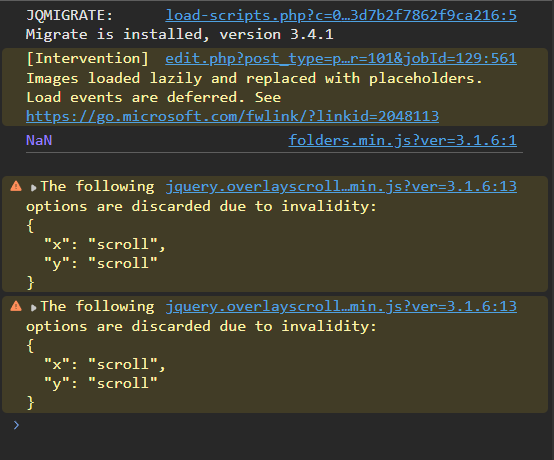 |
| April 8, 2026 at 12:28 pm #17956874 | |
|
Olexander Zhitskiy Supporter |
I’ve checked this from our side and I don’t see any failed requests or activity related to this job — in fact, there are no requests reaching ATE when you click the crayon. To investigate this further, could you please share a HAR file from your browser? You can record it by: This may help us identify what’s happening during the request flow. In parallel, I’m also escalating this internally so we can investigate it from the WPML side as well. Thanks for your patience. |
| April 8, 2026 at 12:41 pm #17956926 | |
|
ahmedH-37 |
please activate the function of adding a file, i can just upload an image now |
| April 8, 2026 at 12:43 pm #17956931 | |
 Eduard Pleh WPML Supporter since 12/2025 Languages: English (English ) Timezone: Europe/Riga (GMT+03:00) |
Hi, Can we get access to the site where we can check out for the problem? We need to check the database state. I will set up next reply for you as private, so you can share the credentials safely. You can remove them once we will be done with the investigation. Thanks and best wishes, |
| April 8, 2026 at 9:35 pm #17957695 | |
|
Eduard Pleh WPML Supporter since 12/2025 Languages: English (English ) Timezone: Europe/Riga (GMT+03:00) |
Update Best regards, |
| April 9, 2026 at 7:55 am #17958451 | |
|
ahmedH-37 |
1) We normally never have issue with this. It does happend that we create some pages originally in french and others in english. It is essential for this client that the pages are orginally in english and THEN we translate them to FR, even though the site's primary language is french. You said you fixed it, but now it's the EN home page that appears broken, and we still can't open the advanced editor. If I click on the crayon from the english page, it brings to the wordpress editor, and same if I click on the crayon from the french page.... 2) We we aware of that issue and we had found a workaround. When saving 2 times the translation in the advanced editor, the visual bug was fixed. But it's indeed better to fix this with a code snippet. |
| April 9, 2026 at 7:48 pm #17960562 | |
|
Eduard Pleh WPML Supporter since 12/2025 Languages: English (English ) Timezone: Europe/Riga (GMT+03:00) |
1) Thanks for the update, I restored back EN default language to the pages that had EN language setup initially(as you confirmed it is valid functionality). After that I wrote small plugin to fix stuck posts in ATE(it is located in 'Settings > WPML Post Editor Fixer'), applied fix and 'Home' page now correctly opens in the ATE editor(not Gutenberg) when we click on edit 'French' translation button from 'English' pages list. So, you can check and open the 'Home' page in the ATE editor. I will search further why layout is broken after we save original post and update after with result. 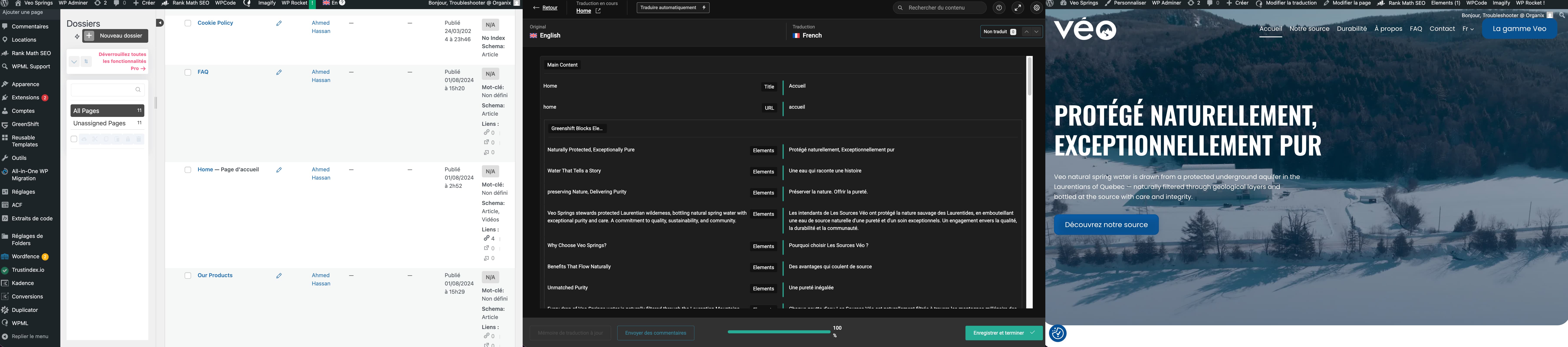 |
| April 10, 2026 at 4:12 am #17960989 | |
|
ahmedH-37 |
Thank youuuu !!! It took some time but glad to see it's fixed now. Could you please elaborate on what was the initial cause of the issue ? Was it related to the know issue ''https://wpml.org/errata/all-in-one-wp-migration-database-error-missing-uuid-column-after-migration/'' ? I tried following the instructions but using a code snippet since we didn't have access to the file manager and I think I made it worse. And yes for the broken layout, maybe we can open an other ticket for this, since my original once is resolved. Thanks again! |
| April 10, 2026 at 1:16 pm #17962267 | |
|
Eduard Pleh WPML Supporter since 12/2025 Languages: English (English ) Timezone: Europe/Riga (GMT+03:00) |
Hello again, Sure, I checked, the issue was not caused by the WPML “missing uuid column after migration” bug from errata you attached(the database state is a correct). There was an another reason. There is a flag in the database that it was saved with 'Wordpress Gutenberg Editor' at some point earlier, and when the system later tried to open it with 'ATE editor', there was some issue and it got stuck — showing the error you saw. We fixed it by re-linking the translation to the ATE editor, and everything is working as expected now. We will investigate later for exact test steps that can lead to such problem, but currently I was unable to reproduce it by trying to save the page translation in the 'Wordpress Gutenberg Editor'(Home FR) and then trying to open it in ATE editor instead. It worked correctly in all cases. Yes, thank you, please open separate ticket for the second issue with broken layout, and we will check it together with my colleagues from our Compatibility team. Best wishes, |