Home›Support›English Support›[Resolved] Translated page is associated with a wrong English original page
[Resolved] Translated page is associated with a wrong English original page
This thread is resolved. Here is a description of the problem and solution.
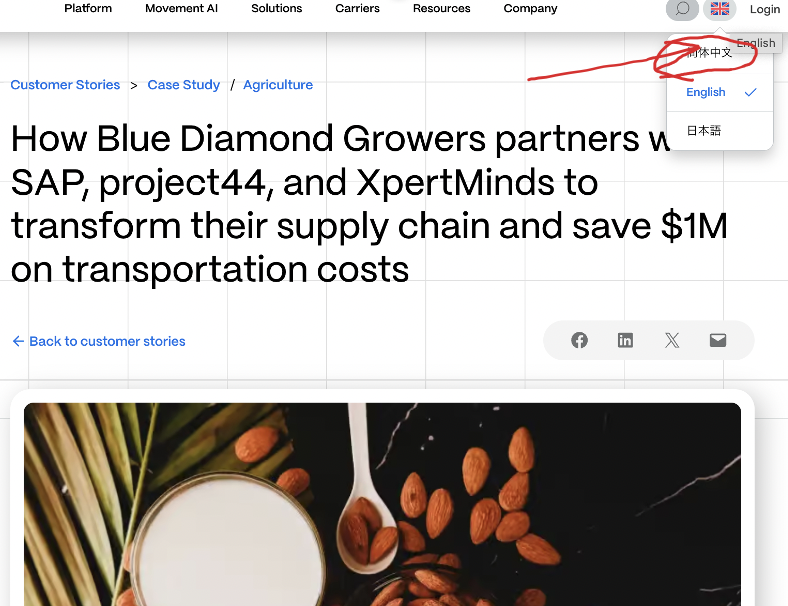
Problem: You are experiencing issues where the Chinese Univar customer story page displays the wrong image and is incorrectly associated with the English Blue Diamond customer story. When selecting Chinese from the language selector on the English Blue Diamond page, it redirects to the Chinese Univar customer story instead of the Chinese Blue Diamond page. Solution: We have identified that the header image might have been set previously or synced from the original English version. Unfortunately, since revisions are not enabled for this Custom Post Type, we cannot verify further details. It appears that the image defined in the English post is also being used in the Chinese version.
If this solution does not resolve your issue or seems irrelevant due to being outdated or not applicable to your case, we recommend opening a new support ticket. We also highly recommend checking related known issues at https://wpml.org/known-issues/, verifying the version of the permanent fix, and confirming that you have installed the latest versions of themes and plugins. For further assistance, please visit our support forum at https://wpml.org/forums/forum/english-support/.
This is the technical support forum for WPML - the multilingual WordPress plugin.
Everyone can read, but only WPML clients can post here. WPML team is replying on the forum 6 days per week, 22 hours per day.
Background of the issue:
I am trying to investigate the root cause of an issue and fix it so that translated pages are associated under the correct English original page. I found that the Chinese Univar customer story page has two issues. The link to a page where the issue can be seen is: hidden link
Symptoms:
1) The Chinese Univar customer story has a wrong image (the image is for Blue Diamond customer story). 2) The Chinese Univar customer page is associated with the original English Blue Diamond customer story. When I click the Chinese in the language selector on the English Blue Diamond page, the Chinese Univar customer story page is opened instead of the expected Chinese Blue Diamond page.
Questions:
Why is the Chinese Univar customer story page showing the wrong image?
Why is the Chinese Univar customer story page associated with the English Blue Diamond customer story?
Languages: English (English )Spanish (Español )German (Deutsch )
Timezone: Europe/Vienna (GMT+02:00)
Hi,
I would need to request temporary access (WP-Admin and FTP) to your site
– preferably to a test site where the problem has been replicated if possible –
in order to be of better help and check if some configurations might need to be changed
Your next answer will be private which means only you and I have access to it.
❌ Please backup your database and website ❌
✙ I would additionally need your permission to de-activate and re-activate Plugins and the Theme, and to change configurations on the site. This is also a reason the backup is really important.
✙ Please add the Links to the […] Edit Screen, the Page/Post where you insert the […] and the corresponding Front End Page/Screen
Languages: English (English )Spanish (Español )German (Deutsch )
Timezone: Europe/Vienna (GMT+02:00)
Hi,
There is currently no saved WPML translation for Chinese: hidden link
It looks like all the Chinese content you're seeing was manually added directly in the backend. This is exactly what appears here: hidden link
Please complete the WPML translation via the translation editor (to 100%), and then review the output on the frontend. The image is currently identical to the original as well.
I will add Chinese translations to the WPML translation via the translation editor to 100%.
But we have not used the translation editor for Chinese translations for not only this page but also any other pages. We always send content pages to our translation agency via WPML plugin to get the pages translated especially for China website. No manual translation involved so far. That means I have no idea why "all the Chinese content are manually added directly in the backend" happened. Would you have any idea why this manual addition to the backend happened?
I am asking this because we would like to avoid the same issue in near future.
I added Chinese translations to the WPML translation editor (to 100%). Now I see Chinese page but the header image is not correct (it's Suntory Global Spirits image, not for Continental image).
I can of course manually change the header image to the right one. But I reached out to you because I would like to know what factor causes this kind of issue. The more understanding, the more we can avoid issues in the future.
Since revisions are not enabled for this Custom Post Type, I’m unable to check further details. Technically, I see the image that is also defined in the EN post.