This thread is resolved. Here is a description of the problem and solution.
Problem:
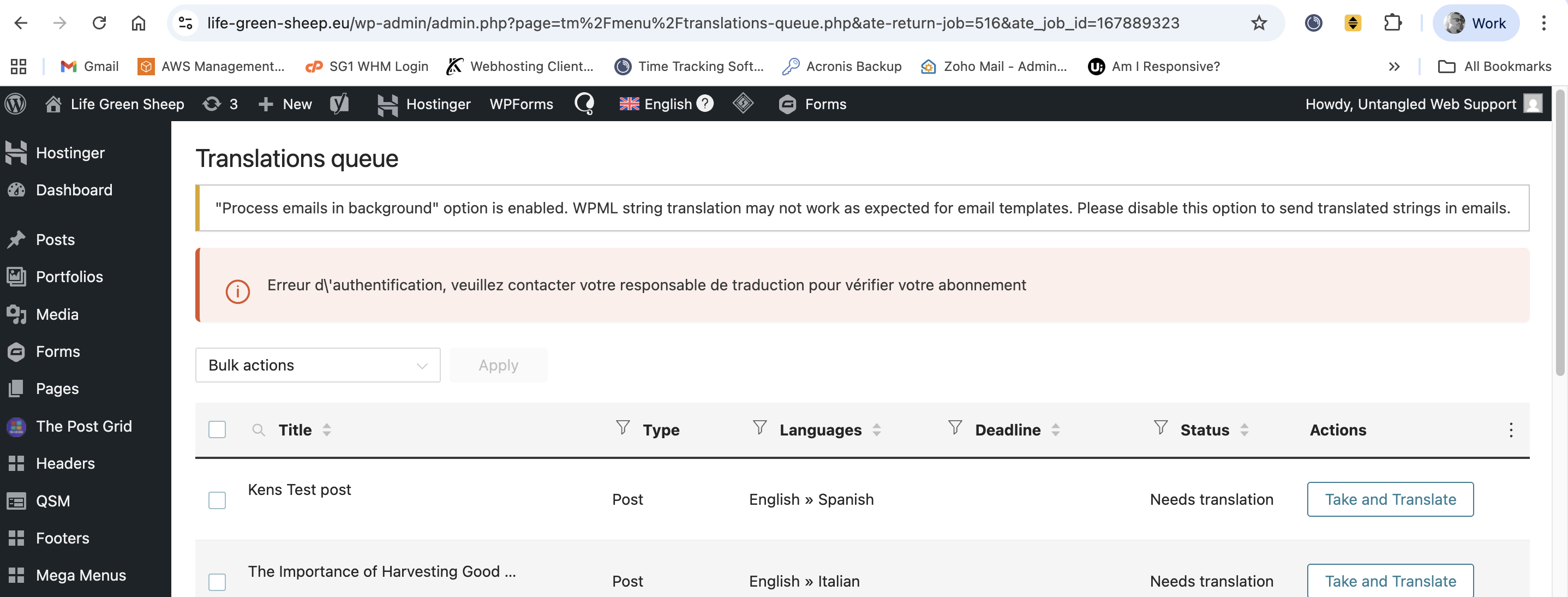
You are trying to enable translators to translate content into any language using WPML, but encounter an issue when attempting to translate posts. Specifically, translation engines have stopped working, displaying an 'Authentication error, please contact your translation manager to verify your subscription' message. This error appears in different languages each time you try to translate a post, and clicking 'Take and translate' keeps you on the translations queue page instead of proceeding to the post translation page.
Solution:
We recommend following these steps to address the issue:
1. Ensure that you are logged into wpml.org.
2. Create a staging version of your website to test if the problem persists in a minimal setup. This approach helps in troubleshooting without the risk of affecting the live website.
3. If the issue still occurs on the staging site, please provide us with the URL and user/password of the staging website. You can set your next reply as private for security.
Please note that this solution might be outdated or not applicable to your specific case. We highly recommend checking related known issues at https://wpml.org/known-issues/, verifying the version of the permanent fix, and confirming that you have installed the latest versions of themes and plugins. If the problem persists, do not hesitate to open a new support ticket at WPML support forum.
This is the technical support forum for WPML - the multilingual WordPress plugin.
Everyone can read, but only WPML clients can post here. WPML team is replying on the forum 6 days per week, 22 hours per day.
This topic contains 1 replies, has 0 voices.
Last updated by 2 weeks, 5 days ago.
Assisted by: Christopher Amirian.