Skip to content Skip to sidebar

This is the technical support forum for WPML - the multilingual WordPress plugin.

Everyone can read, but only WPML clients can post here. WPML team is replying on the forum 6 days per week, 22 hours per day.

Sun Mon Tue Wed Thu Fri Sat
- 9:00 – 12:00 9:00 – 12:00 9:00 – 12:00 9:00 – 12:00 9:00 – 12:00 -
- 13:00 – 18:00 13:00 – 18:00 13:00 – 18:00 13:00 – 18:00 13:00 – 18:00 -

Supporter timezone: Asia/Singapore (GMT+08:00)

This topic contains 9 replies, has 1 voice.

Last updated by Kor 5 hours, 18 minutes ago.

Assisted by: Kor.

Author Posts
November 28, 2025 at 11:48 am #17617958

victoriaK-4

Background of the issue:
I am trying to see the same attribute swatches in all languages on my WordPress site. You can see the issue on this page: hidden link

Symptoms:
The attribute swatches are not showing in all languages as expected.

Questions:
Why are the attribute swatches not syncing across all languages?
How can I ensure the attribute swatches appear in all languages?

November 28, 2025 at 11:49 am #17617968

victoriaK-4

you can see the issue here
hidden link

November 28, 2025 at 11:50 am #17617971

victoriaK-4

I should not have to resync the translations of the product attributes all the time for it to work

November 29, 2025 at 4:11 pm #17619768

Andreas W.
WPML Supporter since 12/2018

Languages: English (English ) Spanish (Español ) German (Deutsch )

Timezone: America/Lima (GMT-05:00)

Hello,

Do you see any configuration errors at WooCommerce > WCML > Status? If yes, please send us a screenshot.

---

It seems those are global attributes that were created at Products > Attributes, correct?

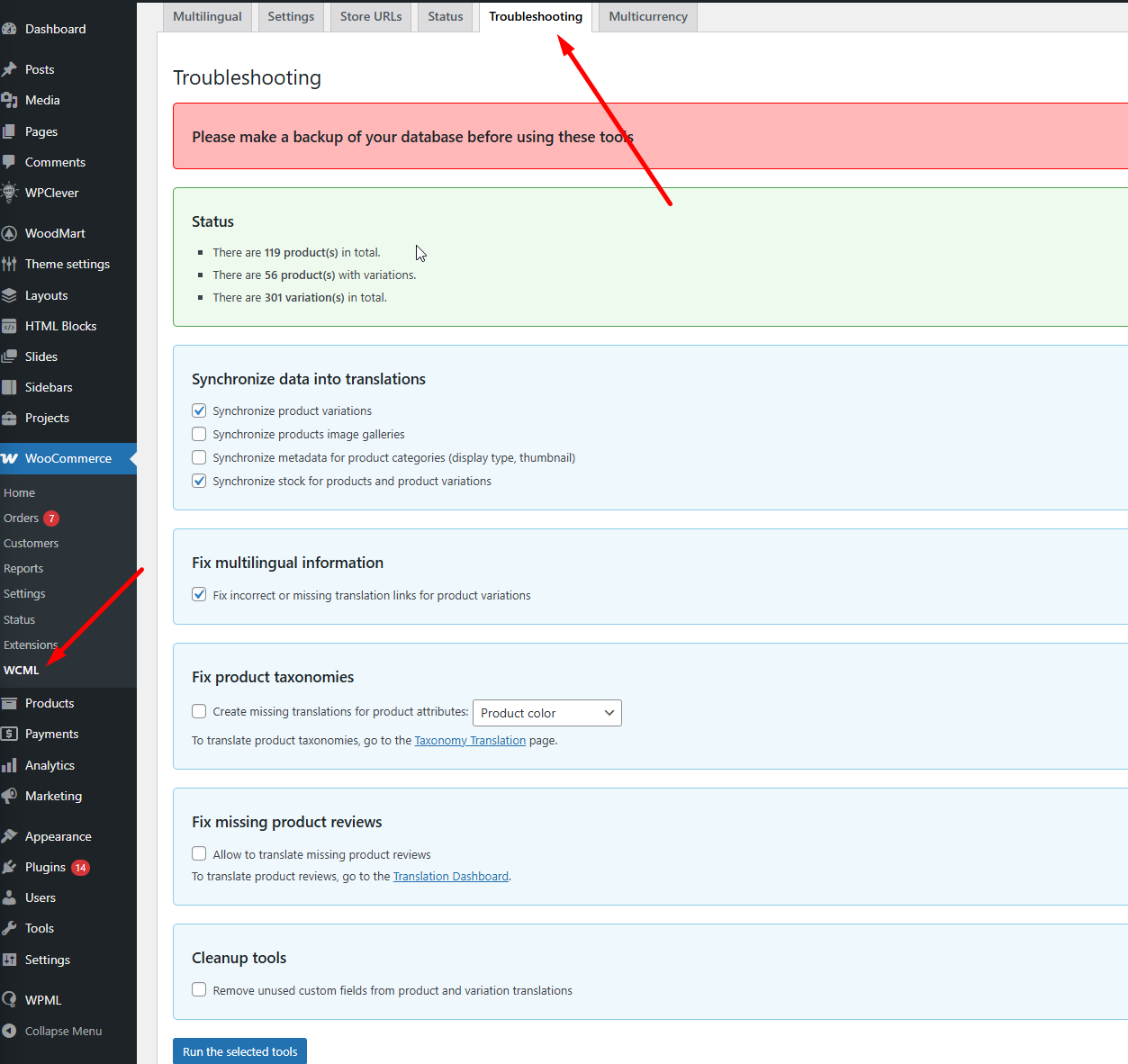
If so, please try to sync them at WooCommerce > WCML > Status > Troubleshooting.

After that, test if the issue is replicable by editing an original product and saving it, or verify if the issue occurs after a product has been translated or purchased.

We will be awaiting your reply.

Best regards
Andreas

December 1, 2025 at 9:21 am #17621770

victoriaK-4

Hi

Yes the attributes where created at products>attributes
Ok I will check that and get back to you shortly.
i see 1 config error

Skärmbild 2025-12-01 102034.png
December 1, 2025 at 9:42 am #17621868

victoriaK-4

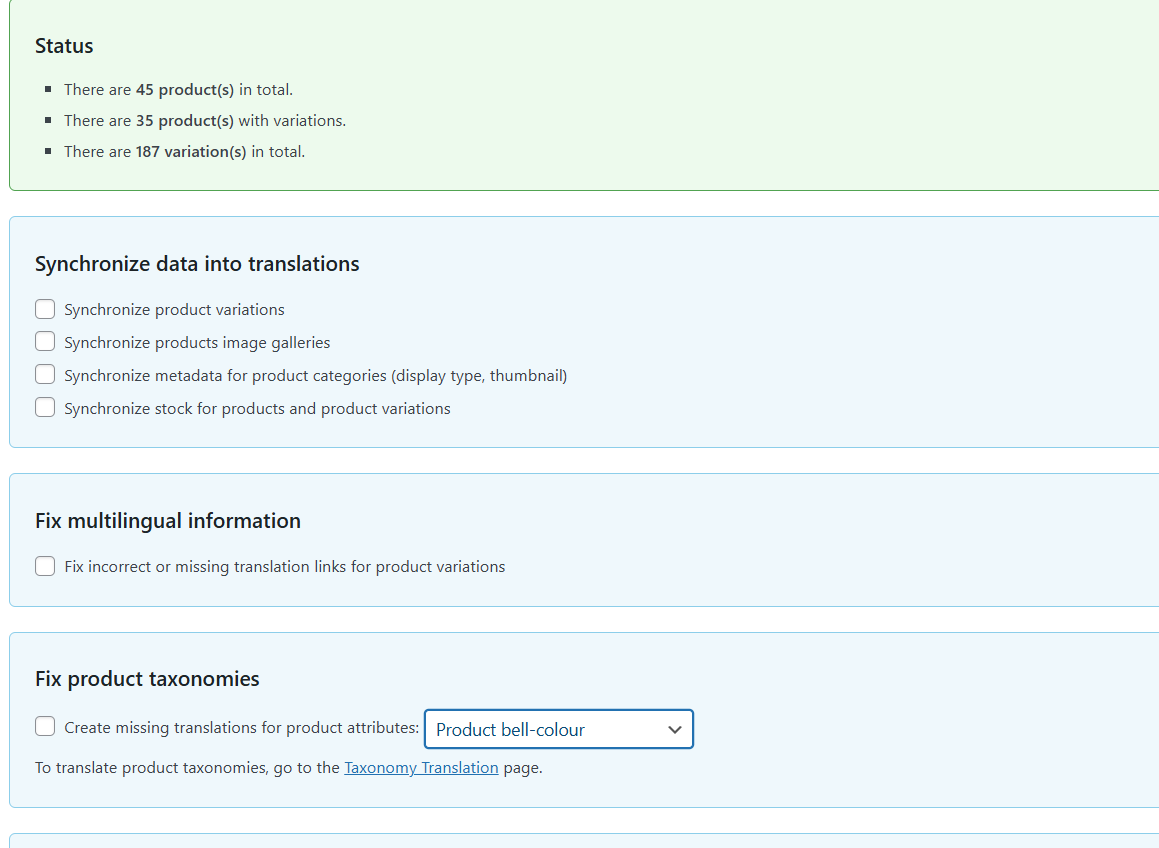
i only see these options in wcml - only the taxonomies, but all the taxonomies have already been translated.

What exactly do i need to sync?

Skärmbild 2025-12-01 104117.png
December 1, 2025 at 10:37 am #17622075

Kor
WPML Supporter since 08/2022

Languages: English (English )

Timezone: Asia/Singapore (GMT+08:00)

Thanks for your reply. I've checked the product in both languages, and the attribute shows correctly to me. Did you sort it out yourself?

hidden link
hidden link

December 3, 2025 at 11:06 am #17630281

victoriaK-4

Hi No i update the taxonomy translations again. For some reason its seems to happen on the live site and when i try to replicate on staging it never happens - typical.
I cant let the live site go with out the translated attribute swatches so i update them almost every day.

December 3, 2025 at 11:08 am #17630286

victoriaK-4

i need to know exactly what to sync in the trouble shooting area -
As all the products are translated and all the taxononmies are already translated. please show me step by step

December 3, 2025 at 4:12 pm #17631636

Kor
WPML Supporter since 08/2022

Languages: English (English )

Timezone: Asia/Singapore (GMT+08:00)

Thanks for your reply. The sync option is in WooCommerce > WCML > Status > Troubleshooting. Please make sure to have a backup before you proceed.

Screenshot_173.png