
Skip to content Skip to sidebar

This is the technical support forum for WPML - the multilingual WordPress plugin.

Everyone can read, but only WPML clients can post here. WPML team is replying on the forum 6 days per week, 22 hours per day.

Tagged: 

This topic contains 8 replies, has 1 voice.

Last updated by nasirS 4 months, 2 weeks ago.

Assisted by: Otto.

Author Posts
October 16, 2025 at 2:41 am #17488613

nasirS

Background of the issue:
I am trying to translate the header, footer, and event listings on my site hidden link. I am using Event Booking Manager for WooCommerce – WpEvently, which has a shortcode that works on the English version but not on the French translation. I have tried resetting, translating again, and manually translating the strings.

Symptoms:
The header and footer are not translating, and the event listing shortcode does not work on the French translation version.

Questions:
Can you help me fix the translation issue with the header and footer?
Why is the event listing shortcode not working on the French translation version?

October 16, 2025 at 2:18 pm #17490907

nasirS

Still have same problem, hoping someone human can help fix this.

October 16, 2025 at 2:40 pm #17491020

Otto

Hello,

The Event Booking Manager for WooCommerce is not in our compatibility list, however, it doesn't necessarily imply that it is not compatible, just that our team has not tested yet.
Here you have some compatible alternatives:
https://wpml.org/plugin-functionality/calendar/

In order to take a deeper look, I created a clean installation of WordPress, WooCommerce, Elementor, WPML, and all necessary WPML add-ons.
You can access the WordPress dashboard using the link below:
hidden link

Kindly follow the steps below:

- Don't restore your site there.
- Install Event Booking Manager for WooCommerce
- Try to replicate the issue with the minimal steps.
- Then let me know the steps to see the problem and reproduce it

Best Regards,
Otto

October 17, 2025 at 6:04 pm #17495020

nasirS

Hi Otto,
Thank you very much for your response. I have installed the same theme and plugin. However, I am unable to edit the page in Elementor. i think its because of some server settings. This is the shortcode that i needed to add to the home page and see if the translated page shows the event list. The event list currently showing on the home page is the default one came with the theme and need to be replaced with the following shortcode.
[event-list show='3' style='list' pagination='yes']

Please let me know if you are able to edit the page in elementor on the staging site you shared with me.

October 17, 2025 at 6:06 pm #17495021

nasirS

In case you want me to share admin access to my site, I can do that. Please let me know in case you would want that.

October 17, 2025 at 7:38 pm #17495151

Otto

Hello,

Sure, I can take a look at your site. Thanks.

I would like to request temporary access (wp-admin and FTP) to your site to take a better look at the issue.
It would be better to a testing site where the issue is replicated.

The information you will enter is private which means only you and I can see and have access to it.
Maybe I'll need to replicate your site locally. For this, I'll need to temporarily install a plugin called “Duplicator” or "All in One WP Migration" on your site.
This will allow me to create a copy of your site and your content.
Once the problem is resolved I will delete the local site.

**IMPORTANT**
- Please make a backup of site files and database before providing us access.
- If you do not see the wp-admin/FTP fields this means your post & website login details will be made PUBLIC. DO NOT post your website details unless you see the required wp-admin/FTP fields.

Best Regards,
Otto

October 20, 2025 at 6:16 pm #17500648

Otto

Hello,

The integration between WPML And Event Booking Manager for WooCommerce – WpEvently is done by them.

I made a copy of your site to try it locally, and this fixed the problem for me:
- I went to Events > Quick Setup > went through the wizard
- Once I did that, it worked. It looks like that the plugin needs to recognize that WPML is active in the site.

Can you give it a try on your end? If it does not work, I suggest checking with their support too. I think they should be in a better position to help.

Let me know how it goes, please.

Best Regards,
Otto

October 22, 2025 at 12:38 am #17504811
nasirS

Hi Otto,
Thank you very much for the suggestion. I reset the WPML plugin completely and followed the step you suggested and was able to translate it. The problem I had was, the Shortcode for the plugin was not listing any event on the french version of homepage. So after translating the event, i found that the translated version of the event somehow got the event date set to today's date (causing the event to expire - and expired event does not show in the list) and the ticket price and quantity were removed too that's why it was not listing the event on French version. SO as I understood that whenever I translate the event, I have to recheck and correct the event date and event ticket.

Anyways I can do that.
The other major problem I have been facing it that when i do the translation of any page or even if I click the "edit translation link" of any translated page, it does not show every section or content to translate and automatic translation also does not translate the whole content. If you edit the translation for contact page you will just se two words available for translate. and thus the wholepage is not translated.

Can you please check the live site now and tell me why it is not translating all the content. please see the screenshot of translated contact us page for reference.

New threads created by Otto and linked to this one are listed below:

https://wpml.org/forums/topic/automatic-translation-also-does-not-translate-the-whole-content/
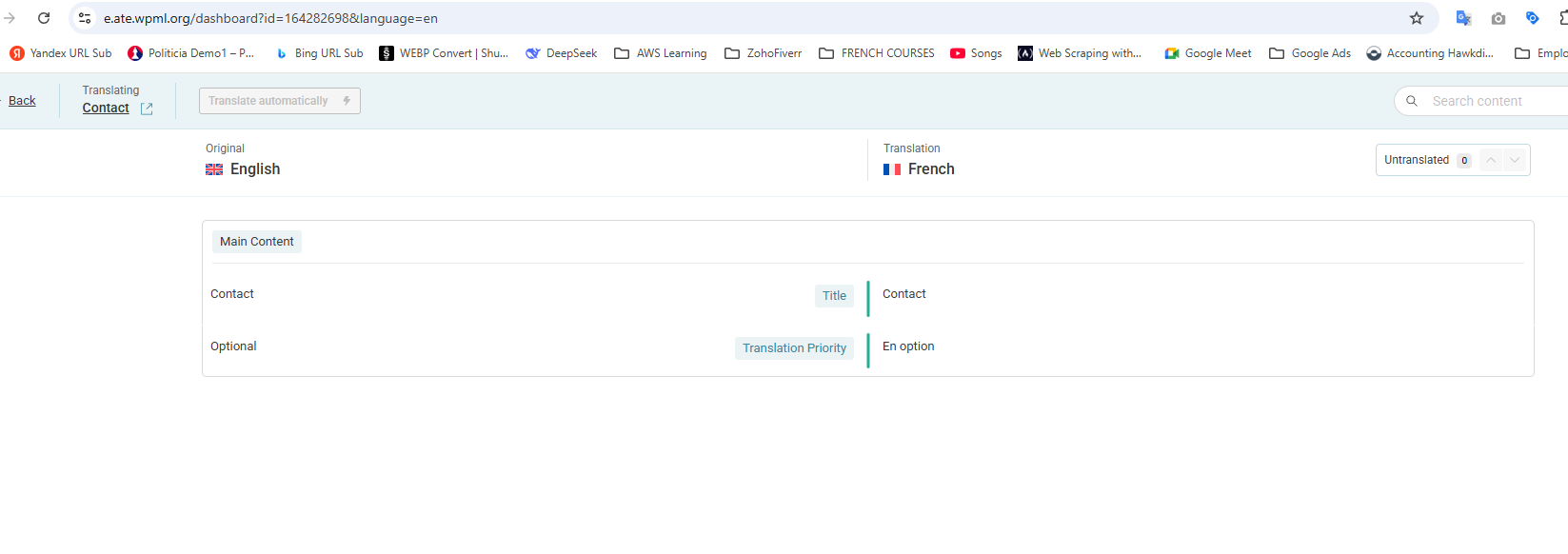
Screenshot 2025-10-22 043429.png
October 22, 2025 at 1:27 pm #17508397

Otto

Hello,

Great, I am glad you managed to solve it.

As the original issue is resolved, I created a new ticket to handle this new question.

This will also help other users with similar problems find solutions when searching the forum as well as we avoid mixing lots of questions in one ticket.

I'll follow up here:
https://wpml.org/forums/topic/automatic-translation-also-does-not-translate-the-whole-content/

Best Regards,
Otto

October 22, 2025 at 1:37 pm #17508538

nasirS

Ok sure, I am closing this ticket as this problem is solved. Thank you!
