
This is the technical support forum for WPML - the multilingual WordPress plugin.
Everyone can read, but only WPML clients can post here. WPML team is replying on the forum 6 days per week, 22 hours per day.
This topic contains 14 replies, has 0 voices.
Last updated by baptisteW-2 2 weeks, 2 days ago.
Assisted by: Shekhar Bhandari.
| Author | Posts |
|---|---|
| March 21, 2026 at 8:04 pm #17915974 | |
 baptisteW-2 |
For the last two translations (likely because of an update), my French translations are missing single quotes. Here is the English source I tried today: This is a test that will translate poorly. This is usually sprinkled with quotes but I have seen none. The weird thing is that ATE is showing the quotes but they disappear as soon as I am in WordPress. Even if I look at the code editor, there does not seem to be anything there. I had never had this issue before, it only happened in the last week or so.   |
| March 24, 2026 at 4:34 am #17920078 | |
 Shekhar Bhandari WPML Supporter since 03/2015 Languages: English (English ) Timezone: Asia/Kathmandu (GMT+05:45) |
Hello there, Thank you for contacting WPML support. I'd be happy to assist you on this issue. Can you provide me the ate editor url so I can check the job-id and check this further? Look forward to your reply. Thanks |
| March 24, 2026 at 7:56 pm #17923979 | |
|
baptisteW-2 |
Hi What do you mean by ATE editor URL? Is that hidden link? As I said, the apostrophes appear in ATE, but not in WordPress |
| March 24, 2026 at 8:16 pm #17924016 | |
|
baptisteW-2 |
I have noticed one extra thing: straight quotes (') appear to be fine while apostrophes (`) are note. Apparently, WPML AI uses both and when it uses straight quotes they are not lost between ATE and WP, but apostrophes are lost in between. Can I tell WPML AI to only use straight quotes? |
| March 25, 2026 at 4:24 am #17924316 | |
|
Shekhar Bhandari WPML Supporter since 03/2015 Languages: English (English ) Timezone: Asia/Kathmandu (GMT+05:45) |
Hello there, I couldn't find any use of ` on the provided job details. Can you provide me another page where this is being used to test further? To debug this issue further, I would need to check your site settings once, for this I would need temporary access (wp-admin and ftp) to your site. So could you please provide me with those details, you will find the needed fields for this below the comment area when you log in to leave your next reply. This info is private and available to you and WPML supporters only. Note: Look forward to your reply. Thanks |
| March 25, 2026 at 5:27 am #17924428 | |
|
baptisteW-2 |
Isn't there no other way? Can't you think of something that could go wrong between ATE and WordPress? Could it be a collation error? Could I tell WPML to only use straigh quotes? |
| March 25, 2026 at 5:31 am #17924434 | |
|
Shekhar Bhandari WPML Supporter since 03/2015 Languages: English (English ) Timezone: Asia/Kathmandu (GMT+05:45) |
Hello there, I would need logins to check further, since you mentioned it shows fine on ATE, it probably have something to do with how it's being downloaded on WordPress, this requires a check. If you don't want to share the logins, can you please create a new test page with just a sentence with issue and share the link with me? Please make sure to translate this page. Look forward to your reply. Thanks |
| March 25, 2026 at 5:31 am #17924437 | |
|
baptisteW-2 |
The symbol is not ` but ’ (bad copy-pasting on my end). If you look at this job, 187993459, you will see a mix of two different quotes: Straight quote ('): Stratégie d'investissement |
| March 25, 2026 at 5:40 am #17924440 | |
|
Shekhar Bhandari WPML Supporter since 03/2015 Languages: English (English ) Timezone: Asia/Kathmandu (GMT+05:45) |
Hello there, From my side it looks like the ’ was included in the translations, looks like something is wrong while it's being delivered. Also the page is not public so I couldn't check this further. Can you check my previous response and create a test page if logins is not possible. Thanks |
| March 25, 2026 at 5:55 am #17924448 | |
|
baptisteW-2 |
In ATE, I replaced some of the apostrophes and they appeared fine in WordPress. To make it easier, I made a public page: hidden link All of them are missing from the WordPress page: |
| March 25, 2026 at 5:59 am #17924455 | |
|
Shekhar Bhandari WPML Supporter since 03/2015 Languages: English (English ) Timezone: Asia/Kathmandu (GMT+05:45) |
Hello, I might be misunderstanding the issue, but I checked the page on the front end and it appears to be displaying correctly for me. Could you please clarify what you mean by it not showing properly in WordPress? Are you referring to the admin section? I look forward to your reply. Thank you.  |
| March 25, 2026 at 6:12 am #17924471 | |
|
baptisteW-2 |
I don't understand. When I created it, the 3 apostrophes were missing. I did a new test page: hidden link 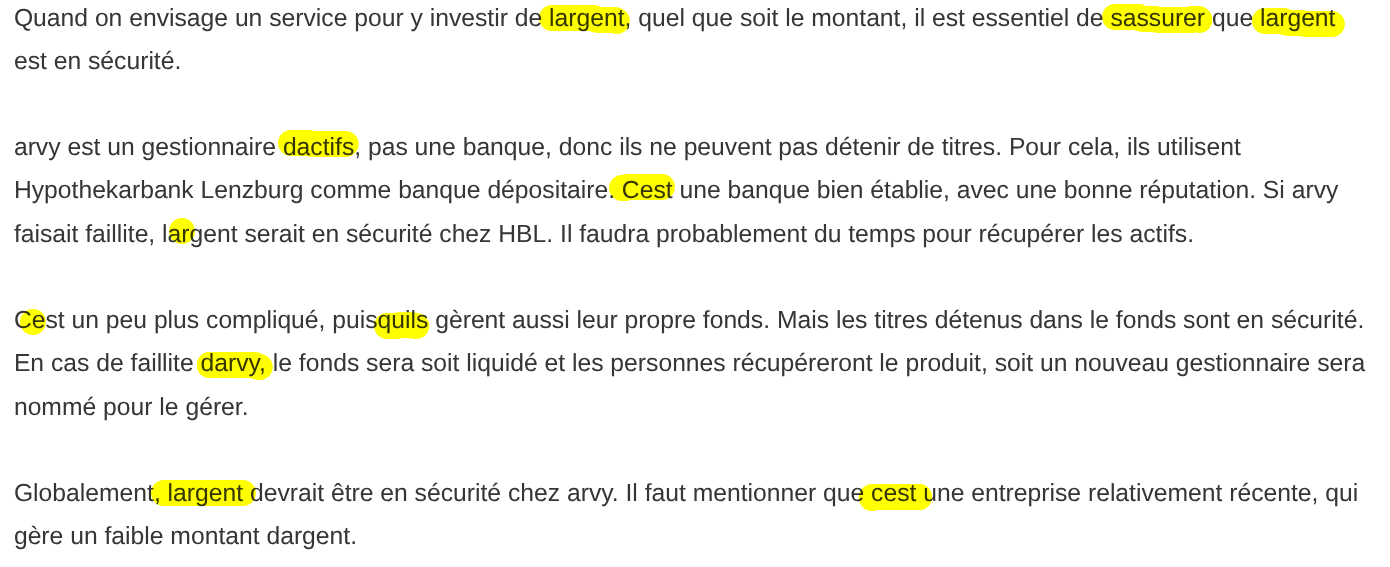 |
| March 25, 2026 at 7:58 am #17924758 | |
|
Shekhar Bhandari WPML Supporter since 03/2015 Languages: English (English ) Timezone: Asia/Kathmandu (GMT+05:45) |
Hello there, I can see the issue, can you please follow the below steps and check if the problem exists: Let me know if this helps. Thanks |
| March 26, 2026 at 5:37 am #17927809 | |
|
baptisteW-2 |
Here is what I did 1) I made a small change in the English version and did an automatic translation. In ATE, this changed one phrase (the first one) and still showed apostrophes. But once on the web page, the first phrase was fixed. 2) I removed the change from the English version and redid a translation, yielding back the exact same French phrase (likely from translation memory) and then saving the change. In this case, the issue is back on the page in the first phrase. 3) I did a small change again to the second phrase and translated it automatically This fixed the phrase with proper quotes 4) In the fourth phrase, I changed an apostrophe with a straight quote This fixed the phrase with proper quote 5) In the last phrase, I removed a word that did not have quotes This also fixed the entire phrase So, it appears that everything coming from translation memory is broken, but new translations are good at this point, and that even changing an unrelated word in ATE fixes the phrase. I have two questions: |
| March 26, 2026 at 7:45 am #17927917 | |
|
Shekhar Bhandari WPML Supporter since 03/2015 Languages: English (English ) Timezone: Asia/Kathmandu (GMT+05:45) |
Hello, Yes, the issue was with translation memory, and it’s all fixed now! So, any new translations you make won’t have any problems. If you are using automatic translation, you can go to WPML → Translation Management and resend the page for translation. While doing so, select the Override existing translations option to overwrite the translation memory. Alternatively, you can update the translation memory by editing the translations directly. Please let me know if this helps. Thanks. |





