Skip to content Skip to sidebar

This thread is resolved. Here is a description of the problem and solution.

Problem:
You are trying to ensure that glossary entries are updated on your site, but they are not displaying as expected.
Solution:
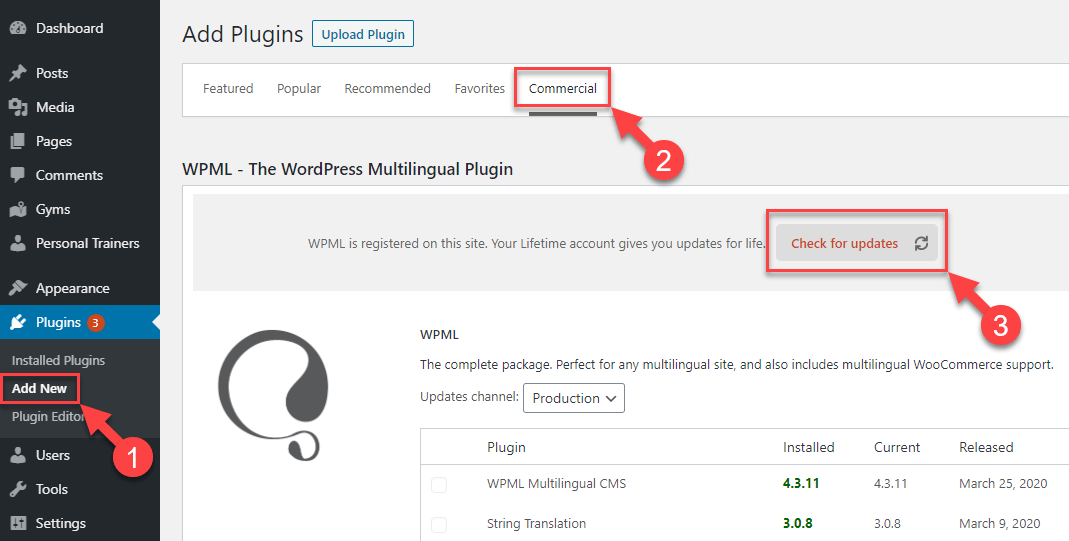
We recommend updating your WPML plugins to the latest version, as a recent update includes a fix for this issue. Here's how you can update:
1. Navigate to Plugins → Add New Plugin.
2. Click on the Commercial tab.
3. Click the Check for updates button.
View update instructions
Please ensure to create a backup before updating as a precaution.

If the solution provided here does not resolve your issue or seems irrelevant due to being outdated or not applicable to your case, we highly recommend checking related known issues at https://wpml.org/known-issues/, verifying the version of the permanent fix, and confirming that you have installed the latest versions of themes and plugins. If further assistance is needed, please open a new support ticket.

This is the technical support forum for WPML - the multilingual WordPress plugin.

Everyone can read, but only WPML clients can post here. WPML team is replying on the forum 6 days per week, 22 hours per day.

Tagged: 

This topic contains 1 replies, has 0 voices.

Last updated by Shekhar Bhandari 6 months, 1 week ago.

Assisted by: Shekhar Bhandari.

Author Posts
July 4, 2025 at 6:39 am

sorenP

Background of the issue:
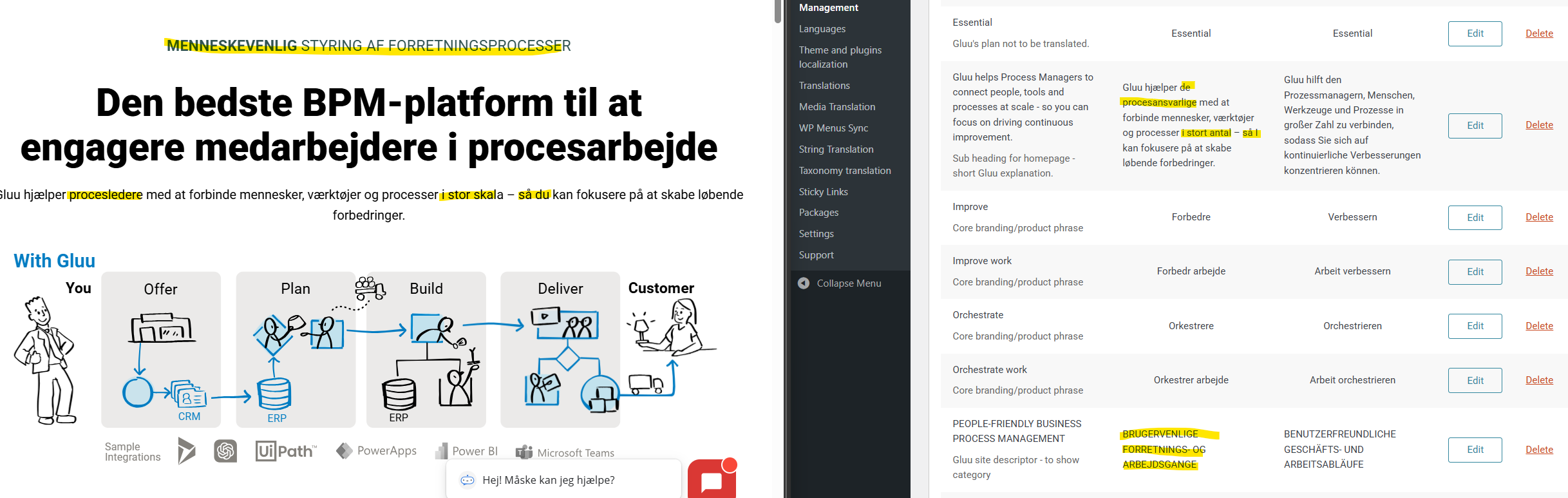
I am trying to ensure that our glossary entries are updated on the site. The issue can be seen on the page: hidden link

Symptoms:
I expected to see: 'Gluu hjælper de procesansvarlige med at forbinde mennesker, værktøjer og processer i stort antal – så I kan fokusere på at skabe løbende forbedringer.' Instead, I got: 'Gluu hjælper procesledere med at forbinde mennesker, værktøjer og processer i stor skala – så du kan fokusere på at skabe løbende forbedringer.'

Questions:
Why are the glossary entries not updating as expected?
How can I ensure the correct glossary entries are displayed on the site?

August 20, 2025 at 4:42 am #17333012

Shekhar Bhandari
WPML Supporter since 03/2015

Languages: English (English )

Timezone: Asia/Kathmandu (GMT+05:45)

Hello there,

We've recently rolled out a new version of WPML plugins with the fix. Could you please update your plugins to the latest version and inform me if it resolves the issue?

Our WPML updates are distributed gradually. If your websites haven't received this update yet, please be patient, and you should see it within a few days.

If you want to expedite the process and receive the update immediately, follow these steps:
1. Go to the Plugins → Add New Plugin.
2. Click on the Commercial tab.
3. Then, click the "Check for updates" button.
https://wpml.org/wp-content/uploads/2020/04/wpml-force-plugin-update-1.png

Please remember to create a backup before updating, as a precaution.

Thanks