
This is the technical support forum for WPML - the multilingual WordPress plugin.
Everyone can read, but only WPML clients can post here. WPML team is replying on the forum 6 days per week, 22 hours per day.
| Sun | Mon | Tue | Wed | Thu | Fri | Sat |
|---|---|---|---|---|---|---|
| - | 9:00 – 13:00 | 9:00 – 13:00 | 9:00 – 13:00 | 9:00 – 13:00 | 9:00 – 13:00 | - |
| - | 14:00 – 18:00 | 14:00 – 18:00 | 14:00 – 18:00 | 14:00 – 18:00 | 14:00 – 18:00 | - |
Supporter timezone: Europe/Kyiv (GMT+02:00)
Tagged: Compatibility
This topic contains 23 replies, has 0 voices.
Last updated by Andrey 3 days, 15 hours ago.
Assisted by: Andrey.
| Author | Posts |
|---|---|
| January 25, 2026 at 7:19 pm #17760392 | |
 peterS-210 |
Hi Support I have been in contact with Barn2 support who have referred me to your support if the guide they provided could not help me. The guide did not solve my problem so now I am trying to get help from you. I have a WPML setup with two languages enabled, DK (miho.dk) and SE (miho.se). I am using the product tabs plugin from Barn2, and have created two global tabs in the DK version with default content. Each product will override the global tabs with product specific tab content. The global tabs label and the global content have been translated in the SE version, but I cannot see the product specific translated content in the SE version. Please guide me on how to set up WPML in order for getting the SE translation to work. If needed I can grant you access to the backend. Thank you. /Peter   |
| January 25, 2026 at 11:12 pm #17760542 | |
 Andrey WPML Supporter since 06/2013 Languages: English (English ) Russian (Русский ) Timezone: Europe/Kyiv (GMT+02:00) |
Hello Peter, Just to make sure we’re on the same page — have you followed the steps described in this documentation? I’ve enabled debug information for this support ticket. Please follow the instructions here to retrieve the debug information from your site and share it with us: |
| January 27, 2026 at 7:35 am #17765157 | |
|
peterS-210 |
Hi Andrey I have received the attached guide from Barn2, and my global tabs and content is translated just fine. But it is the product specific content I dont see on the frontend. The product specific content seems to be translated in the WMPL Advanced Translation Editor, however it is not displayed on the frontend. On the products I can see that the override checkmark on the products are not set. Hence the global content is display as expected. So I guees the override checkmark needs to be set somehow - hopefully done automatically?Next, the translation of the product specific tab content from the original language needs to be inserted on the tab. Hopefully this is done automatically as part of the product translation when set up correctly? I have attached some screenschots to help explain my situation. BR Peter   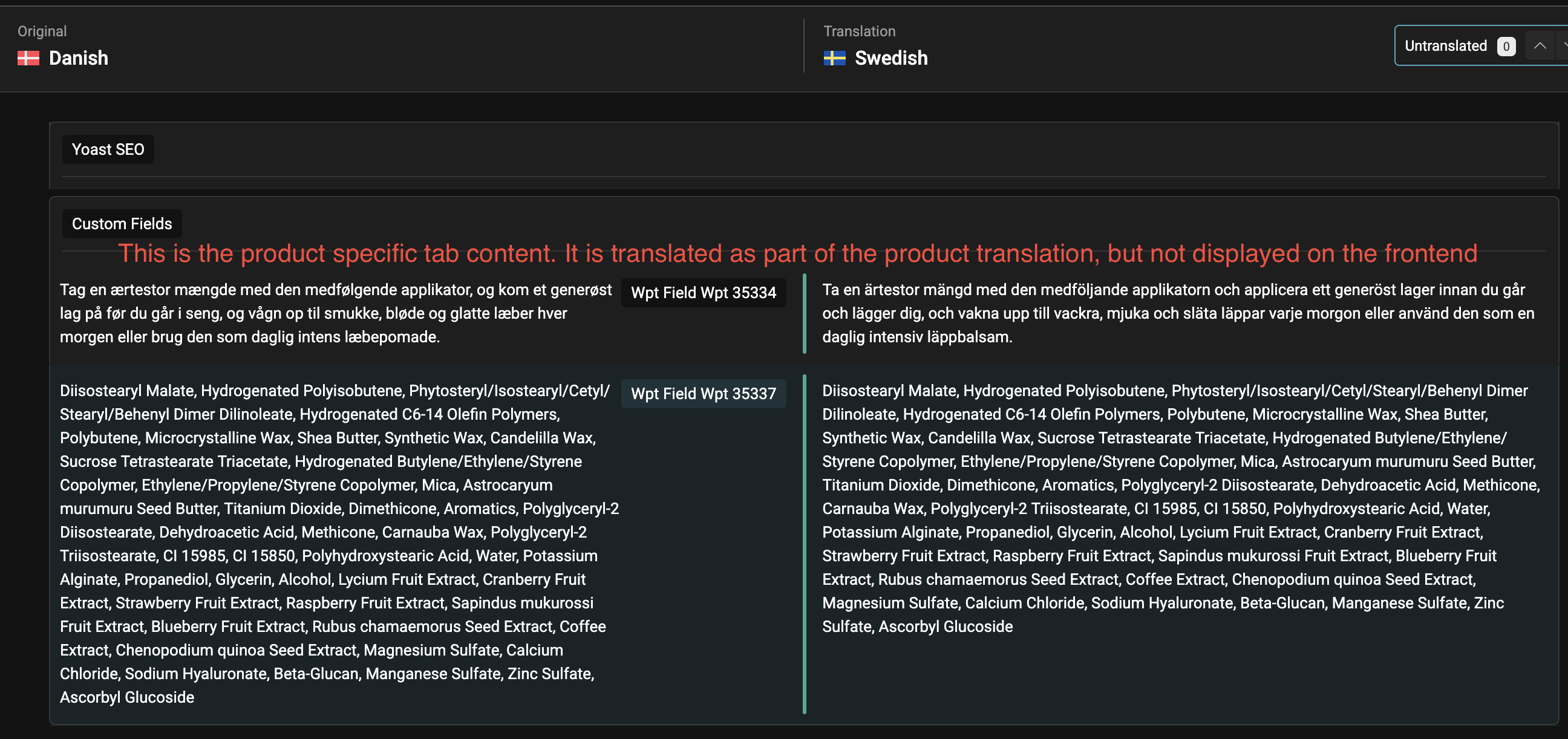 |
| January 27, 2026 at 3:44 pm #17768097 | |
|
Andrey WPML Supporter since 06/2013 Languages: English (English ) Russian (Русский ) Timezone: Europe/Kyiv (GMT+02:00) |
Hello Peter, Thank you for the explanation and the screenshots. From what I understand, the global tab content is not being overwritten in the translated product, even though it is set correctly on the product in the default language. This usually indicates that the information is stored in a custom field that is not being copied to the translation. Could you please try the following steps? |
| January 27, 2026 at 5:14 pm #17768428 | |
|
peterS-210 |
Hi Andrey I found these "custom fields" when I click "Show System Fields" on a product in the default language - please see screenshot. These are the two tab custom fields. As you can see there are four fields, two of them will probably control the override. So, are these the fields to adjust? If yes, please guide how to set the radio button for each field. Thank you /Peter  |
| January 27, 2026 at 7:29 pm #17768816 | |
|
Andrey WPML Supporter since 06/2013 Languages: English (English ) Russian (Русский ) Timezone: Europe/Kyiv (GMT+02:00) |
Hi Peter, Try two of them where it says "override". I also pointed out in the screenshot. And then, an important part :
 |
| January 28, 2026 at 8:16 am #17769620 | |
|
peterS-210 |
Hi Andrey I have followed your procedure, but I still don't see the product specific content on the frontend tabs. After doing the changes I tried translating a new product but I experienced the same issue - no product specific content in the tab. I have looked at the translated products and the override checkmark are still not set with the change from "Don't translate" to "Copy" I can see that the global tabs in the translated version have their own custom fields (_wpt_override_wpt-35344, _wpt_override_wpt-35346 and _wpt_field_wpt-35344 - _wpt_field_wpt-35346 is missing!!) It seems like there is no connection between the custom fields in the original version and the translated version. Please see attached screenshots for further description. BR Peter   |
| January 28, 2026 at 12:17 pm #17770397 | |
|
Andrey WPML Supporter since 06/2013 Languages: English (English ) Russian (Русский ) Timezone: Europe/Kyiv (GMT+02:00) |
Hello Peter, I need to request temporary access (wp-admin and FTP) to your site—preferably to a test site where the problem has been replicated if possible—in order to be of better help. When you log in to leave your next reply, you will find the needed fields below the comment area. The information you will enter is private, meaning only you and I can see and access it. Please give an example of such a product. |
| January 29, 2026 at 10:40 pm #17775313 | |
|
Andrey WPML Supporter since 06/2013 Languages: English (English ) Russian (Русский ) Timezone: Europe/Kyiv (GMT+02:00) |
Hello Peter, I’ve reviewed your website, and you’re absolutely right — there is no connection between the custom fields in the original product and its translated version. This leads me to believe that the fields may have been added separately rather than inherited during translation. Could you please clarify the steps you followed? For example, were the tabs added or modified after the products had already been translated? Also, would it be possible for me to create a test product on your live site to further check the issue? This would help me better understand the workflow. |
| January 30, 2026 at 7:52 am #17775975 | |
| peterS-210 |
Hi Andrey Honestly, I cannot remember if I created the tabs myself and then translated them with WPML OR if WPML created the tabs as part of a translation. I can remember I had a tab too much created by mistake which I then deleted. So the process has not been so clean. Would it be possible to delete the translated tabs completely (only in the SE version) and then let WPML translate them again and inherit setup/content from the original language (DK)? You can go ahead and create a test product, no problem. I have experienced that my stock is reduced 2-3 times when an order is processed. I can see I receive several woo messages on the order that stock has been reduced - in both the original language and the translated language (have a look at order #35591). I have tried to sync stock status using your 'Troubleshooting' tools and flushed WP Rocket and Redis cache afterwards but I am still seeing the problem. We have to adjust stock manually after processing every order, so a rather critical issue. I know it is probably not related to the issue regarding the tabs, but would it be possible for you to have a look at this also when you are logged into the system? Maybe it is because all the published products on the original language have not been translated yet? Can this cause some out of sync issues that can trigger several stock reductions? Thank you very much for your help 🙂 /Peter New threads created by Andrey and linked to this one are listed below: https://wpml.org/forums/topic/split-i-have-experienced-that-my-stock-is-reduced-2-3-times/ |
| January 31, 2026 at 12:25 pm #17780142 | |
|
Andrey WPML Supporter since 06/2013 Languages: English (English ) Russian (Русский ) Timezone: Europe/Kyiv (GMT+02:00) |
Hello Peter, I’ve investigated this further and have created a ticket for our compatibility team to review, as I was also able to reproduce the issue on my end. The Product Tabs are using different custom fields in the original product and in its translation. This is why the content appears in the Translation Editor, but does not display on the front end — the custom field IDs are different between the original and translated products. I’ll keep you updated here as soon as I have more information from the compatibility team. If this issue is blocking your work and you need to proceed in the meantime, you’ll need to make the adjustments directly in the WordPress editor for the translated product, rather than using the Translation Editor. Regarding the other issue, I’ve created a separate support ticket and will reply to you here: |
| January 31, 2026 at 12:44 pm #17780176 | |
|
peterS-210 |
Hi Andrey Thank you for the update. Looking forward for the feedback from your compatability team. I decided to buy the Barn2 plugin, because I thought it was fully WPML compatible. So if it turns out there is a compatability issue I have to use another plugin. Can you recommend other plugins providing extra tabs that are fully compatible with WMPL? Then I can have a look while we wait for your compatability team to provide feedback. I am planning launch of the second language shop mid Febuary, so I hope we can find a solution together soon 🙂 Thank you once again. /Peter |
| January 31, 2026 at 12:59 pm #17780200 | |
|
Andrey WPML Supporter since 06/2013 Languages: English (English ) Russian (Русский ) Timezone: Europe/Kyiv (GMT+02:00) |
The plugin is compatible. As far as I can see, in earlier versions (or in other versions), it was possible to adjust the slug of the Product Tabs custom fields so that the same fields were used in both the original product and its translations. However, somehow this is no longer possible in the version you’re currently using. Let’s wait for feedback from the compatibility team. I will keep the support ticket open 🙂 In the meantime, if you’d like to explore alternative options, you can check the list of WPML-compatible plugins here: You can also try searching on Google for the plugin name + WPML to see whether it’s confirmed as compatible. |
| February 2, 2026 at 5:27 pm #17784833 | |
|
Andrey WPML Supporter since 06/2013 Languages: English (English ) Russian (Русский ) Timezone: Europe/Kyiv (GMT+02:00) |
Hello Peter, I have some good news for you. You might remember that earlier I mentioned it was no longer possible to adjust the slug of the Product Tabs custom fields. Our compatibility team has now identified the cause: the option was simply hidden by CSS. Here’s what I did to confirm this: body.post-type-woo_product_tab #screen-meta-links {
display: block !important;
}
2. This made the “Screen Options” panel visible when editing a product tab. You can safely remove this CSS rule afterward if you don’t need it anymore. What you need to do next To ensure everything works correctly, make sure that the Tab ID (slug) is identical in all languages: Finally, as originally suggested: This way, the product and its translation will correctly share the same custom field setup. I’ve attached a screenshot where the slug is visible for reference.  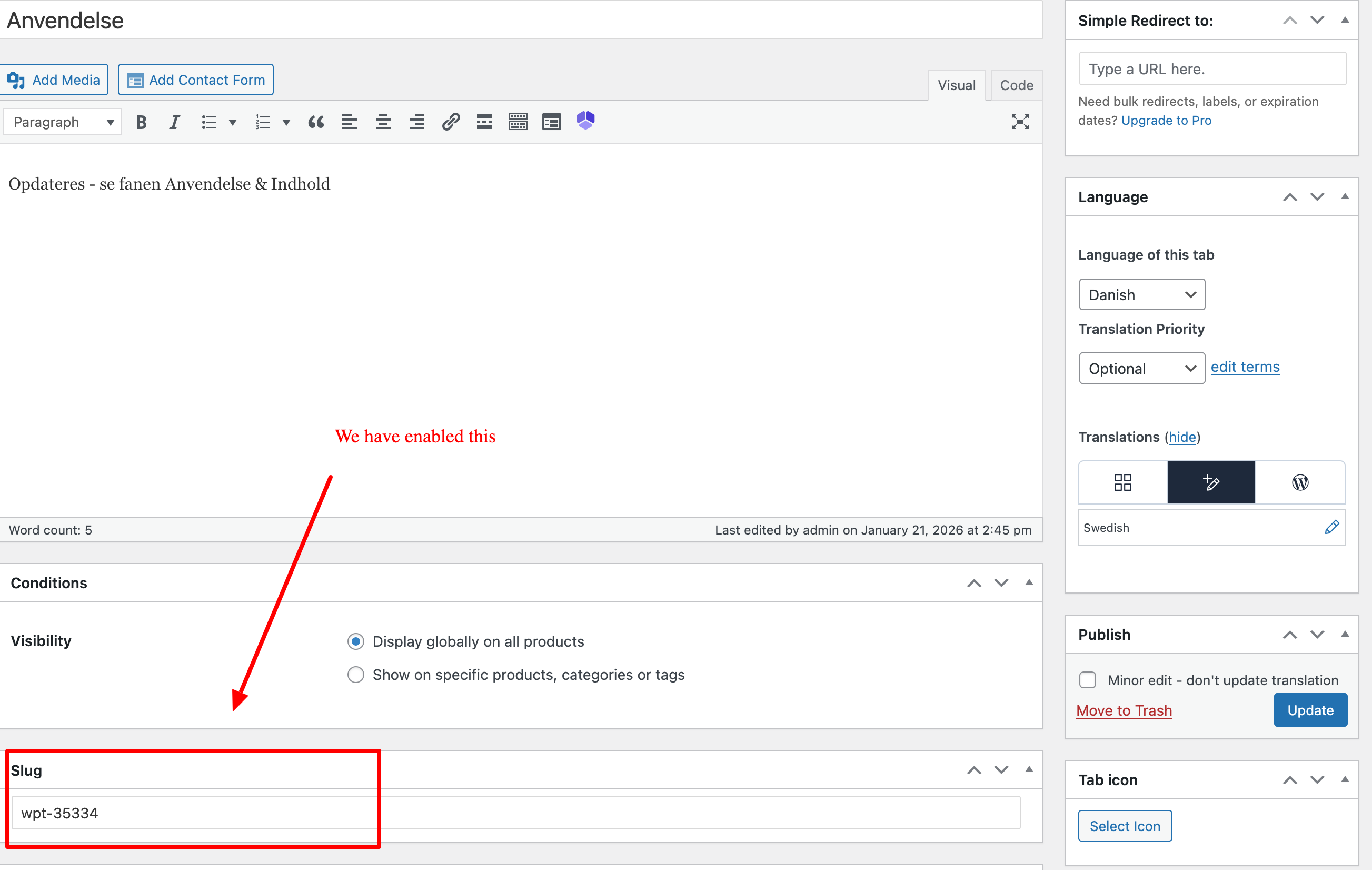 |
| February 2, 2026 at 6:31 pm #17785019 | |
|
peterS-210 |
Hi Andrey This is really good news 🙂 Some questions to your procedure, where you write "• Create new tabs and use the same title in Danish and Swedish (so the slug is generated identically)" - Does this mean I have to make new Tabs for the Danish products or only the Swedish? So maybe if you can detail this step a bit more for me, I would be really happy 🙂 It sounds like the most safe way is to create new tabs, so I will go for that solution. Thanks Andrey /Peter |