[Resolved] misalignment between the page and the translated interface
This thread is resolved. Here is a description of the problem and solution.
Problem: The client was experiencing issues with untranslated URLs and discrepancies between the translation interface and the actual page content. Additionally, there were concerns about numerous 'in progress' and 'finished, update necessary' statuses in the translation queue. Solution: 1. We advised the client to complete any pending translations directly on the page by accessing the category template and filling in the untranslated fields. 2. To address the clutter in the translation queue, we recommended removing unnecessary translation jobs via WPML > Translation Dashboard > Translation Jobs. This helps in managing only the required translations. 3. We clarified that the jobs marked as 'Automatic Translation' are those sent through the Translation Dashboard, whereas 'Manual Translation' involves directly translating content on the page. 4. For the jobs showing 'en cours' (in progress), if they are incomplete or empty, the client should remove them to clean up the queue.
If this solution does not resolve your issue or seems outdated, please check the related known issues and ensure you have the latest versions of themes and plugins installed. If problems persist, we highly recommend opening a new support ticket here.
This is the technical support forum for WPML - the multilingual WordPress plugin.
Everyone can read, but only WPML clients can post here. WPML team is replying on the forum 6 days per week, 22 hours per day.
- the URL seems not translated, where is the setting to make it translated directly by WPML ?
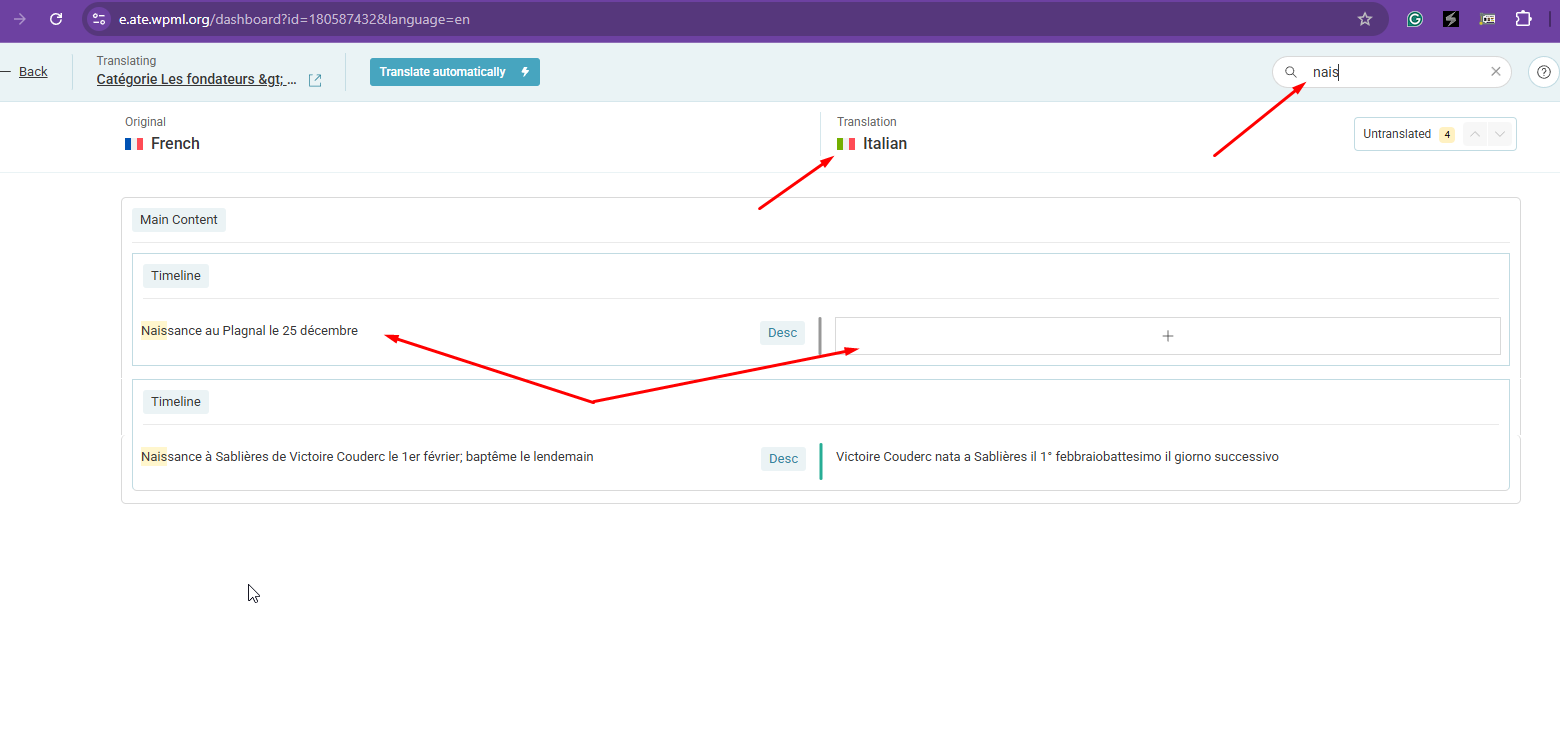
- part of the 8% not translated in the translation interface : the first timeline field "Naissance au Plagnal le 25 décembre" is blank in terme of translation ; however when i look at the front page, the field contains a translation : "Nascita a Le Plagnal". Is this the sign of a complete misalignement between the page and the translated interface since the french field doesn't match with the italian one ?
Thanks for your reply. I’ve checked your category template here hidden link , and I can see that the page hasn’t been fully translated, as shown in the attached screenshot.
Could you please complete the remaining translation and let me know how it goes?
On the production site, we have updated the italian translation this morning (because we had some H1/H2 title to set up on this page, and the interface requested us to validate all translation), now it is showing aligned beetwen the italian page and the translation interface.
I get back to the development site and the issue of misalignement between "Naissance au Plagnal le 25 décembre" and "Nascita a Le Plagnal" is not showing anymore :-/
Maybe linked to this issue, there is a lot of queueing jobs in this tab : hidden link >> are we supposed to treat them ?
See attachement, do you know how/why there are many "En cours" and "Finished, - update necessary" in the queue ? Are they automatic translated and is it required to open and validate each manually ?
Thanks for your reply. I don't think it's related. If you’ve already sent your pages or posts for translation, they’ll all appear in the translation queue. You can remove these translation jobs by going to WPML > Translation Dashboard > Translation Jobs.
After that, you can start fresh and send only the specific pages or posts that you actually need for translation.
Okay, if i understand correctly : any post or any article with URL to be "translated" by me were ending in the "translation queue".
But now if i use the "auto-generated" URL, it will be done automatically and not ending in the translation queue for that specific reason ?
Thanks for your reply. Yes, if you complete the translation, these jobs will not show up in the translation queue. Referring to the translation queue screenshot you shared, could you clarify whether you intentionally sent those pages/posts for translation, or if you’re unsure why they appeared in the queue?
Thanks for your help, in fact we juste discovered that the job queue was pending and waiting for our action. It is a surprise for us that some job were queued, most probably due to the "translate" option for the slug. It seems that when we validate the queuing jobs, the URL issue disappear :-/ Do you see other reason why some jobs were pending here ?
Thanks for your reply. I've checked and most of the translation jobs are from "Automatic Translation" as shown in the attached screenshot. It's completed, and if you make changes to the primary language, it will ask you to complete the translations of the pages you have translated.
Hello Kor,
Where can you see that the translations jobs are from "Automatic Translation" is it an information that i can see as weel in the screenshot or in the interface panel ?
Thanks Kor. Well i displayed an hidden colomn and could see the translation job source ; but they are all set as "Manual translation" and not "Automatic translation". Do you know where that "Manual translation job" come from ?
Ok Kor, i understand.
Can you help me clarify why there is so many "en cours" : are they manual translations which have been validated without filling-up all blank fields ?
Yes, it looks like you initiated the manual translations but didn’t complete them. That’s why they are still appearing in the list showing "en cours" (in progress)
If those jobs are empty and no translations were added, you can safely remove them.