Skip to content Skip to sidebar

This is the technical support forum for WPML - the multilingual WordPress plugin.

Everyone can read, but only WPML clients can post here. WPML team is replying on the forum 6 days per week, 22 hours per day.

Sun Mon Tue Wed Thu Fri Sat
- 10:00 – 17:00 10:00 – 17:00 10:00 – 17:00 10:00 – 17:00 10:00 – 17:00 -
- 18:00 – 19:00 18:00 – 19:00 18:00 – 19:00 18:00 – 19:00 18:00 – 19:00 -

Supporter timezone: Asia/Kathmandu (GMT+05:45)

This topic contains 12 replies, has 1 voice.

Last updated by Shekhar Bhandari 3 months, 3 weeks ago.

Assisted by: Shekhar Bhandari.

Author Posts
December 17, 2025 at 9:36 pm #17672907

gabrieleL-14

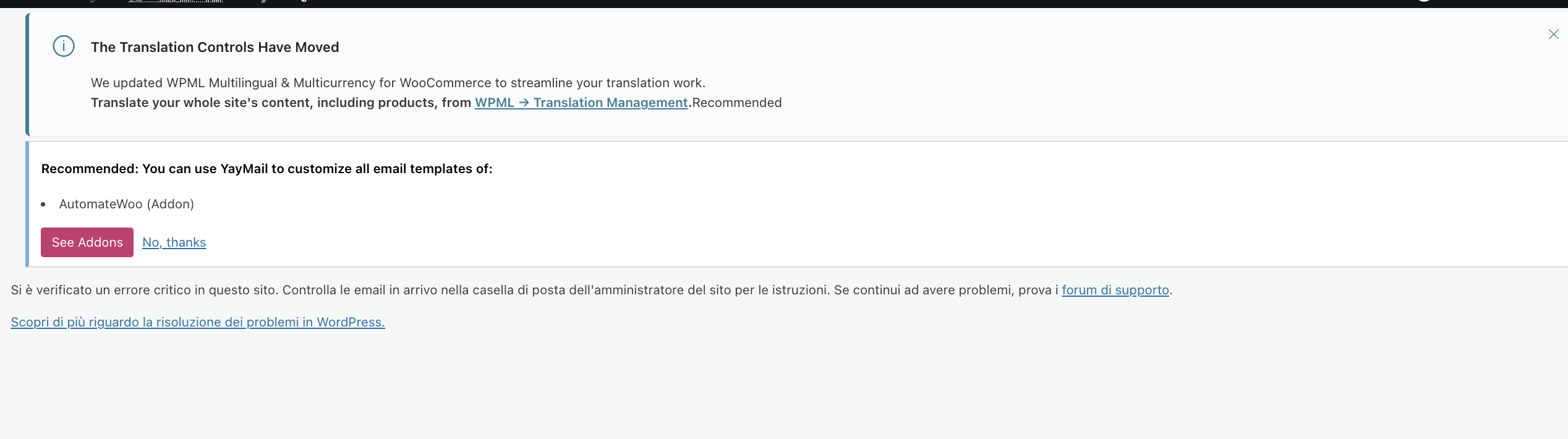
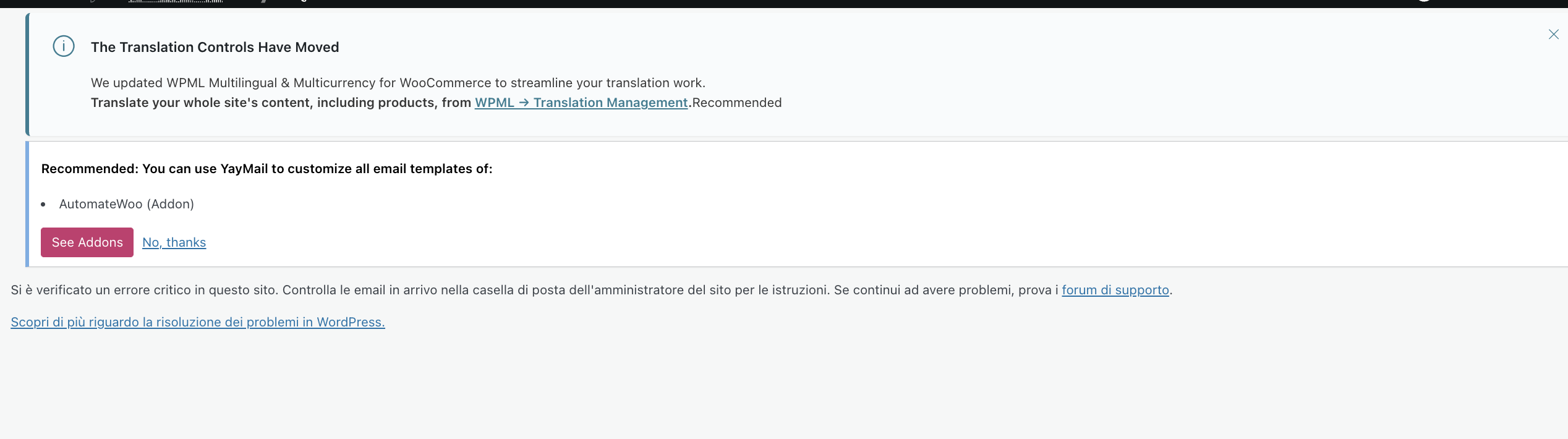
I have opened a new ticket because I cannot see my previous one, so I didn't know if my request was successful sent or not. So my problem is after I tried to update the internal links, the process got interrupted and got an error saying I had to refresh the page. After I did, I checked the WCML section under WooCommerce, went to Settings tab and got the error you see in the attachment. Could you please help me to understand and fix it? I ran the troubleshooting but nothing changed.
Can I be contacted as soon as possible?

December 17, 2025 at 9:42 pm #17672961

gabrieleL-14

Now I tell you wahat I tried. All the way to run the troubleshooting on WCML (setting tab) or WPML> Support> Troubleshooting, I always got the error you see on the attached file. I need human support to fix it.

Screenshot 2025-12-16 at 15.47.52.png
December 17, 2025 at 9:48 pm #17672977

gabrieleL-14

I can even provide the error I got for the logs:

PHP Fatal error: Uncaught ValueError: Unknown format specifier "p" in /srv/htdocs/wp-content/plugins/woocommerce-multilingual/inc/template-classes/multi-currency/class-wcml-multi-currency-ui.php:98 Stack trace: #0 /srv/htdocs/wp-content/plugins/woocommerce-multilingual/inc/template-classes/multi-currency/class-wcml-multi-currency-ui.php(98): sprintf('Mostra solo i p...', 'get_model() #2 /srv/htdocs/wp-content/plugins/woocommerce-multilingual/inc/template-classes/class-wcml-menus-wrap.php(97): WCML_Templates_Factory->get_view() #3 /srv/htdocs/wp-content/plugins/woocommerce-multilingual/inc/template-classes/class-wcml-menus-wrap.php(74): WCML_Menus_Wrap->get_current_menu_content('multi-currency') #4 /srv/htdocs/wp-content/plugins/woocommerce-multilingual/inc/template-classes/class-wcml-menus-wrap-base.php(24): WCML_Menus_Wrap->get_child_model() #5 /srv/htdocs/wp-content/plugins/woocommerce-multilingual/inc/template-classes/class-wcml-templates-factory.php(25): WCML_Menu_Wrap_Base->get_model() #6 /srv/htdocs/wp-content/plugins/sitepress-multilingual-cms/classes/templating/class-wpml-templates-factory.php(84): WCML_Templates_Factory->get_view(NULL, NULL) #7 /srv/htdocs/wp-content/plugins/woocommerce-multilingual/inc/admin-menus/class-wcml-admin-menus.php(147): WPML_Templates_Factory->show() #8 /wordpress/core/6.9/wp-includes/class-wp-hook.php(341): WCML_Admin_Menus::render_menus('') #9 /wordpress/core/6.9/wp-includes/class-wp-hook.php(365): WP_Hook->apply_filters('', Array) #10 /wordpress/core/6.9/wp-includes/plugin.php(522): WP_Hook->do_action(Array) #11 /wordpress/core/6.9/wp-admin/admin.php(264): do_action('woocommerce_pag...') #12 {main} thrown in /srv/htdocs/wp-content/plugins/woocommerce-multilingual/inc/template-classes/multi-currency/class-wcml-multi-currency-ui.php on line 98

December 18, 2025 at 3:22 pm #17675371

Shekhar Bhandari
WPML Supporter since 03/2015

Languages: English (English )

Timezone: Asia/Kathmandu (GMT+05:45)

Hello there,

Thank you for contacting WPML support. I'd be happy to assist you on this issue.

Can you please go to WPML->String Translations and search for Show only products with %1$scustom prices%2$s in secondary currencies and delete the translations for it to see if it helps?

If the above doesn't help, To debug this issue further, I would need to check your site settings once, for this I would need temporary access (wp-admin and ftp) to your site.

So could you please provide me with those details, you will find the needed fields for this below the comment area when you log in to leave your next reply.
hidden link

This info is private and available to you and WPML supporters only.
Read more about this: https://wpml.org/purchase/support-policy/privacy-and-security-when-providing-debug-information-for-support/

Note:
Backup your sites before providing the credentials or if possible provide credentials for the test site

Look forward to your reply.

Thanks

December 18, 2025 at 10:07 pm #17676285

gabrieleL-14

Sorry but I never got access to the ftp server, I use wordpress only. So I can give you access if you send me an email. I can create your account to my staging website. So you can understand the problem

December 21, 2025 at 1:36 pm #17680584

gabrieleL-14

Sorry but any updates? do you have found the solution to fix it?

December 22, 2025 at 4:27 am #17680952

Shekhar Bhandari
WPML Supporter since 03/2015

Languages: English (English )

Timezone: Asia/Kathmandu (GMT+05:45)

Hello there,

I went here: hidden link and I couldn't see any issue? Can you please check once?

Look forward to your reply.

Thanks

December 23, 2025 at 7:38 am #17683939

gabrieleL-14

Here : hidden link

I said the error shows on tab "settings" after you go to WooCommerce>WCML>

December 23, 2025 at 7:41 am #17683940

Shekhar Bhandari
WPML Supporter since 03/2015

Languages: English (English )

Timezone: Asia/Kathmandu (GMT+05:45)

The provided url also works without any issues for me, can you try from a separate browser?

WCML-‹-Levantesi-Store-Ufficiale-—-WordPress-12-23-2025_01_25_PM.jpg
December 23, 2025 at 10:43 am #17684293

gabrieleL-14

Hi,
yeah i still see the problem, I tried Brave, Firefox, Safari on my mac. I even tried a new pc and I still see that error when I go to WCML> Tab Settings. I don't understand why? I cleaned the cache and everything.

I don't understand, WordPress support told me that from their side everything was ok.

so do you cannot do anything as well?

December 23, 2025 at 12:30 pm #17684532

Shekhar Bhandari
WPML Supporter since 03/2015

Languages: English (English )

Timezone: Asia/Kathmandu (GMT+05:45)

Hello there,

Yes, since it's not reproduced for me, it's hard to me to help further.

Can you try creating a new user and see if the login from that users help?

Thanks

December 23, 2025 at 1:29 pm #17684817

gabrieleL-14

Yeah I think its related with my administrator account, so how i can fix it?

December 24, 2025 at 4:27 am #17685901

Shekhar Bhandari
WPML Supporter since 03/2015

Languages: English (English )

Timezone: Asia/Kathmandu (GMT+05:45)

Hello there,

Can you provide me the same details for your admin account on the next private reply so I can test this further?

Look forward to your reply.

Thanks

The topic ‘[Closed] URGENT PROBLEM WITH WCML settings tab’ is closed to new replies.