Thanks for testing. Since the issue happens only with this new product, it seems specific to its setup rather than a general WPML or Product Bundles issue.
Could you please:
1. Compare the new product settings with a bundled product that works correctly.
2. Check for any unusual variations, attributes, or custom fields that might prevent the bundle from being copied.
If the issue persists, it might be easiest to recreate the product with the same settings and bundle, which usually fixes glitches like this.
not only it's weird that it does not copy bundled product to a translation, but when I manually add a bundled product, then hit publish, it disappears.
also, how can I enable email notifictions for your replies?
Thanks for confirming. Since the settings are the same and the bundle still disappears even when added manually, this points to a product specific data issue or a conflict affecting that item.
To investigate further, could you please try the following steps to isolate the cause of the issue:
1. Take a backup of your site first for safety reasons.
2. Deactivate all plugins except WooCommerce, Product Bundles, WPML, and its add-ons.
3. Switch to the default WP theme like 2025.
4. If the issue is gone, start reactivating the other plugins one by one to find which one might be causing a conflict.
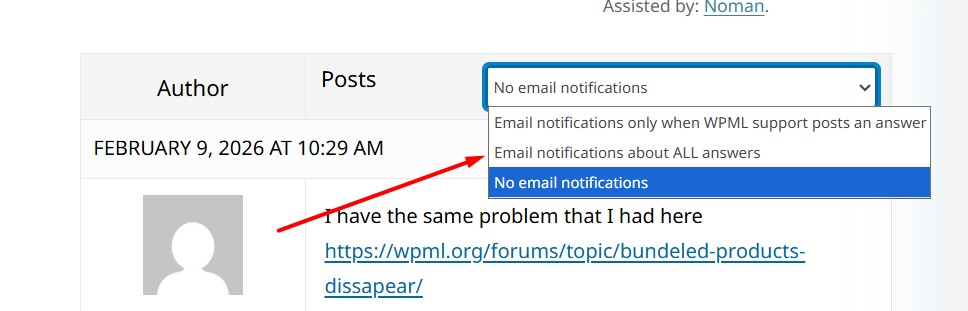
Regarding email notifications, on the forum page please make sure you are logged in and choose “Email notifications about ALL answers”, as shown in the attached screenshot.
If you still don’t receive emails, please also check your spam folder.
Kindly let me know the results,
Thank you for your cooperation and patience
Sorry for the wait, was finally able to clone the site.
So I switched to default theme and disabled all the plugins. I only left Woocommerce, product bundles and wpml enabled.
The problem remains, the bundle still does not copy over to translation. Also if I add the bundle to croatian language manually, it goes missing as soon as I hit an update button.
Thanks for trying it. Could you follow the below steps and let me know how it goes:
1. Take a backup of your site first for safety reasons.
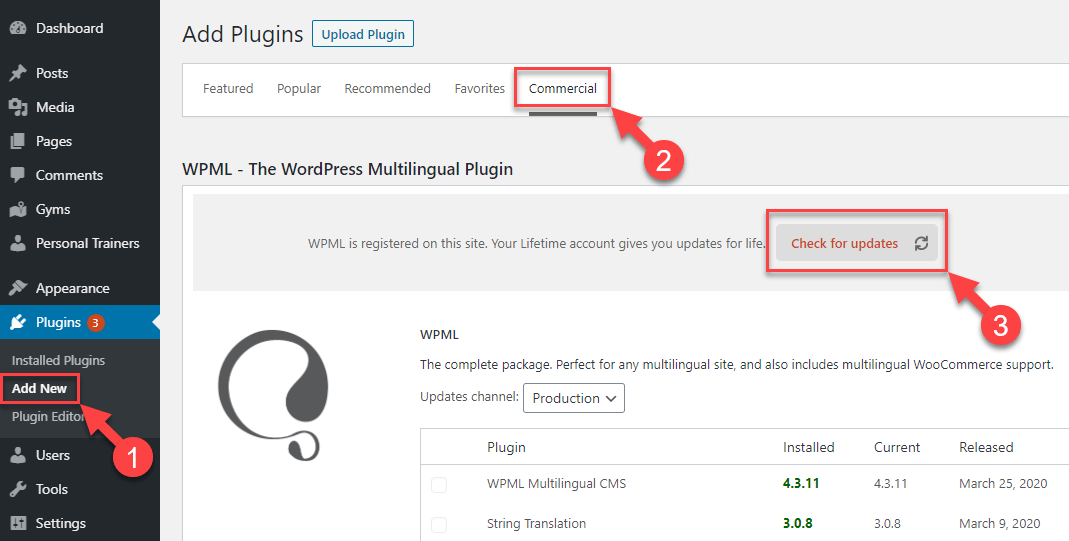
2. We have recently released WPML 4.9.0, please update it to the latest version. You can update it from Plugins >> Add New, click the Commercial tab, and then click the “Check for updates” button. Here is the screenshot for more details: https://wpml.org/wp-content/uploads/2020/04/wpml-force-plugin-update-1.png
3. Please update WooCommerce and WPML Multilingual & Multicurrency for WooCommerce plugins to the latest version and see if this resolves the issue. .
If the issue still persists, could you please:
1. Send a short screencast video showing the exact steps you take when the problem occurs? You may use Loom or any similar tool, here’s the link if needed: hidden link
2. Share the problematic product link where the issue can be seen.
3. To take a closer look at this issue, please provide temporary access (WP-Admin and FTP Login info) to your site (preferably staging site), so that I can look into your setup and debug the issue.
Your next answer will be private, meaning only you and I can access it.
=== Please backup your database and website ===
✙ I would need your permission to deactivate and reactivate Plugins and the Theme and to change configurations on the site. This is also a reason the backup is essential.