[Resolved] Woocommerce products sorting not working in translated site
This thread is resolved. Here is a description of the problem and solution.
Problem: If you're experiencing issues with WooCommerce product sorting on your multilingual site, such as products only loading in the order of creation or missing 'default' sorting options in the German version, the problem might be related to WPML String Translation settings. Solution: First, check if the 'Default sorting' string is available and correctly translated in WPML → String Translation. This string might be under the domains
woocommerce_product_catalog_sorting
or
theme_mods_woodmart
. If it's not registered, you may need to manually scan or register it for translation. Detailed steps can be found here: Registering strings for translation. Additionally, ensure that the setting value for 'woocommerce_default_catalog_orderby' in WPML > String Translation is not incorrectly translated. It should remain as 'menu_order' and not be translated to another value like 'Beliebtheit' in German. If it is, delete the incorrect translation.
If these steps do not resolve your issue or if the solution seems outdated or irrelevant to your specific case, we highly recommend checking related known issues at WPML known issues, verifying the version of the permanent fix, and confirming that you have installed the latest versions of themes and plugins. If problems persist, please open a new support ticket.
This is the technical support forum for WPML - the multilingual WordPress plugin.
Everyone can read, but only WPML clients can post here. WPML team is replying on the forum 6 days per week, 22 hours per day.
Background of the issue:
I want my WooCommerce products sorting to work in the archive/catalog pages, like sort by latest, default sorting, by popularity, etc. I also set up menu order value on certain products (0-10). The issue can be seen here: hidden link.
Symptoms:
Sorting does not work in the German version of the site: the products only load in the order of creation (oldest to newest). Only when clicking on the sorting option does it change, but it does not behave the same when it loads. The 'default' sorting option does not even appear as an option in the sorting list and is also nowhere to be found in string translation.
Questions:
Why does the product sorting not work in the translated German version of the site?
Why is the 'default' sorting option missing from the sorting list and string translation?
No I am actually referring to the native Woocommerce sorting. I have attached more screenshots again please check it.
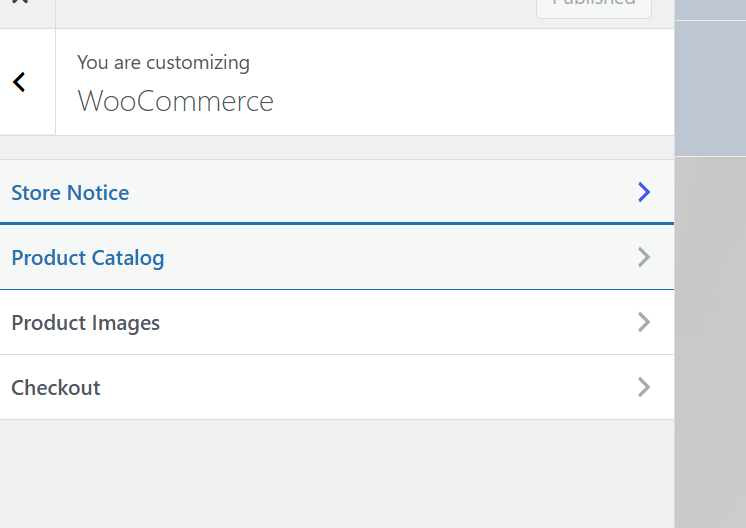
In Appearance > Customize
In Woocommerce you can customize the order how products appear on archive/catalog pages.
I believe a Woodmart option like you describe does not exist. There is only an option for "review" sorting when I search the theme options. I know that Woodmart takes the sorting from native Woocommerce settings.
I did try do look for the strings like in the tutorial you linked but could not find anything.
I have also tested this on my staging site with WPML+Woocommerce and storefront theme (everything else deactivated) and the issue persists.
Any help would be appreciated as I need to show the German-facing customers newest products not just oldest ones.
Languages: English (English )Spanish (Español )German (Deutsch )
Timezone: America/Lima (GMT-05:00)
Hello,
I would like to offer to take a closer look and request temporary access (wp-admin and FTP) to the website to investigate the issue further.
The required fields are located below the comments section when you log in to leave the next reply. The information you provide is private, meaning only you and I can see and access it.
IMPORTANT
Please be sure to back up your website and database before granting us access.
If you can't see the "wp-admin / FTP" fields, your post and website credentials will be set to "PUBLIC." DO NOT publish the data unless you see the required wp-admin / FTP fields.
The private reply form looks like this: hidden link
Click "I still need assistance" the next time you reply.
Video: hidden link
Please note that we are required to request this information individually on each ticket. We are not permitted to access any credentials that were not specifically submitted on this ticket using the private response form.
Languages: English (English )Spanish (Español )German (Deutsch )
Timezone: America/Lima (GMT-05:00)
Additionally:
I see the "Default sorting" option is missing on the German shop.
The “Default sorting” label is coming from the Customizer, especially under Appearance → Customize → WooCommerce → Product Catalog, then it’s likely stored as a theme or WooCommerce setting, and must be translated via WPML → String Translation.
Possible string domains or names:
woocommerce_product_catalog_sorting
theme_mods_woodmart
Likely causes:
- The “Default sorting” string may not be registered for translation, especially if the theme or WooCommerce doesn’t expose it via gettext.
- WPML’s String Translation may not detect it unless manually scanned or registered.
Hello Andreas,
Can you try to log in via the frontend? I can't edit my previous private message to update the link :/
It's the same url but with: /my-account/
I could not find the strings for the sorting methods
Languages: English (English )Spanish (Español )German (Deutsch )
Timezone: America/Lima (GMT-05:00)
The problem disappears once I disable WPML String Translation, which means the issue seems to be with one of the translated strings at WPML > String Translation.
Die ist kein Text, sondern ein Einstellungswert, der nicht übersetzt werden sollte. Er wurde aber zu "Beliebtheit" auf Deutsch übersetzt, was nicht zulässig ist.
Ich habe den String gelöscht und das Problem ist damit behoben.