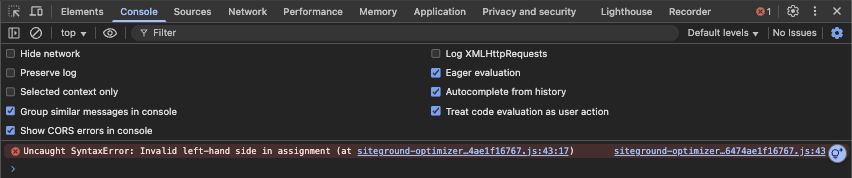
I have a question about WPML compatibility with SiteGround‘s Speed optimizer‘s feature called "Combine JavaScript Files".
So I use WPML and have translated my homepage to German, but there are some problems on the German version:
1.No background images
2.The language switcher doesn‘t show english option
You can check it out here: hidden link
I have SiteGround‘s "Speed Optimizer" plug-in activated. When I disable the plug-in, the German version of the homepage works fine. And when I enable the plug-in back on, it stops working.
Good, so now I know the plug-in is the problem, so I went to the next step and that is to disable every setting of the plugin separately to see which one affects the German homepage.
After testing, I found that the following settings breaks the German homepage:
"Combine JavaScript Files
(Combine multiple JavaScript files into one to lower the number of requests your site generates.)"
But it only affects the German version of the homepage, now I‘m not a professional, but I guess this "Combine JavaScript Files" makes my website faster so I don‘t want to disable it.
And this only happens on the homepage, on other pages the German version works well.
I have contacted SiteGround support to ask them about this and they said the following:
"The combine JS feature breaking the page would indicate that the WPML plugin is executing a script or making an action that does not work with the combination of JS files. The plugin is designed to work for our hosting environment and certain features may not be compatible with 3rd party plugins based on their setup. A developer could review the code in the WPML plugin to indicate what is causing it to conflict with the JS combination. Checking with WPML support can be helpful as the feature conflicts after the 3rd party plugin translates the page. Meaning in the process of translation there is a conflict that occurs."
Do you have any idea on why that is and could it be fixed?
I would need to look closely at your site, so I would need to request temporary access (WP-Admin and FTP) Preferably to a test site where the problem has been replicated.
Your answer will be private, meaning only you and I can access it.
❌ Please back up your database and website ❌
✙ I need your permission to deactivate and reactivate the plugins and themes and change site configurations. This is also why the backup is critical.
✙ I also need your permission to take a local copy of your site to debug the issue without affecting your live site.
Hello, I am George from second tier support.
My colleague here asked me to respond to your subsequent question.
The problem - at least as I see it - was with the concatenation and minification of inline scripts (in the page contents and not separate files)
The other scripts (which are separate files) will still be minified and concatenated (depends on whether or not you have enabled those settings of course) and the functionality should not be impacted in any other way.
I followed the SiteGround documentation over here: hidden link where they explain that the inline JavaScripts can be excluded in this way.
The plugin does not offer a graphical way of doing this for the scripts added to the contents.
For more information, perhaps you should consult with SiteGround about the inner workings of this code.