This thread is resolved. Here is a description of the problem and solution.
Problem: The client is experiencing issues with the search functionality on their multilingual website using WPML. Specifically, search results are displayed correctly in the default language (NL), but no results are found in other languages (e.g., EN). Disabling the WPML String Translation plugin temporarily resolves the issue, indicating a potential compatibility problem with the theme or incorrect URL parameters being added. Solution: 1. Verify that the theme is updated to the latest version. 2. Check if the URL parameters are being translated by WPML String Translation and adjust if necessary. 3. Test the search functionality in a minimal environment to rule out conflicts with other plugins or database issues. 4. If the issue persists, consult the theme support for potential known issues or fixes. 5. Review the WPML errata documentation for any related known issues: https://wpml.org/errata/wpresidence-no-results-found-in-advanced-search/
If this solution does not resolve the issue or seems irrelevant due to being outdated or not applicable to your case, we highly recommend opening a new support ticket. Also, ensure you have the latest versions of themes and plugins installed. For further assistance, please visit our support forum: WPML Support Forum
This is the technical support forum for WPML - the multilingual WordPress plugin.
Everyone can read, but only WPML clients can post here. WPML team is replying on the forum 6 days per week, 22 hours per day.
Background of the issue:
We are encountering problems with the search bar. We are using WPML. On the default language (NL) the search results are shown. On a translated page (for example EN) there are no results found. On homepage hidden link we go to the search block in the header. At "project name" we enter "palo" en then we click on "Search properties", the following page shown: hidden link. This shows the correct results. When we go to EN website hidden link and do the same (at "project name" we enter "palo" en then we click on "Search properties") we get "No results found", see: hidden link. Link to a page where the issue can be seen: hidden link. When we disable "WPML String Translation", the search results shown correctly, please see our test environment: hidden link.
Symptoms:
On the default language (NL) the search results are shown. On a translated page (for example EN) there are no results found. When we disable "WPML String Translation", the search results shown correctly.
Questions:
Why are search results not shown on the translated page (EN) when using WPML String Translation?
How can we fix the issue so that search results appear correctly on the translated page?
Unfortunately I cannot send updates to a specific email, but if they have a wpml account they can follow this thread.
When using the search function, there are parameters added in the URL as seen here:
hidden link
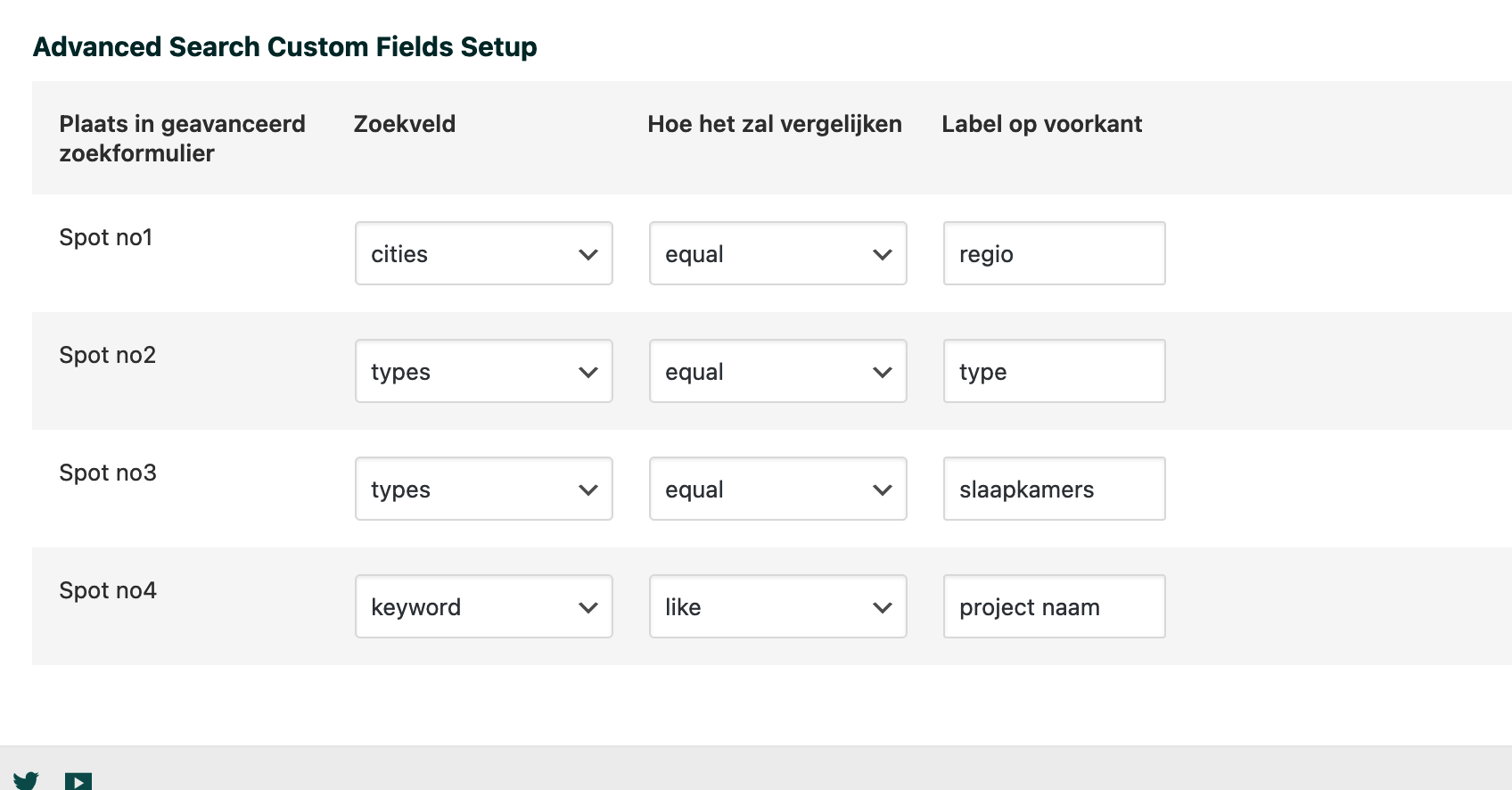
slaapkamers, naam, budget
These parameters most likely are being translated and that causes the search not to work when WPML ST is activated.
Is there somewhere in the backend that you can edit these parameters? This will help me find which string they are coming from as there are many strings with these names.
Because we don't have a valid license on the test environment, not all theme settings are shown. I can give you access to the live environment so you can see how these fields are specified.
I've attached an image, please see how these fields are specified.
To further debug this I'd like to test in a minimal environment to ensure it's not caused by something 'stuck' in the database or a third-party plugin as we don't have any known reported issues from your theme developers and WPML.
I created a sandbox for us here: hidden link
Please use the link above to access it and add a search function to the homepage similar to the one you are using on the live site. I have attempted to reproduce it but I might be doing something wrong.
Hello, we already set-up an sandbox, please see: hidden link.
Your colleague created this sandbox. We can't use the options of the theme because we do not have a valid license for sandbox. Like we already said earlier.
If you like, the theme developer can set-up a test license on the sandbox. Do you have a actual sendbox for me? Or don't you need a (new) sandbox for now?
We have been in communication with the theme author regarding this issue and he provided us with a license on the sandbox.
To get proper help on this issue we will need to ensure the Theme Options are copied onto the sandbox from the live site.
At the moment in your staging site I cannot access the theme options to review them and copy them on the sandbox, if possible, please access the sandbox and configure/copy the theme options from your site onto our sandbox for our team and the theme author to further help debug this issue.
I am not 100% positive the import of the theme options worked as I am not able to reproduce the issue.
1. Go to hidden link
2. Search for 'Palo' in project name
3. You will see a property named Palo populated
4. Switch languages to EN and it will work OK there as well (EN is the default language)
Please use this link to login to the sandbox environment and verify that the theme options are set up as they should be based on your live/staging environment where the issue is present.
hidden link
You should be able to access it now without an err 504.