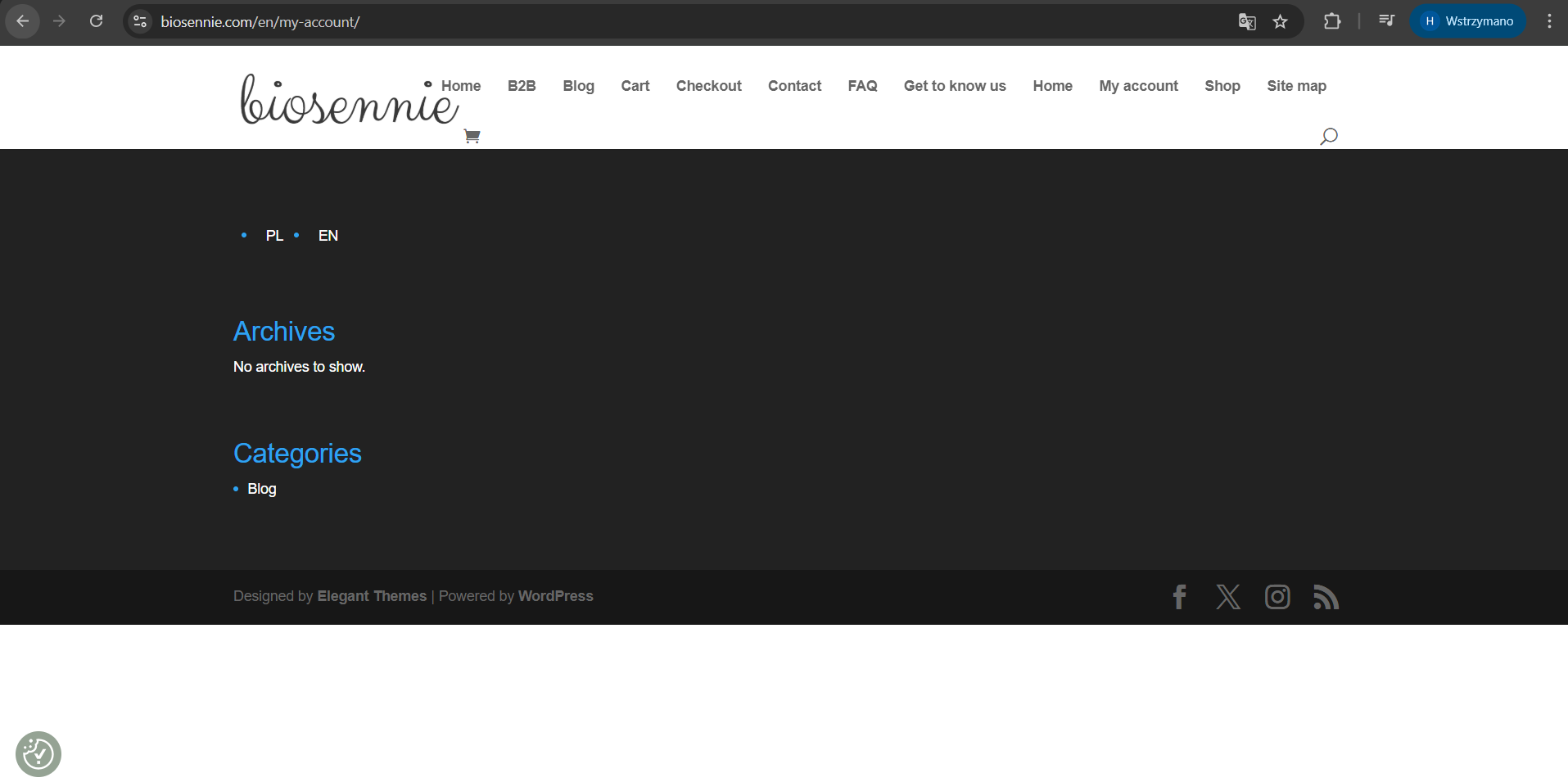
Following the recent WPML update, the integration with Divi is completely broken on translated pages.
Symptoms:
1. No Content: The translated pages do not pull any content from the Divi Builder. They appear empty or show only the raw default theme container.
2. Template Failure: Theme Builder layouts (Global Header/Footer) are ignored, and the site falls back to the default WordPress theme (e.g., loading the standard WP menu and basic "index.php" styling).
3. No Shortcode Execution: It appears that Divi's shortcodes are not being parsed on translated URLs, even though the content is visible in the backend editor.
You can compare: hidden link vs hidden link [WPML]
Thanks for your reply. I will require temporary access (WP-Admin and FTP) to a test site where the problem has been replicated, if possible. This will enable me to provide better assistance and determine if any configurations need to be modified.
Please note that it is important to have a backup for security purposes and to prevent any potential data loss. You can use the UpdraftPlus plugin (https://wordpress.org/plugins/updraftplus/) to fulfill your backup requirements.
Your upcoming reply will be treated with confidentiality and will only be visible to you and me.
✙ To resolve the issue, I may need your consent to deactivate and reactivate plugins and the theme, as well as make configuration changes on the site if necessary. This emphasizes the significance of having a backup.
2. Template Failure: Theme Builder layouts (Global Header/Footer) are ignored, and the site falls back to the default WordPress theme (e.g., loading the standard WP menu and basic "index.php" styling). The footer and header templates can be viewed here. Could you tell me where the footer and header template is designed? hidden link hidden link;
3. No Shortcode Execution: It appears that Divi's shortcodes are not being parsed on translated URLs, even though the content is visible in the backend editor. Could you share an example with me? I'd like to check this out to see if this is a known issue.
1. No, I don't. I didn't use canvas to build my templates.
2. I have all my layouts here: hidden link
3. Look at shop: hidden link
There is nothing onsite.
I checked your site and confirmed that the pages are built using the Divi Canvas page builder, which isn’t currently compatible with our translation editor. Because of that, automatic/advanced translation won’t work reliably for these pages.
As a workaround, you can switch to manual translation instead. I’ve already applied this approach to your Shop page here: hidden link
You should now be able to adjust the English version by editing the English page directly in WordPress (just like a normal page).
Could you please check on your side and confirm if you’re able to edit and update the English Shop page as expected?
Hello,
I am sorry, I think that is missunderstanding.
We waited several months for WMPL to be adapted to Divi 5. We were informed that the fix had been implemented. Now I am receiving information that some elements are still not supported. I don't know about canvas, I don't know how to disable it. I built my layouts without it.
I'm uploading a screenshot. Do you think this page is displaying correctly? In my opinion, no. Some menus are duplicated. It's loading incorrectly from who knows where. Categories that are submenus are appearing .The same errors still appear in other sections that are automatically generated by the theme builder. How can I edit all of this? This is not a solution to the problem.
Thanks for your patience. Please allow me to escalate this to our 2nd Tier Support for further assistance. I will come back to you as soon as I've feedback.
Thanks for your patience. While preparing a report for our 2nd Tier Support, I spent some time troubleshooting it. I found out that if I configure the "et_theme_builder" to "Not Translate" in WPML > Settings > Post Type Translation, it will force DIVI to use the templates from Polish and display them on the English language page.
Now, it looks like the templates are displaying correctly in the translated English language. Could you recheck and let me know how it goes? Once you confirm that it's fixed, we'll check on the string translation for the footer widgets.
Hello Kor,
Thank you very much. It finally works better.
There are some problems:
1. Footer:
Where finally should I translate it? In my tanrslation pannel I have: Divi layouts, divi templates, Divi footer, Div header, divi body. I don't know where I should find it?
2. Header
Still there is liitle different than polish version. There is no Shop page and categories are developed. It should be in dropdown.
New threads created by Kor and linked to this one are listed below: