Could you please provide a bit more detail about what exactly happens when you try to open the Advanced Editor?
• Do you see any error message? If yes, what does it say?
• Does the page load partially or not at all?
• If possible, could you share a screenshot or a short video of the issue?
This will help us better understand what’s going wrong and investigate it further.
When I click on the crayon to edit the translation of the page, instead of bringing me to the advanced editor, now I'm getting a code ''WPML tried to translate this page three times and failed. To get it fixed, contact WPML support'' at the top of the page.
I'm getting this code since I tried the instructions sent by you collegue. He said:
Did you recently migrate your site using the All-in-One WP Migration plugin? If so, you might be encountering a known issue.
Thanks for the additional details — that really helps.
I’ve checked your setup and can confirm that the site migration looks correct and the site key is properly assigned, so the issue is not related to that.
From what you’re describing, this is most likely related to the translation jobs themselves, so I’ll now review those on my side.
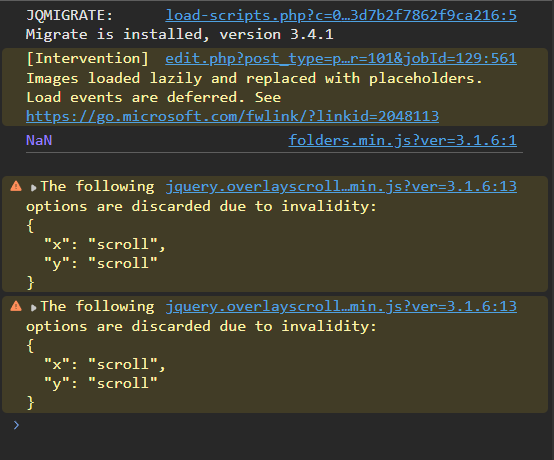
In the meantime, could you please check if you see any errors in the browser console?
• Open the page
• Right-click → Inspect → Console tab
• Try clicking the crayon again
If you see any errors (especially failed requests or red messages), a screenshot would be very helpful.
This will help us narrow down the root cause faster.
I’ll continue investigating from my side and keep you updated.
I’ve checked this from our side and I don’t see any failed requests or activity related to this job — in fact, there are no requests reaching ATE when you click the crayon.
To investigate this further, could you please share a HAR file from your browser?
You can record it by:
• Opening DevTools → Network tab
• Enabling recording
• Clicking the crayon
• Then exporting the HAR file
This may help us identify what’s happening during the request flow.
In parallel, I’m also escalating this internally so we can investigate it from the WPML side as well.
Hi,
My name is Eduard and I will help to check for the issues.
Can we get access to the site where we can check out for the problem? We need to check the database state. I will set up next reply for you as private, so you can share the credentials safely. You can remove them once we will be done with the investigation.
Update
Thanks for sharing. There are 2 problems:
1) Some pages had EN default language and not FR(site default one). Probably they got broken during site migration. Because of that editor could not be opened. I fixed the pages and now all have correct default language. Homepage in French is fixed and opened correctly.
2) There is another issue with WPML+GreenShift integration. When page translation is saved(like homepage in EN) some CSS blocks are rewritten with wrong values. I prepare a small plugin to fix a problem. I will test it out and update about the results today ASAP.
1) We normally never have issue with this. It does happend that we create some pages originally in french and others in english. It is essential for this client that the pages are orginally in english and THEN we translate them to FR, even though the site's primary language is french. You said you fixed it, but now it's the EN home page that appears broken, and we still can't open the advanced editor. If I click on the crayon from the english page, it brings to the wordpress editor, and same if I click on the crayon from the french page....
2) We we aware of that issue and we had found a workaround. When saving 2 times the translation in the advanced editor, the visual bug was fixed. But it's indeed better to fix this with a code snippet.