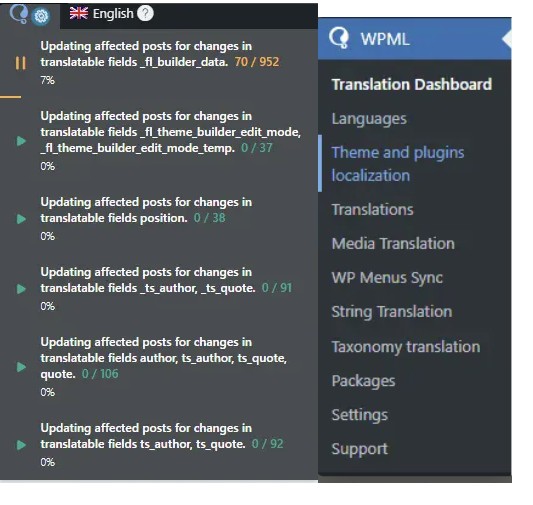
Background of the issue:
I am trying to resolve an issue with WPML where the translation update for _fl_builder_data is being impacted by database table fragmentation. The tables wp_icl_translate and wp_icl_translation_status have grown significantly and need optimization. I have completed all safe optimization steps, but the process is still stalled.
Symptoms:
The process is stuck at 7% for a long time due to database table fragmentation impacting WPML's performance.
Questions:
How can I safely rebuild the affected tables to restore full translation functionality?
Should I escalate this issue to WPML support or my hosting provider?
To ensure the quickest and most accurate support, please provide your debug information so I can look at some of your configurations. We have an excellent article on how to locate it here: https://wpml.org/faq/provide-debug-information-faster-support/.
So, please follow these steps:
❌ Please make a full website backup before proceeding ❌
- Update WPML core/add-ons to latest
- Go to WPML → Support → Troubleshooting and run: “Clear the cache in WPML”, “Remove ghost entries…”, “Fix element_type collation”, and related sync tools; then use Database Tables Optimization if the section appears for your site. (maybe you already tried this, if you updated WPML, do it again)
- If tables remain bloated, follow the Errata cleanup: install the temporary “Delete jobs” helper, delete old translation jobs in batches (increase batch size cautiously if needed), then click Optimize _icl_translation_status in the helper. Remove the helper when done.
- For Beaver Builder content, ensure _fl_* fields (including _fl_builder_data) are set to Copy under WPML → Settings → Custom Fields Translation, then re-save one affected page to regenerate translation packages.
Best Regards,
Otto
The topic ‘[Closed] stuck at 7% for a long time’ is closed to new replies.