Background of the issue:
I am trying to resolve an issue with the WooCommerce checkout page on my website when using the secondary language (English). I contacted WooCommerce first, but they directed me to WPML. The issue can be seen on the checkout page: hidden link. I have a staging environment available for further testing if needed.
Symptoms:
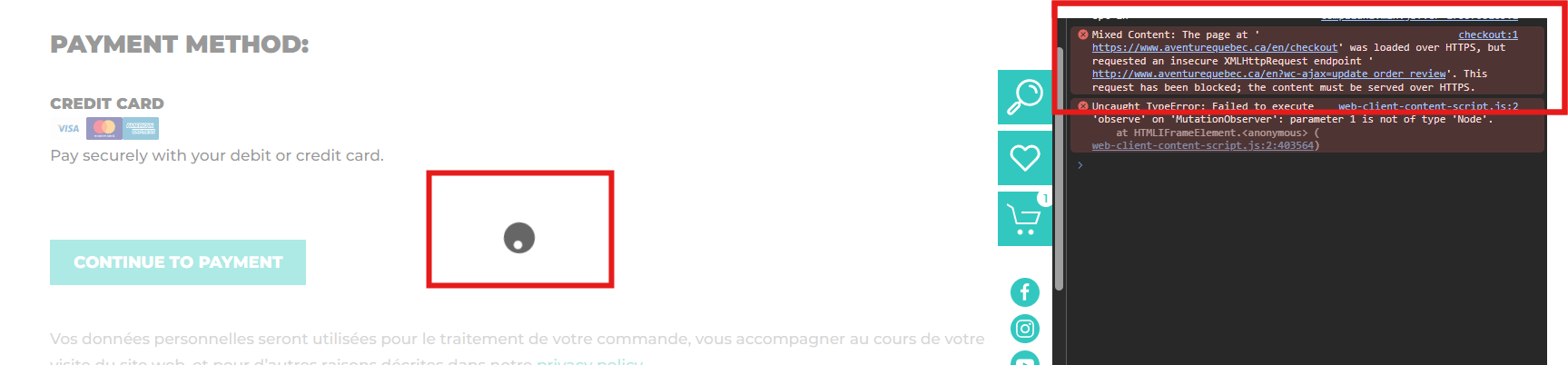
The page fails to load properly in English due to a mixed content error. The AJAX request attempts to use HTTP instead of HTTPS, resulting in the console error: 'Mixed Content: The page at 'hidden link' was loaded over HTTPS, but requested an insecure XMLHttpRequest endpoint 'hidden link'. This request has been blocked; the content must be served over HTTPS.' This causes an infinite loading loop in the secondary language version.
Questions:
Could you please advise on how to resolve the mixed content error on the checkout page in the secondary language?
Do you require additional details or access to the staging environment for further testing?
I apologize for the delay in responding. I will take care of this ticket; the reply time will be shorter now.
I tried to reproduce the problem on my end, but it worked fine for me.
I suggest you try this to help us identify if it might be a conflict with another plugin or theme that is causing the problem.
**IMPORTANT:** Please try this in a staging environment or at least with a backup of your site files and database before continuing.
Disable all plugins except WooCommerce and WPML-related and temporarily change the theme to a default WordPress such as Twenty Twenty-five.
Is the issue resolved with these settings? If so, please reactivate one by one to see which conflicts.
I really don’t understand how it can work on your side. We’re experiencing this issue on our end, and WooCommerce support (who suggested we check this with you) can also reproduce it.
Here are my steps (English version only; the French version, which is the primary language, works fine):
- Add a product to the cart : hidden link
- Proceed to the checkout page : hidden link
After that, the "Your Order" and "Payment Method" sections keep loading indefinitely, and an AJAX error appears in the console (see the uploaded screenshot).
We’ve already tested this on our staging site by:
- Disabling all plugins except WooCommerce and WPML,
- Switching to the Storefront theme,
I am sorry, I meant that I tried to reproduce the issue from scratch and I couldn't. I can see it on your site. I create a fresh new site to test it and it worked there. That's why I suggested a minimal setup.
I would like to request temporary access (wp-admin and FTP) to your site to take a better look at the issue.
It would be better to a testing site where the issue is replicated.
The information you will enter is private which means only you and I can see and have access to it.
Maybe I'll need to replicate your site locally. For this, I'll need to temporarily install a plugin called “Duplicator” or "All in One WP Migration" on your site.
This will allow me to create a copy of your site and your content.
Once the problem is resolved I will delete the local site.
**IMPORTANT**
- Please make a backup of site files and database before providing us access.
- If you do not see the wp-admin/FTP fields this means your post & website login details will be made PUBLIC. DO NOT post your website details unless you see the required wp-admin/FTP fields.
I made a copy of your site and installed it locally. And I couldn't reproduce the issue either.
I noted that your site uses some mu-plugins (must use plugins).
Is it possible for you to do this again and make sure to disable the mu-plugins too?
Disable all plugins except WooCommerce and WPML-related and temporarily change the theme to a default WordPress such as Twenty Twenty-five.
To disable the mu-plugins you'll need to rename the folder /wp-content/mu-plugins (undo the change to reactivate them again).
I've removed all mu-plugins, switched to the theme you recommended, and disabled all plugins except WooCommerce and WPML. However, the issue still persists on the checkout page: hidden link
Let me know if you'd like me to test anything else.
Both environments (staging and live) are currently set to "Current encryption mode: Full".
We attempted switching to Full (Strict) on the live server, but it didn’t resolve the problem. That said, we have multiple other WooCommerce + WPML sites running without issues under "Full" encryption mode.
I think so, the redirect drops from HTTPS to HTTP and also removes the trailing slash after /en/. I don't see it in my local environment, and the mixed content issue is not happening there.
I am not sure what it's causing it, though. But it does not seem to be coming from WPML.
I deactivating it to test and checking this URL in the redirection checker: hidden link
also shows the redirection. It seems that the trailing slash makes it happen because this does not redirect: hidden link
As I said, I am not sure about the root cause of the problem, but is it possible for you to check with Cloudflare support to see if they have any hint?
Best Regards,
Otto
The topic ‘[Closed] Woocommerce Checkout AJAX Issue with Mixed Content (HTTP/HTTPS) in Secondary Language’ is closed to new replies.