Home›Support›English Support›[Resolved] Avada Global Options > WPML > WP HIde & Security Enhancer URL Problem
[Resolved] Avada Global Options > WPML > WP HIde & Security Enhancer URL Problem
This thread is resolved. Here is a description of the problem and solution.
Problem: If you're using the WPML plugin with the Avada theme and WP Hide & Security Enhancer Pro, you might encounter an issue where you cannot save options for individual languages when the 'Create a new admin URL instead of the default /wp-admin and /login' option is activated in WP Hide & Security Enhancer Pro. Solution: We recommend you try the following workaround until the next WPML release addresses this issue: 1- Edit the
Please note that this solution might become irrelevant due to future updates or it might not apply to your specific case. We highly recommend checking related known issues at https://wpml.org/known-issues/, verifying the version of the permanent fix, and confirming that you have installed the latest versions of themes and plugins. If the issue persists, please open a new support ticket.
This is the technical support forum for WPML - the multilingual WordPress plugin.
Everyone can read, but only WPML clients can post here. WPML team is replying on the forum 6 days per week, 22 hours per day.
Hi,
I am using your plugin in conjunction with the Avada theme and WP Hide & Security Enhancer Pro.
In Avada Global Options, I have to make separate adjustments for each individual language.
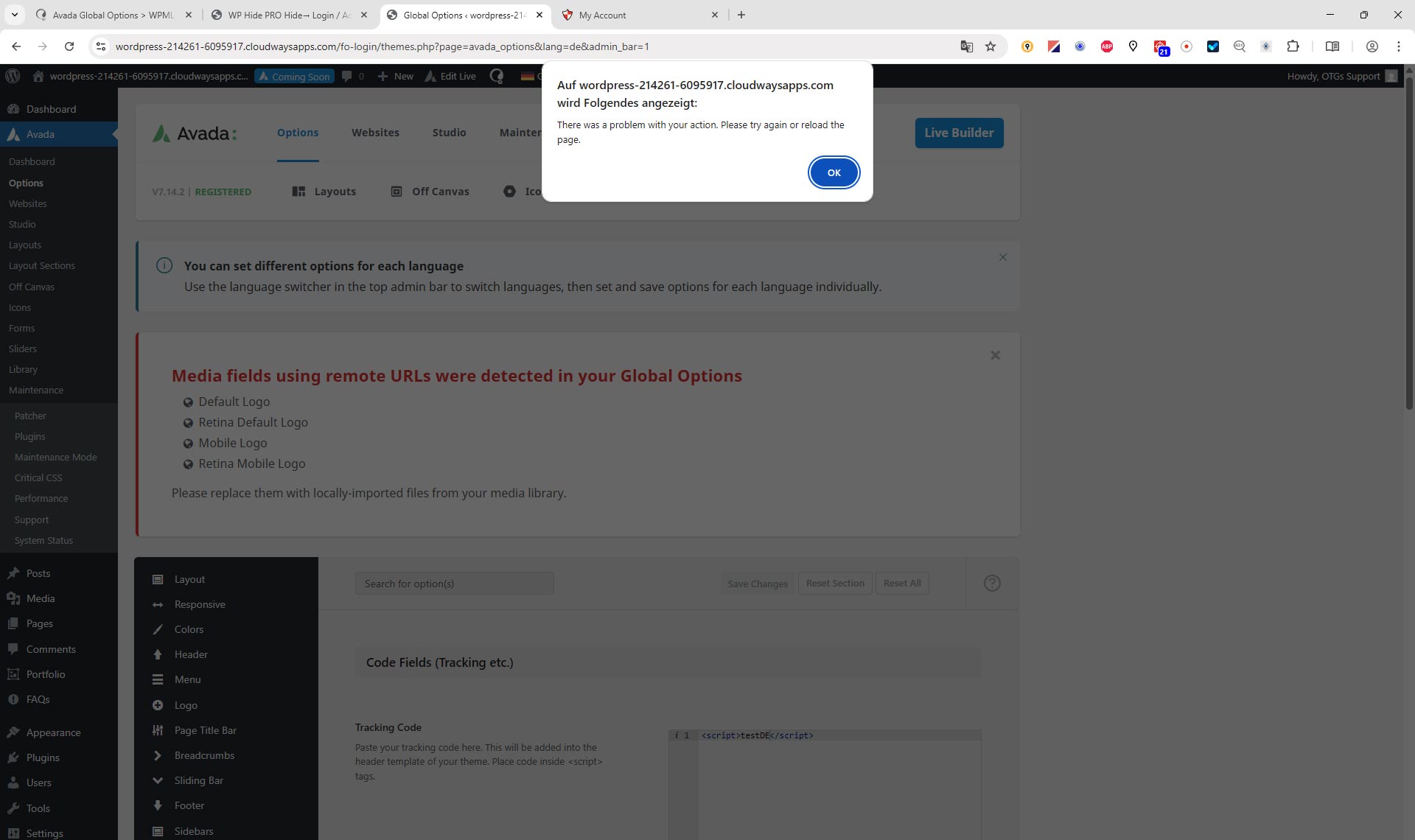
When the WP Hide & Security Enhancer Pro plugin and the option “Admin URL > Create a new admin URL instead of the default /wp-admin and /login” is activated, the options for the individual languages cannot be saved.
I have already discussed this with the developers of WP Hide, and after some testing, I received the following response:
"Indeed, this is still not working in certain language selections.
After back and forth, it turns out the problem is on the WPML, as it checks the default admin URL on Ajax calls. Obviously, that fails if the admin slug is customised. The actual problem is at the file sitepress-multilingual-cms/classes/language/Detection/Ajax.php at the function is_admin_action_from_referer()
Can you please get in touch with WPML support and ask for a fix?
There are 2 approaches for this:
1) Either use a simple code to fetch the actual customised admin URL:
$admin_url = admin_url();
$admin_slug = basename(trim($admin_url, '/'));
2) Or add a filter that we can use on our plugin to return the actual customised admin slug"
Could you kindly assist us with this?
Best regards
Peter
Hello, I just wanted to reproduce the problem with the rewrite URL/admin URL etc. in the sandbox environment. I installed the plug-in, but the rewrites don't work because:
"Your server operates on Nginx!
Automatic deployment of the rewrite rules is not possible, manual action is required. Refer to the Setup menu for guidelines on adding the rewrite rules to your server."
Hello, I received the following email today:
"I'm guessing that your support thread isn't relevant anymore, so I'll be closing it soon. "
Of course, my problem has not been solved at all, and I haven't received any further feedback from you. I was supposed to test it in your sandbox, but that's not possible because the URLs cannot be overwritten on your server, and that's exactly where the problem is in my live environment.
Hi Osama,
Thank you very much for your feedback!
Sorry, I didn't see your private message in my account.
As you suggested, I have now installed the WP Hide & Security plugin under CloudWays.
The only change the plugin currently makes is that the admin URL is now different – no longer wp-admin but fo-login.
Please go to the Avada menu > Options > Advanced > Code Fields to Tracking Code.
In the default language (in our case now EN), you can enter something and save it without any problems.
Then switch to NL or DE, enter something, try to save it, and you will see the error I described.
As soon as the language parameter is added by WPML, it can no longer be saved correctly - if the admin login has been renamed for security reasons. This also applies to custom CSS, etc.
1- Translate the homepage
2- Visit the translated homepage on the front end
3- From the top admin bar, click "Avada > Global Options"
4- Add the code and save the settings
Our compatibility team tried that on the staging site in German. Please try it in Dutch and let me know if it works correctly.
Hi Osama,
I've tested it now. It works, but it's not very practical and quite cumbersome.
I also tested it on one of my websites. I don't use the WPML editor for translation there, but the standard WordPress editor. WPML is only used for language management.
With your “workaround,” I first have to open a page in the WordPress backend. Then I have to use the language switcher to open this page in the desired foreign language. Then I have to display this page in the frontend and then from there go back to the backend to save the global options. This is cumbersome and also annoying because of the loading times. Especially when you're trying things out and switching between languages frequently.
I'm much faster if I temporarily don't rename the admin URL in WP Hide & Security Enhancer, but use the standard URL instead. Then I can simply switch languages in the backend and save the global options in all languages accordingly.
For example, if I have loaded an English-language page in the backend, I can use the WPML flags to switch to another language, edit the page in that language, and save it without any problems.
The same should apply to Avada's global options. I change the language in the backend and should then be able to save the options.
Please take a look at my first post on this topic. The developers of WP Hide have made suggestions for solving the problem there.