This thread is resolved. Here is a description of the problem and solution.
Problem:
You are working on a DIVI-based site with WPML in two languages (EN and FR). The global header is set through the DIVI theme builder, and the language flags are set through the widget '[wpml_language_selector_widget]'. On the mobile version of the site, the language flags are not clickable, although they work fine on the PC version.
Solution:
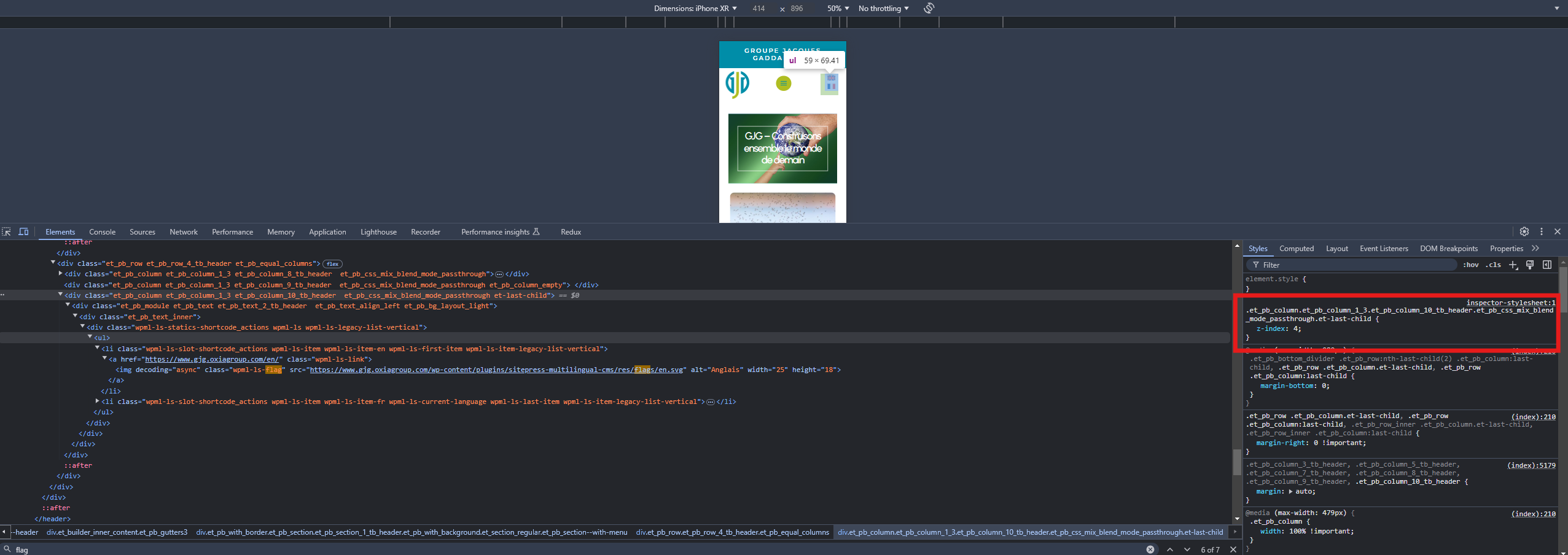
The issue is due to the z-index settings in your DIVI theme. The main row has a z-index of 3, while the columns have a lower z-index, causing the column with the language switcher to be positioned behind the row. To make the language flags clickable on mobile, assign a higher z-index (greater than 3) to the column that contains the language switcher from the Divi editor. Adjusting the CSS as highlighted can also make the language switcher clickable.
If this solution does not resolve your issue, or if it seems outdated or irrelevant to your case, we recommend opening a new support ticket. We also highly recommend checking related known issues at https://wpml.org/known-issues/, verifying the version of the permanent fix, and confirming that you have installed the latest versions of themes and plugins. For further assistance, please visit our support forum at WPML support forum.
This is the technical support forum for WPML - the multilingual WordPress plugin.
Everyone can read, but only WPML clients can post here. WPML team is replying on the forum 6 days per week, 22 hours per day.
This topic contains 1 reply, has 2 voices.
Last updated by 1 year, 4 months ago.
Assisted by: Prosenjit Barman.