
This is the technical support forum for WPML - the multilingual WordPress plugin.
Everyone can read, but only WPML clients can post here. WPML team is replying on the forum 6 days per week, 22 hours per day.
| Sun | Mon | Tue | Wed | Thu | Fri | Sat |
|---|---|---|---|---|---|---|
| - | 9:00 – 12:00 | 9:00 – 12:00 | 9:00 – 12:00 | 9:00 – 12:00 | 9:00 – 12:00 | - |
| - | 13:00 – 18:00 | 13:00 – 18:00 | 13:00 – 18:00 | 13:00 – 18:00 | 13:00 – 18:00 | - |
Supporter timezone: Asia/Singapore (GMT+08:00)
Tagged: Compatibility
This topic contains 14 replies, has 1 voice.
Last updated by Kor 2 days, 4 hours ago.
Assisted by: Kor.
| Author | Posts |
|---|---|
| January 14, 2026 at 5:49 pm #17730740 | |
 justinK-16 |
Hello I have just switched from Yoast to SEOPress plugin - I have sorted pretty much everything but this: So it appears that the Primary Category has been correctly assigned when I switched plugins (imported settings etc) in English. However, all other languages did not carry through - the primary Category field is set to NONE in the other languages. The field also does not appear in the ATE for translation. I thought i may be able to bulk edit the posts instead of having to open every post and translate it in the ATE. I went to WPML > Settings to see what the field was set in Custom Field Translations > Show System Fields - BUT the settings page continually resets in a loop. (see the loom) 3 Big issues for me right now: Any help is much appreciated 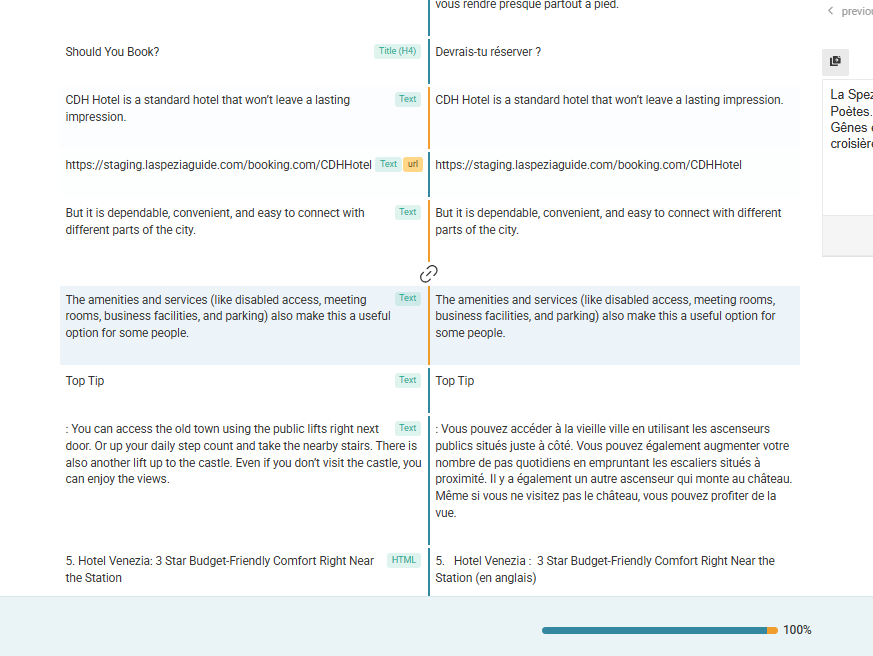 |
| January 14, 2026 at 5:59 pm #17730785 | |
| justinK-16 |
I deactivated ALL plugins except WPML, and the looping continues to happen. it just loops faster now... New threads created by Kor and linked to this one are listed below: |
| January 14, 2026 at 6:22 pm #17730840 | |
 Kor WPML Supporter since 08/2022 Languages: English (English ) Timezone: Asia/Singapore (GMT+08:00) |
Thanks for your patience. I've checked your screen recording and it looks like the correct step. Not sure what's going on over there, so I will require temporary access (WP-Admin and FTP) to a test site where the problem has been replicated, if possible. This will enable me to provide better assistance and determine if any configurations need to be modified. Please note that it is important to have a backup for security purposes and to prevent any potential data loss. You can use the UpdraftPlus plugin (https://wordpress.org/plugins/updraftplus/) to fulfill your backup requirements. Your upcoming reply will be treated with confidentiality and will only be visible to you and me. ✙ To resolve the issue, I may need your consent to deactivate and reactivate plugins and the theme, as well as make configuration changes on the site if necessary. This emphasizes the significance of having a backup. |
| January 14, 2026 at 7:06 pm #17730934 | |
|
Kor WPML Supporter since 08/2022 Languages: English (English ) Timezone: Asia/Singapore (GMT+08:00) |
Thanks for your reply. I may have unintentionally broken the site while deactivating a plugin. Could you please share FTP access here so I can restore the site myself? I also need to run further tests to understand why it keeps entering a loop, as this is currently preventing me from properly troubleshooting the original issue. |
| January 15, 2026 at 9:19 am #17732203 | |
|
justinK-16 |
Any updates? I need to resume work on that staging site, can i access it and make updates ot pages/posts etc? Actually, I don't see anyone on the site, so i am going to take over and continue working on it. This is a major project with tight deadllines and I am at the last stage, updating content and links, and then translating. If I can't translate, then I need to at least be updating the content. I will keep this chat window open in case you respond and need to take over. Is it possible to actually speak with someone about this? Or even a live chat? |
| January 15, 2026 at 9:23 am #17732207 | |
|
Kor WPML Supporter since 08/2022 Languages: English (English ) Timezone: Asia/Singapore (GMT+08:00) |
Thanks for your reply. I'm actually looking at this now. The attached screenshot is what I'm checking and this is the page that I'm working on hidden link 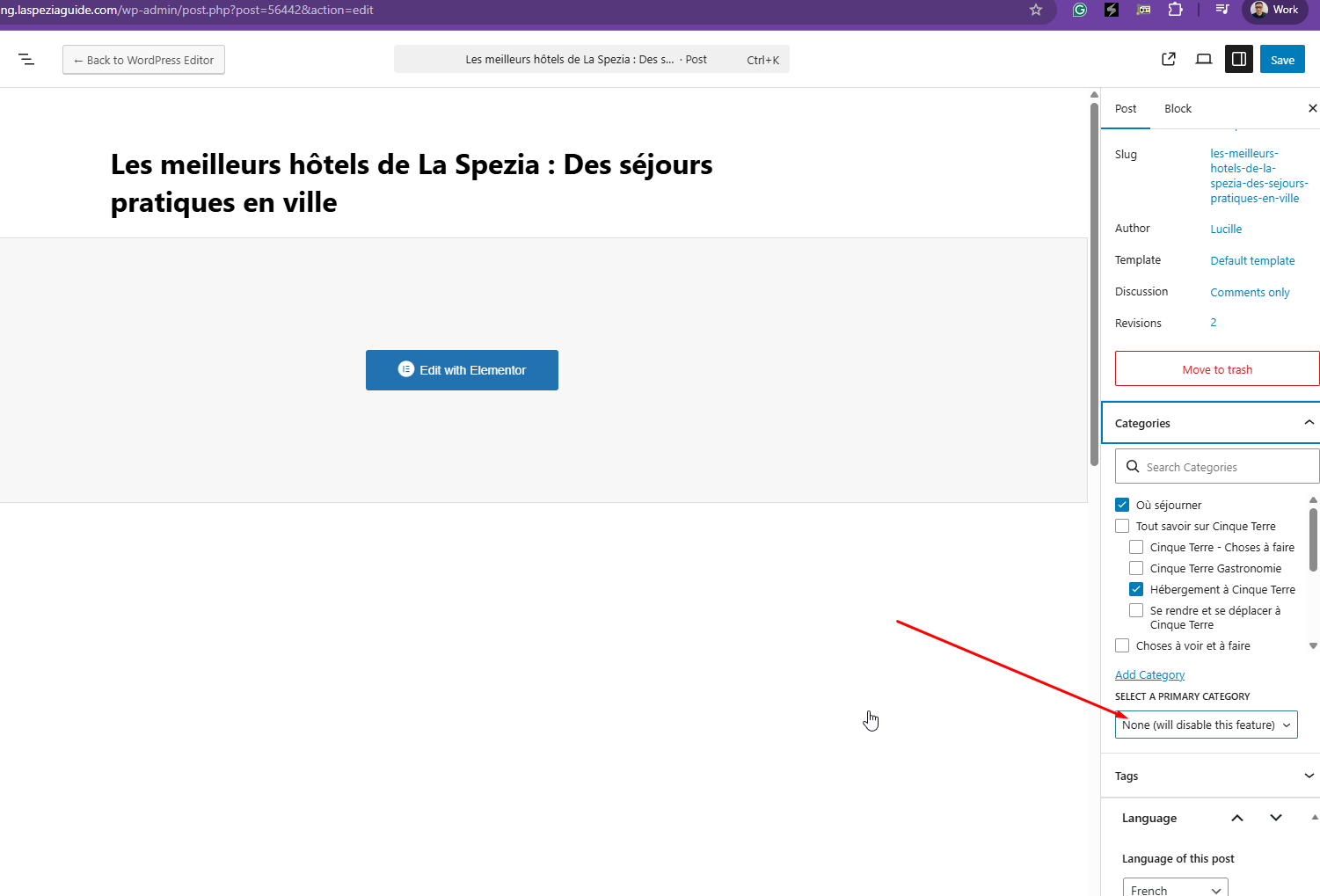 |
| January 15, 2026 at 9:26 am #17732230 | |
|
Kor WPML Supporter since 08/2022 Languages: English (English ) Timezone: Asia/Singapore (GMT+08:00) |
As for the looping issue, I've split the ticket here https://wpml.org/forums/topic/wpml-settings-page-keeps-refreshing-automatically-and-gets-stuck-in-a-loop/ so that we can follow up accordingly. |
| January 15, 2026 at 9:33 am #17732265 | |
|
justinK-16 |
Hi Kor sorry , i did look to see if you or someone was on the site before i sent the message. Is it ok if i continue to update content on pages ONLY at this point - while you are working/troubleshooting? Or do you need me off the site??? If i can continue that would be great but i don't want to interfere or slow you down. LMK whats best |
| January 15, 2026 at 9:36 am #17732276 | |
|
Kor WPML Supporter since 08/2022 Languages: English (English ) Timezone: Asia/Singapore (GMT+08:00) |
Thanks for your reply. We’ll need to identify what’s triggering the loop first, and then apply the proper fix. Since it’s now happening even while you’re editing the page, I’ll proceed with troubleshooting by temporarily deactivating and reactivating plugins to isolate the cause. I’ll do this carefully and revert anything immediately if it affects the site. Please let me know if you notice any unexpected behavior on your end while I’m testing. |
| January 15, 2026 at 9:39 am #17732282 | |
|
justinK-16 |
that's fine...i will ONLY edit content using Elementor. But so you know, before I contacted you guys i switched themes to 2025, deactivated ALL plugins except for the 3 WPML plugins and the probelm still occurs on Settings and Support (i have not visited ll WPML sections) If you still need to disable Elementor, could you please let me know first and i will save and log out |
| January 15, 2026 at 9:42 am #17732287 | |
|
Kor WPML Supporter since 08/2022 Languages: English (English ) Timezone: Asia/Singapore (GMT+08:00) |
Thanks for your reply. You can work on the pages. I'll try to reinstall WPML now. |
| January 15, 2026 at 9:53 am #17732295 | |
|
Kor WPML Supporter since 08/2022 Languages: English (English ) Timezone: Asia/Singapore (GMT+08:00) |
Thanks for your patience. Please refer to my reply here https://wpml.org/forums/topic/wpml-settings-page-keeps-refreshing-automatically-and-gets-stuck-in-a-loop/ regarding the loop issue. As for this ticket, I will continue to investigate the category not being assigned on the translated page. |
| January 15, 2026 at 6:21 pm #17735054 | |
|
Kor WPML Supporter since 08/2022 Languages: English (English ) Timezone: Asia/Singapore (GMT+08:00) |
Thanks for your reply. I've checked, and this looks like a compatibility issue. I'm able to replicate the issue on our sandbox site here hidden link and here is the link to login. hidden link On the translated page, the Primary Category is not selected. Please allow me to escalate this further to our 2nd Tier Support for further investigation. I will get back to you once I've feedback. |
| January 16, 2026 at 8:47 am #17736009 | |
| justinK-16 |
Ok thank you - in the meantime, can i continue updating content in the primary language (without performing translations)? Also, the other issue of the segments becoming untranslated? If you recall i noticed all 3 issues at the same time. When I translate a page in the ATE, and save it - (considering 100% of segments are translated and must be translated in order to save) - if I then revisit the translation in the ATE there are segments that are no longer in translated, and the segment field on the translated side is in English with an orange bar next to it. The screenshot attached is the same from as the other day - and it is for this page: I only noticed it because I went back to look for the Primary category Field New threads created by Kor and linked to this one are listed below: https://wpml.org/forums/topic/segments-becoming-untranslated/ 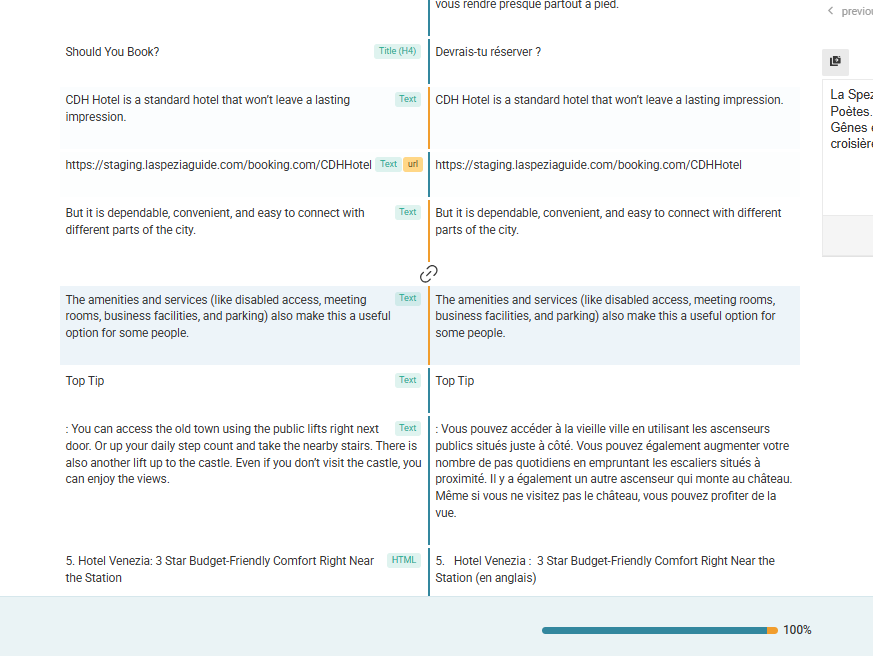 |
| January 16, 2026 at 6:52 pm #17738310 | |
|
Kor WPML Supporter since 08/2022 Languages: English (English ) Timezone: Asia/Singapore (GMT+08:00) |
Thanks for your patience. Yes, you can continue working on your website, as I’ve been able to replicate the issue on our sandbox site. I’m currently waiting for feedback from our compatibility team. Regarding the new issue with “segments becoming untranslated,” I’ve split it into a separate ticket here: https://wpml.org/forums/topic/segments-becoming-untranslated/ We will continue to follow up on that issue in the new ticket. For this current ticket, we will focus on the problem with the SEOPress primary category not syncing correctly with the translated page. Let me know if you need any further assistance. |

