Skip to content Skip to sidebar

This thread is resolved. Here is a description of the problem and solution.

Problem:
If you're experiencing issues with product category pages after switching languages on your website, such as product layout becoming smaller or category names still translating despite being added to the Glossary, the problem might be related to your theme or custom CSS.
Solution:
We recommend updating all related plugins and themes to their latest versions to ensure the issue isn't caused by an outdated bug. Check your theme settings, specifically under Astra > Theme Customizer, and adjust the product image size if it does not match your site's requirements. For issues visible only on specific devices (like iPhones), ensure to clear all types of caches (plugin, hosting, browser). If the problem persists, it might be due to custom CSS added to your theme. For instance, changing

align-items: center;

to

align-items: stretch;

in your CSS might resolve alignment issues. Additionally, adjusting button margins can also help.

Please note that these solutions might be irrelevant if they are outdated or not applicable to your case. We highly recommend checking related known issues at https://wpml.org/known-issues/, verifying the version of the permanent fix, and confirming that you have installed the latest versions of themes and plugins. If the issue persists, please open a new support ticket at WPML support forum.

This is the technical support forum for WPML - the multilingual WordPress plugin.

Everyone can read, but only WPML clients can post here. WPML team is replying on the forum 6 days per week, 22 hours per day.

Tagged: 

This topic contains 13 replies, has 0 voices.

Last updated by Dražen 3 weeks, 2 days ago.

Assisted by: Dražen.

Author Posts
February 4, 2026 at 8:44 am

frederikc-7

Hi Support Team,

I’m facing issues with product category pages after switching languages on my website.
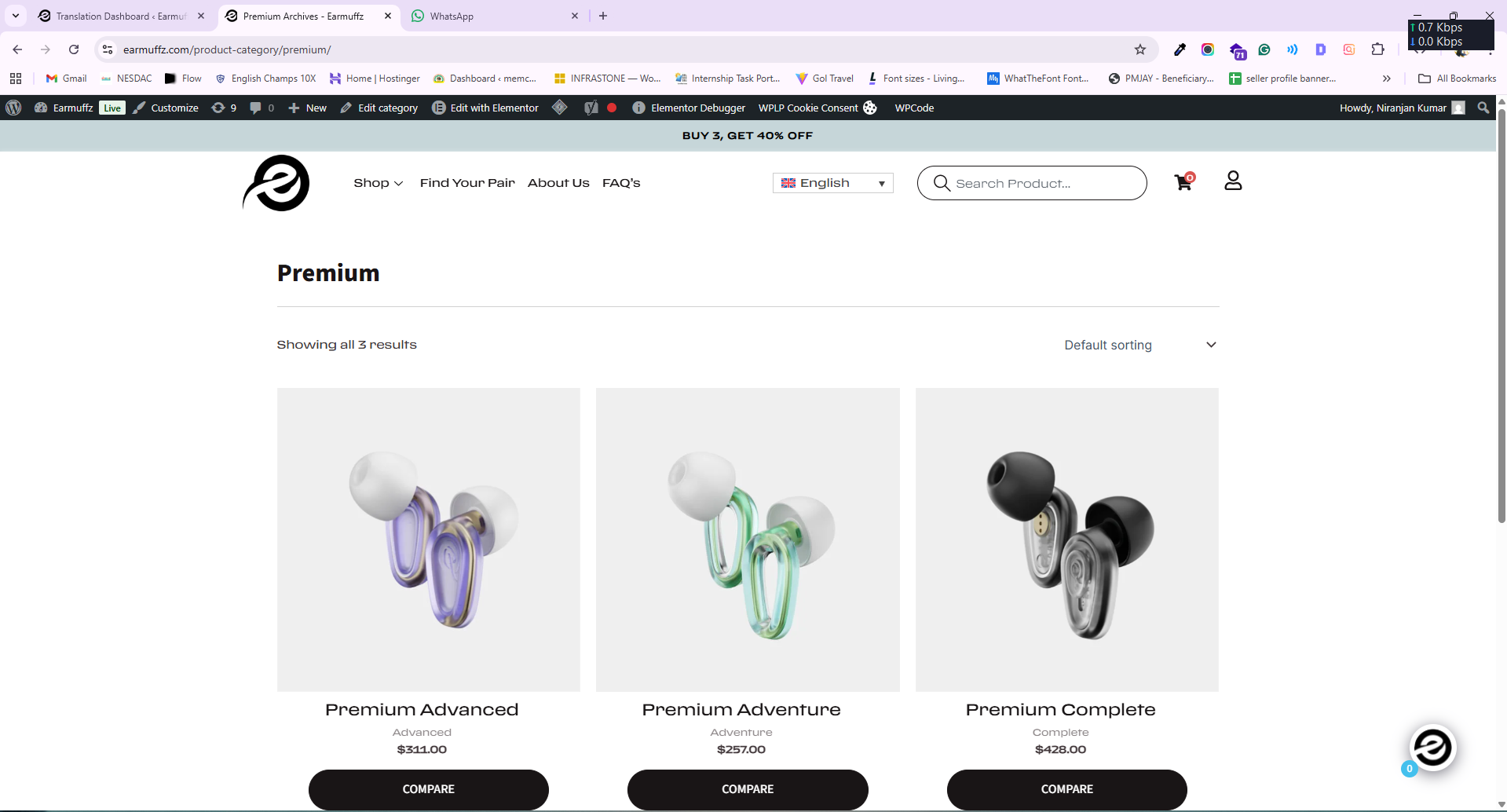
Issue 1: Product Layout Becomes Smaller After Language Switch

When the website is in English, the product layout on category pages displays correctly.

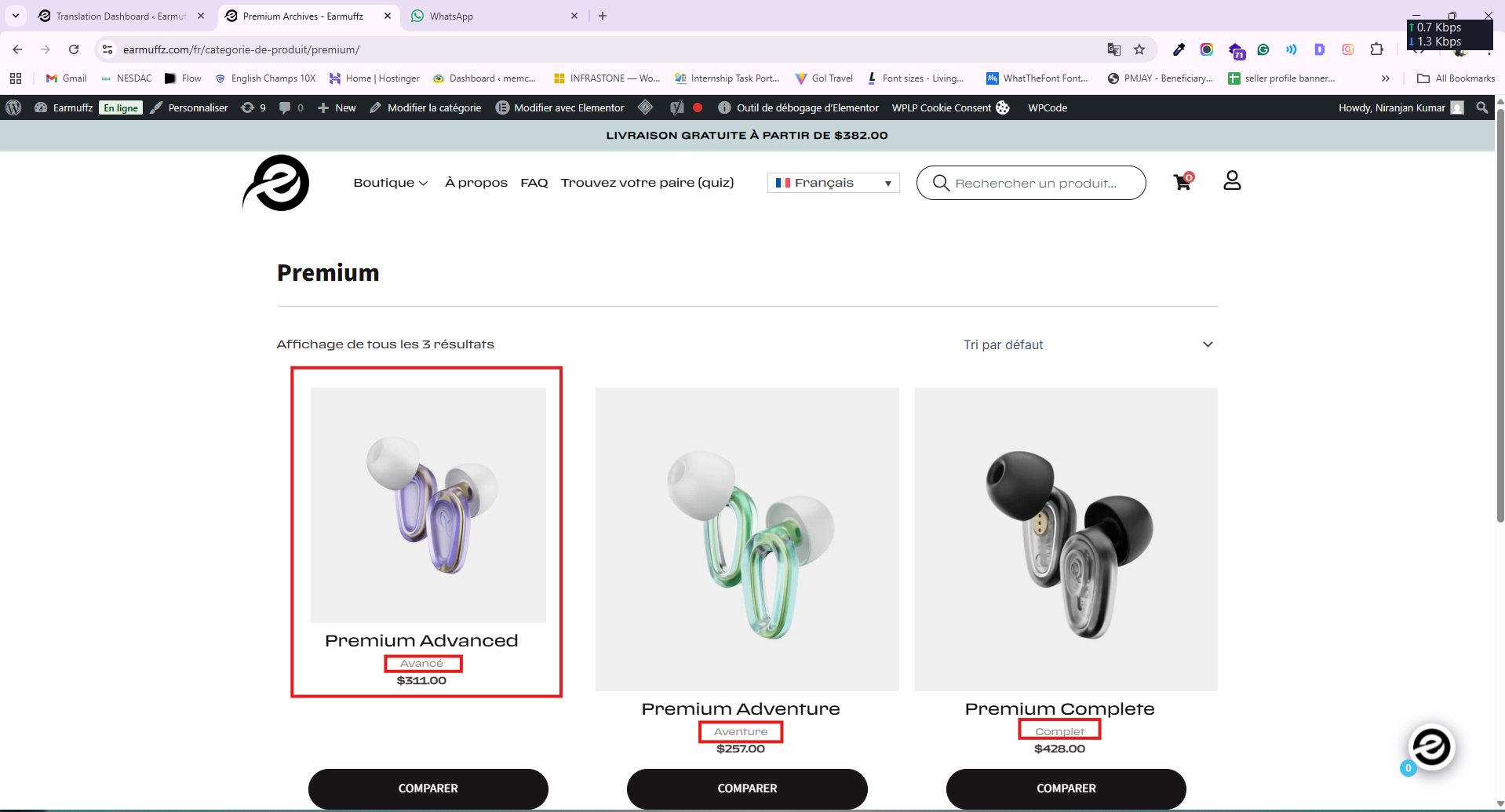
However, when I switch to other languages (for example, French):

The product cards become smaller

This affects the visual consistency of the category pages.

Issue 2: Category Names Translating Even After Adding to Glossary

I have added product category names to the Glossary so that they should NOT be translated.

However, even after adding them:

Category names are still getting translated

For example: “Advanced”, “Adventure”, “Complete” are changing in other languages

They should remain in English across all languages

February 4, 2026 at 10:14 am #17790683

Dražen
Supporter

Languages: English (English )

Timezone: Europe/Zagreb (GMT+01:00)

Hello,

I’ve taken a copy of the site and managed to narrow this down a bit. It looks like the issue only happens when using your child theme together with UAE Elementor Pro and the ElementsKit plugin, so I have a few questions that should help us move forward.

1) Could you please update all related plugins and themes to their latest versions, just to confirm this isn’t caused by an older bug that has already been fixed?

2) How can I see and reproduce the same issue when using the Astra parent theme? With the parent theme active, I don’t see this category layout, so I’d like to understand why it appears only with your child theme.

3) For this specific category page / products, how exactly are UAE Elementor Pro and ElementsKit being used? Are they applied via templates, widgets, or any custom setup?

Once I have this information, I’ll be able to continue testing and advise on the next steps.

Thanks,
Drazen

February 4, 2026 at 10:41 am #17790838

frederikc-7

This is a dynamic WooCommerce category page. We have not created this page using any builder. It is the default dynamic WooCommerce collection page.

February 4, 2026 at 11:18 am #17790968

Dražen
Supporter

Languages: English (English )

Timezone: Europe/Zagreb (GMT+01:00)

Hello,

just a quick update to let you know that I’ve escalated this issue to our 2nd-tier team for further investigation.

They’ll take a closer look from a more technical perspective, and I’ll get back to you as soon as I have any updates or next steps from them.

Thanks for your patience,
Drazen

February 5, 2026 at 7:10 am #17794403

Dražen
Supporter

Languages: English (English )

Timezone: Europe/Zagreb (GMT+01:00)

Hello,

thank you for your patience.

I checked the settings under Astra > Theme Customizer and adjusted the product image size. It was set to 300px, while your site actually uses 387px, which caused the issue with the first product.

It should now be working correctly. Please check here:
hidden link

Regards,
Drazen

February 5, 2026 at 11:48 am #17795875

frederikc-7

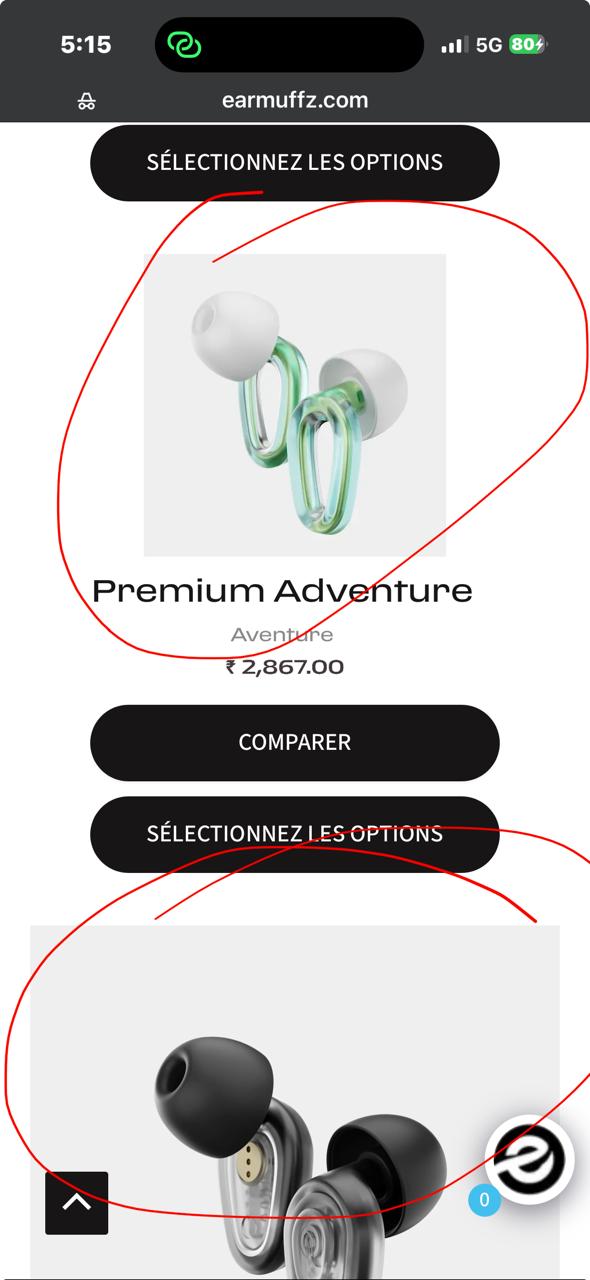
But on mobile view, the same issue is still showing. Could you please check?

WhatsApp Image 2026-02-05 at 5.16.17 PM.jpeg
February 5, 2026 at 11:59 am #17795901

Dražen
Supporter

Languages: English (English )

Timezone: Europe/Zagreb (GMT+01:00)

Hello,

thanks for getting back.

I have just checked this also on my local copy of website that I have and there it works fine.

Can you please make sure to clear any cache (plugin, hosting, browser) and try again it should be the same as in desktop website, it uses same images.

Let me know how it goes.

Regards,
Drazen

February 7, 2026 at 1:13 pm #17801943

frederikc-7

Yes i checked on Android devices, all product cards display correctly and remain the same size.

However, i try on iPhone devices ( Safari / Chrome) ,Product cards appear in different sizes .This issue is only happening on iPhone ,Desktop and Android layouts are working fine.

Could you please check? why happing like this pls...

android.PNG
ipone.jpeg
February 9, 2026 at 6:39 am #17803752

Dražen
Supporter

Languages: English (English )

Timezone: Europe/Zagreb (GMT+01:00)

Hello,

thanks for getting back. I have checked but could not find the cause, I will need to re-check again with our 2nd tier.

I will get back soon.

Regards,
Drazen

February 9, 2026 at 10:15 am #17804415

frederikc-7

Yes pls

February 9, 2026 at 12:06 pm #17804996

Dražen
Supporter

Languages: English (English )

Timezone: Europe/Zagreb (GMT+01:00)

Hello,

our 2nd tier team checked this further and it seems the issue is caused by custom CSS added to your Astra theme, which needs some adjustment.

In the Additional CSS section, you currently have:

.woocommerce-page.ast-woocommerce-related-upsell-list-style ul.products li.product,
.woocommerce.ast-woocommerce-related-upsell-list-style ul.products li.product,
.woocommerce-page.ast-woocommerce-shop-page-list-style ul.products li.product,
.woocommerce.ast-woocommerce-shop-page-list-style ul.products li.product {
-js-display: flex;
display: flex;
flex-direction: column;
padding-bottom: 0;
justify-content: center;
align-items: center;
}

A fix would be to change:

align-items: center;

to:

align-items: stretch;

Additionally, you currently have:

button.woosc-btn {
margin-bottom: 10px !important;
}

which should be adjusted to:

button.woosc-btn {
margin-bottom: 10px !important;
margin-left: auto !important;
margin-right: auto !important;
}

I checked and it works fine now.

Please note that custom CSS is outside the scope of WPML support, as they are related to custom code rather than WPML functionality itself.

Ideally, these changes should be handled by the developer who implemented the custom styling. However, we wanted to share our findings to help point you in the right direction.

Regards,
Drazen

February 9, 2026 at 12:46 pm #17805100

frederikc-7

Thanks ...

February 9, 2026 at 12:46 pm #17805101
frederikc-7

Have you checked the second issue?

Issue 2: Category Names Translating Even After Adding to Glossary

I have added product category names to the Glossary so that they should NOT be translated.

However, even after adding them:

Category names are still getting translated

For example: “Advanced”, “Adventure”, “Complete” are changing in other languages

They should remain in English across all languages

New threads created by Dražen and linked to this one are listed below:

https://wpml.org/forums/topic/split-category-names-translating-even-after-adding-to-glossary/

February 9, 2026 at 12:49 pm #17805107

Dražen
Supporter

Languages: English (English )

Timezone: Europe/Zagreb (GMT+01:00)

Hello,

thanks for getting back.

We limit 1 issue per ticket to keep things clear. This will help other users with similar problems to find solutions when searching the forum.

I have opened a new ticket for you:
- https://wpml.org/forums/topic/split-category-names-translating-even-after-adding-to-glossary/

I will be closing this ticket now since seems no more doubts about this original topic and lets continue in new ticket on your 2nd issue.

Regards,

Drazen