Home›Support›English Support›[Resolved] The languages are totally missing in admin and also on the website
[Resolved] The languages are totally missing in admin and also on the website
This thread is resolved. Here is a description of the problem and solution.
Problem: All languages have disappeared from WPML > Languages. Solution: The WPML language table in the database was missing or corrupted. We have restored the table. In such case, you can find a corresponding option at WPML > Support > Troubleshooting inside the top section of the page. Please then configure the language settings again at WPML > Languages. If the problem persists or if this solution does not seem relevant, please open a new support ticket.
This is the technical support forum for WPML - the multilingual WordPress plugin.
Everyone can read, but only WPML clients can post here. WPML team is replying on the forum 6 days per week, 22 hours per day.
From one day to the next, all the languages are missing.
When I try to open the WPML settings, i get this error:
Fatal error: Uncaught InvalidArgumentException: item should be a Collection or an array or an object in /home/customer/www/hotel-andante-rust.de/public_html/wp-content/plugins/sitepress-multilingual-cms/vendor/wpml/fp/core/Obj.php:112 Stack trace: #0 [internal function]: WPML\FP\Obj::WPML\FP\{closure}(NULL, 'code', false) #1 /home/customer/www/hotel-andante-rust.de/public_html/wp-content/plugins/sitepress-multilingual-cms/vendor/wpml/fp/core/functions.php(154): call_user_func_array(Object(Closure), Array) #2 [internal function]: WPML\FP\Obj::WPML\FP\{closure}(NULL, 'code', false) #3 /home/customer/www/hotel-andante-rust.de/public_html/wp-content/plugins/sitepress-multilingual-cms/vendor/wpml/collect/src/Illuminate/Support/Traits/Macroable.php(56): call_user_func_array(Object(Closure), Array) #4 /home/customer/www/hotel-andante-rust.de/public_html/wp-content/plugins/sitepress-multilingual-cms/vendor/wpml/fp/core/Obj.php(90): WPML\FP\Obj::__callStatic('propOr', Array) #5 [internal function]: WPML\FP\Obj::WPML\FP\{closure}(' in /home/customer/www/hotel-andante-rust.de/public_html/wp-content/plugins/sitepress-multilingual-cms/vendor/wpml/fp/core/Obj.php on line 112
Languages: English (English )Spanish (Español )German (Deutsch )
Timezone: America/Lima (GMT-05:00)
Hello,
Could you please go to WPML > Support > Troubleshooting and use the option to recreate the WPML language information, which will create the WPML language tables inside the database?
Languages: English (English )Spanish (Español )German (Deutsch )
Timezone: America/Lima (GMT-05:00)
Hello,
I would like to offer to have a closer look at the problem and request temporary access (wp-admin and FTP) to the website to investigate this issue further.
You can find the required fields below the comment section when you log in to leave the next reply. The information you provide is private, which means only you and I can see and access it.
IMPORTANT
Please be sure to make a backup copy of the website and database before allowing us access.
If you can't see the wp-admin / FTP fields, your post and website credentials are set as PUBLIC. DO NOT publish the data unless you see the required wp-admin / FTP fields.
I may have to install a plugin called "All In One WP Migration" to make a copy of the website where I can investigate the issue further.
However, I would also be very grateful if you could provide a staging site or copy of the website from your server yourself for this purpose.
If you have any questions about creating such a staging site, you can consult your hosting provider. Just take note that WPML should be registered on this site again.
If you are unable to provide such a copy of the site for testing, please let me know on this ticket.
The private response form looks like this: hidden link
Next time you reply, click "I still need assistance."
Video: hidden link
Please note that we are obliged to request this information individually on each ticket. We may not access any access information not specifically submitted on this ticket in the private response form.
Languages: English (English )Spanish (Español )German (Deutsch )
Timezone: America/Lima (GMT-05:00)
Anscheinend fehlte die WPML Sprachtabelle in der Datenbank oder sie war beschädigt. Ich konnte diese nun wiederherstellen.
Das Problem sollte nun behoben sein. Bitte nehme die Einstellungen der Sprachen nun erneut unter WPML > Sprache vor und lass mich wissen, solltest Du weitere Hilfe benötigen.
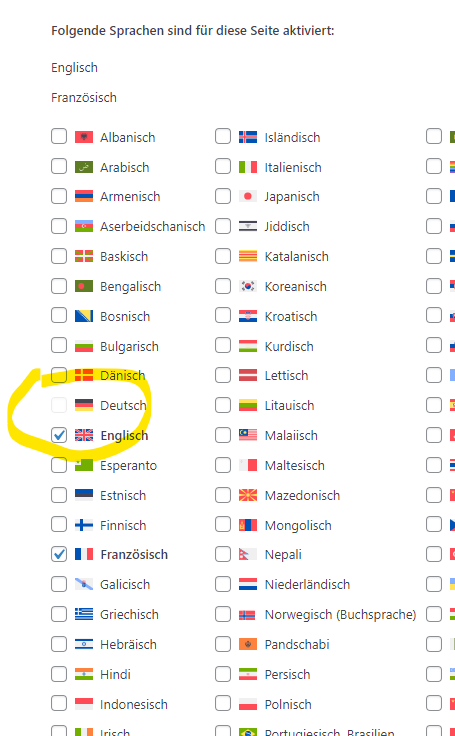
danke, das hat teilweise geklappt. Leider kann ich aber Deutsch nicht auswählen, siehe screenshot. Und im Hauptmenü sind die Menüpunkte "Kontakt" und Dining > Bar verschwunden, obwohl sie als Menüpunkte angelegt sind.
Languages: English (English )Spanish (Español )German (Deutsch )
Timezone: America/Lima (GMT-05:00)
Entschuldige bitte die Verzögerung, da ich Sonntags und Montags nicht arbeite.
Hier musste eine Standardsprache festgelegt werden. Ich habe dazu kurzzeitig Englisch gewählt. Danach konnte ich Deutsch wieder aktivieren und habe es nun als Standardsprache eingestellt.
Sollte weiterhin etwas nicht wie erwartet funktionieren, dann gib uns bitte Bescheid.