
This thread is resolved. Here is a description of the problem and solution.
Problem:
The client is experiencing a critical error when activating the WPML plugin on a subsite in a WordPress multisite environment. The error occurs after following the standard procedure of installing and activating the plugin network-wide, then on the main site, and finally on the subsite. The error manifests as a blank page displaying 'There has been a critical error on this website' during the final steps of the WPML configuration.
Solution:
We identified a syntax error and a fatal error in the WPML plugin files through the debug log provided by the client. The errors were related to incorrect HTML tags and a null object reference in the plugin's upgrade script. To resolve this, we recommended modifying the
AddTranslationManagerCapToAdmin.php
file. The client should change the code from:
get_role('administrator')->add_cap(User::CAP_MANAGE_TRANSLATIONS);to:
if(get_role('administrator') != NULL){ get_role('administrator')->add_cap(User::CAP_MANAGE_TRANSLATIONS); }This modification checks if the 'administrator' role exists before attempting to add capabilities, preventing the error.
If this solution does not resolve the issue or seems irrelevant due to updates or different circumstances, we highly recommend checking related known issues at https://wpml.org/known-issues/, verifying the version of the permanent fix, and confirming that you have installed the latest versions of themes and plugins. If problems persist, please open a new support ticket at WPML support forum for further assistance.
This is the technical support forum for WPML - the multilingual WordPress plugin.
Everyone can read, but only WPML clients can post here. WPML team is replying on the forum 6 days per week, 22 hours per day.
Tagged: Bug
This topic contains 13 replies, has 2 voices.
Last updated by Long Nguyen 1 year, 5 months ago.
Assisted by: Long Nguyen.
| Author | Posts |
|---|---|
| July 4, 2024 at 9:12 am | |
 fulviaL |
Background of the issue: Symptoms: Questions: |
| July 5, 2024 at 3:03 am #15895109 | |
 Long Nguyen WPML Supporter since 02/2022 Languages: English (English ) Timezone: Asia/Ho_Chi_Minh (GMT+07:00) |
Hi there, Thank you for contacting WPML support, I’m happy to help you with this issue. I edit the site in the network area and add the last slash (/) to the site and home URLs then the subsite hidden link is working properly. Can you please confirm it works on your end? Looking forward to your reply.  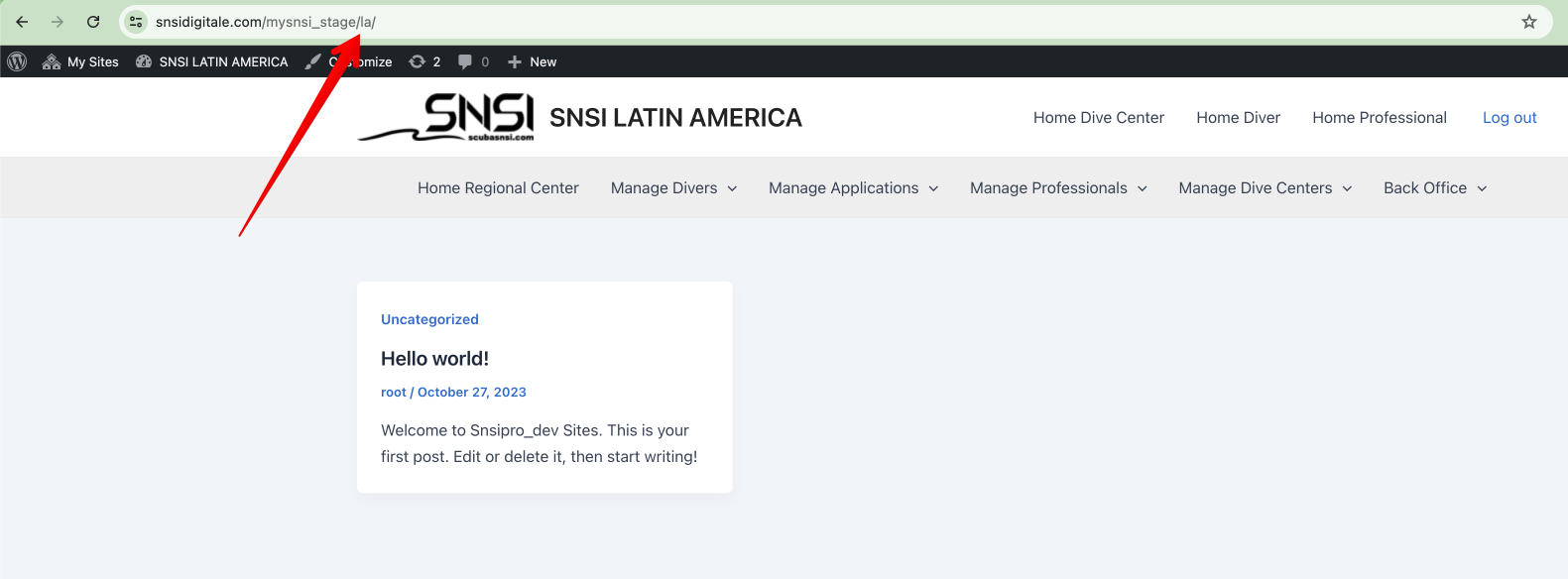  |
| July 5, 2024 at 7:51 am #15896811 | |
|
fulviaL |
Unfortunately is not as you say. Just go in and try to activate wpml string translations and you will constantly see the error. |
| July 5, 2024 at 7:53 am #15896827 | |
|
fulviaL |
Really I do not know how you can say it was working, I just try to go on pages (without activating strin translation) and I have the same error. It woul dbe nice to have a video of your tests to prove you do not have errors on your end. |
| July 5, 2024 at 7:59 am #15896835 | |
|
fulviaL |
another point: You installed WP File manager without asking first! The plugin Should work as usually if not there is a problem in your plugin. The other plugins that are inside are all compatible.... Thanks and kind regatrds |
| July 5, 2024 at 8:50 am #15897161 | |
|
Long Nguyen WPML Supporter since 02/2022 Languages: English (English ) Timezone: Asia/Ho_Chi_Minh (GMT+07:00) |
Hi, I see the error once when I visit the admin area of the subsite /la/. There is an error in the debug log: [03-Jul-2024 11:21:21 UTC] PHP Parse error: syntax error, unexpected token "<" in /web/htdocs/www.snsidigitale.com/home/mysnsi_stage/wp-content/plugins/sitepress-multilingual-cms/classes/upgrade/commands/AddTranslationManagerCapToAdmin.php on line 10 I review that file and see there is an HTML <br> tag in the file which isn't correct so I try to re-install the plugin WPML. For now, there is another error in the log:
[05-Jul-2024 08:39:47 UTC] PHP Fatal error:  Uncaught Error: Call to a member function add_cap() on null in /web/htdocs/www.snsidigitale.com/home/mysnsi_stage/wp-content/plugins/sitepress-multilingual-cms/classes/upgrade/commands/AddTranslationManagerCapToAdmin.php:10
Stack trace:
#0 /web/htdocs/www.snsidigitale.com/home/mysnsi_stage/wp-content/plugins/sitepress-multilingual-cms/classes/upgrade/class-wpml-upgrade-run-all.php(11): WPML\Upgrade\Commands\AddTranslationManagerCapToAdmin->run()
#1 /web/htdocs/www.snsidigitale.com/home/mysnsi_stage/wp-content/plugins/sitepress-multilingual-cms/classes/upgrade/class-wpml-upgrade.php(159): WPML_Upgrade_Run_All->run_admin()
#2 /web/htdocs/www.snsidigitale.com/home/mysnsi_stage/wp-content/plugins/sitepress-multilingual-cms/classes/upgrade/class-wpml-upgrade.php(147): WPML_Upgrade->maybe_run_admin()
#3 /web/htdocs/www.snsidigitale.com/home/mysnsi_stage/wp-content/plugins/sitepress-multilingual-cms/classes/upgrade/class-wpml-upgrade.php(131): WPML_Upgrade->run_command()
#4 /web/htdocs/www.snsidigitale.com/home/mysnsi_stage/wp-content/plugins/sitepress-multilingual-cms/classes/upgrade/class-wpml-upgrade.php(116): WPML_Upgrade->run_commands()
#5 /web/htdocs/www.snsidigitale.com/home/mysnsi_stage/wp-content/plugins/sitepress-multilingual-cms/classes/upgrade/class-wpml-upgrade.php(80): WPML_Upgrade->run_admin()
#6 /web/htdocs/www.snsidigitale.com/home/mysnsi_stage/wp-content/plugins/sitepress-multilingual-cms/classes/upgrade/class-wpml-upgrade-loader.php(150): WPML_Upgrade->run()
#7 /web/htdocs/www.snsidigitale.com/home/mysnsi_stage/wp-includes/class-wp-hook.php(324): WPML_Upgrade_Loader->wpml_upgrade()
#8 /web/htdocs/www.snsidigitale.com/home/mysnsi_stage/wp-includes/class-wp-hook.php(348): WP_Hook->apply_filters()
#9 /web/htdocs/www.snsidigitale.com/home/mysnsi_stage/wp-includes/plugin.php(517): WP_Hook->do_action()
#10 /web/htdocs/www.snsidigitale.com/home/mysnsi_stage/wp-content/plugins/sitepress-multilingual-cms/sitepress.class.php(523): do_action()
#11 /web/htdocs/www.snsidigitale.com/home/mysnsi_stage/wp-includes/class-wp-hook.php(324): SitePress->init()
#12 /web/htdocs/www.snsidigitale.com/home/mysnsi_stage/wp-includes/class-wp-hook.php(348): WP_Hook->apply_filters()
#13 /web/htdocs/www.snsidigitale.com/home/mysnsi_stage/wp-includes/plugin.php(517): WP_Hook->do_action()
#14 /web/htdocs/www.snsidigitale.com/home/mysnsi_stage/wp-settings.php(550): do_action()
#15 /web/htdocs/www.snsidigitale.com/home/mysnsi_stage/wp-config.php(115): require_once('...')
#16 /web/htdocs/www.snsidigitale.com/home/mysnsi_stage/wp-load.php(50): require_once('...')
#17 /web/htdocs/www.snsidigitale.com/home/mysnsi_stage/wp-admin/admin.php(34): require_once('...')
#18 /web/htdocs/www.snsidigitale.com/home/mysnsi_stage/wp-admin/index.php(10): require_once('...')
#19 {main}
  thrown in /web/htdocs/www.snsidigitale.com/home/mysnsi_stage/wp-content/plugins/sitepress-multilingual-cms/classes/upgrade/commands/AddTranslationManagerCapToAdmin.php on line 10
then it turns around to the issue that you reported before https://wpml.org/forums/topic/fatal-error-58/#post-15400711 Please apply the workaround in that ticket and let me know how it goes. Thanks for your patience.  |
| July 8, 2024 at 8:47 am #15911198 | |
|
fulviaL |
It goes that the error is still there and I do not think what you says as something to do with the issue as This issue happen on 1 subsite only. |
| July 8, 2024 at 9:12 am #15911469 | |
|
fulviaL |
I have completely deleted your plugin and reinstalled and it gives exactly the same error. And I repeat again the error is only in the LA subsite. |
| July 8, 2024 at 9:17 am #15911482 | |
|
Long Nguyen WPML Supporter since 02/2022 Languages: English (English ) Timezone: Asia/Ho_Chi_Minh (GMT+07:00) |
Hi, I'm sorry about the experience that you are having. This is an edge case and happens on a subsite only. It has been escalated to our development team to fix this. I will update you here when I have more information. Regarding the plugins deactivated, I don't deactivate them. My colleague tried that in the chat session to troubleshoot the issue. Please let me know if the workaround in the previous ticket helps you to solve the issue on the subsite. Thanks for your patience and co-operation. |
| July 8, 2024 at 9:35 am #15911741 | |
|
Long Nguyen WPML Supporter since 02/2022 Languages: English (English ) Timezone: Asia/Ho_Chi_Minh (GMT+07:00) |
If you don't know how to apply the workaround, please share the FTP account. I will help you to do that. Your next reply is set to private to share the info. Thanks. |
| July 8, 2024 at 3:11 pm #15914254 | |
|
fulviaL |
I know how to apply the workaround but we do not need it as I told you I uninstall your plugin and reinstall from zero, nothing has changed. Everytime I have an issue with transaltion I never get a proper support from you, time to change. |
| July 9, 2024 at 3:15 am #15916790 | |
|
Long Nguyen WPML Supporter since 02/2022 Languages: English (English ) Timezone: Asia/Ho_Chi_Minh (GMT+07:00) |
Hi, We endorse that this is an issue with the admin role capabilities and is an edge case. Our 2nd tier support also provided a workaround that you can apply on your site to solve the issue quickly. Once again, thanks for your patience and co-operation. |
| July 9, 2024 at 7:40 am #15918610 | |
|
fulviaL |
ok,I give you only today as extra mile, edit the plugin and let's see if you solve it. When you edit the plugin you send also to me what you have done and where exactly. |
| July 9, 2024 at 7:57 am #15918712 | |
|
Long Nguyen WPML Supporter since 02/2022 Languages: English (English ) Timezone: Asia/Ho_Chi_Minh (GMT+07:00) |
I see you already applied the workaround on your site: change the code in the file /wp-content/plugins/sitepress-multilingual-cms/classes/upgrade/commands/AddTranslationManagerCapToAdmin.php get_role( 'administrator' )->add_cap( User::CAP_MANAGE_TRANSLATIONS ); to
if(get_role( 'administrator' )!= NULL){
	get_role( 'administrator' )->add_cap( User::CAP_MANAGE_TRANSLATIONS );
}
now I can access the subsite "la" hidden link Thank you. |
| July 11, 2024 at 10:38 am #15934270 | |
|
fulviaL |
It looks fine now. But when arrive an update do we have to manually change again that code? |


