Home›Support›English Support›[Resolved] WPML Translation Dashboard – DownloadError (“target should be an object with map method or an ar...
[Resolved] WPML Translation Dashboard – DownloadError (“target should be an object with map method or an ar...
This thread is resolved. Here is a description of the problem and solution.
Problem: On your website using WordPress, WooCommerce, and WPML, you are encountering an issue where 6 items in WPML → Translation Dashboard cannot be completed due to an unexpected error. The error messages include 'DownloadError' and 'target should be an object with map method or an array'. Additionally, there is a specific error related to WPML_PB_Handle_Custom_Fields indicating a type issue with the argument. Solution: We recommend following the troubleshooting steps available in WPML > Support > Troubleshooting. These steps have resolved the issue for other clients experiencing similar problems.
If this solution does not resolve your issue or seems irrelevant due to it being outdated or not applicable to your case, we highly recommend checking related known issues at https://wpml.org/known-issues/, verifying the version of the permanent fix, and confirming that you have installed the latest versions of themes and plugins. If the problem persists, please open a new support ticket at WPML support forum for further assistance.
This is the technical support forum for WPML - the multilingual WordPress plugin.
Everyone can read, but only WPML clients can post here. WPML team is replying on the forum 6 days per week, 22 hours per day.
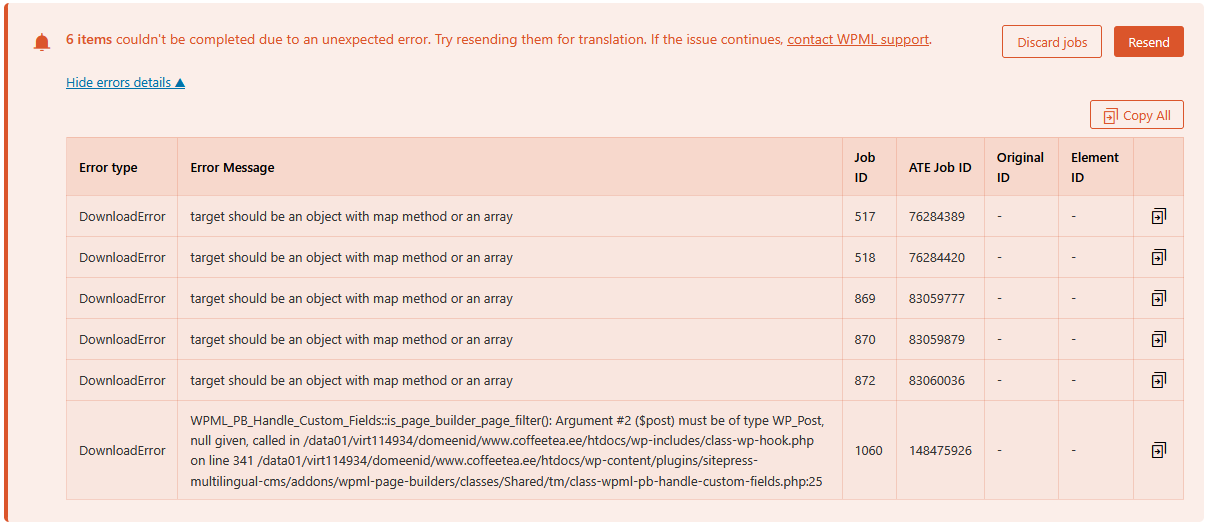
On our website hidden link (WordPress + WooCommerce + WPML), 6 items in WPML → Translation Dashboard cannot be completed due to an unexpected error.
Error details shown in WPML:
• Error type: DownloadError
• Message: “target should be an object with map method or an array”
• One of the errors also shows:
WPML_PB_Handle_Custom_Fields::is_page_builder_page_filter(): Argument #2 ($post) must be of type WP_Post, null given, called in /data01/virt114934/domeenid/www.coffeetea.ee/htdocs/wp-includes/class-wp-hook.php on line 341
File referenced:
wp-content/plugins/sitepress-multilingual-cms/addons/wpml-page-builders/classes/Shared/tm/class-wpml-pb-handle-custom-fields.php:25
What we have already tried:
• Resend jobs
• Discard jobs
• Clear cache
• Clear object cache
The issue persists and the items cannot be completed.
Please investigate why these translation jobs cannot be downloaded from ATE and how we can safely fix or reset them without breaking existing translations.
Thank you, I tried but the redelivery system does not work from our side. It gived error 500 with Bad URL.
Did you change the website URL lately?
Also, I'd appreciate it if you could give me the URL/User/Pass of your WordPress dashboard after you make sure that you have a backup of your website.
It is absolutely important that you give us a guarantee that you have a backup so if something happens you will have a point of restore.