Background of the issue:
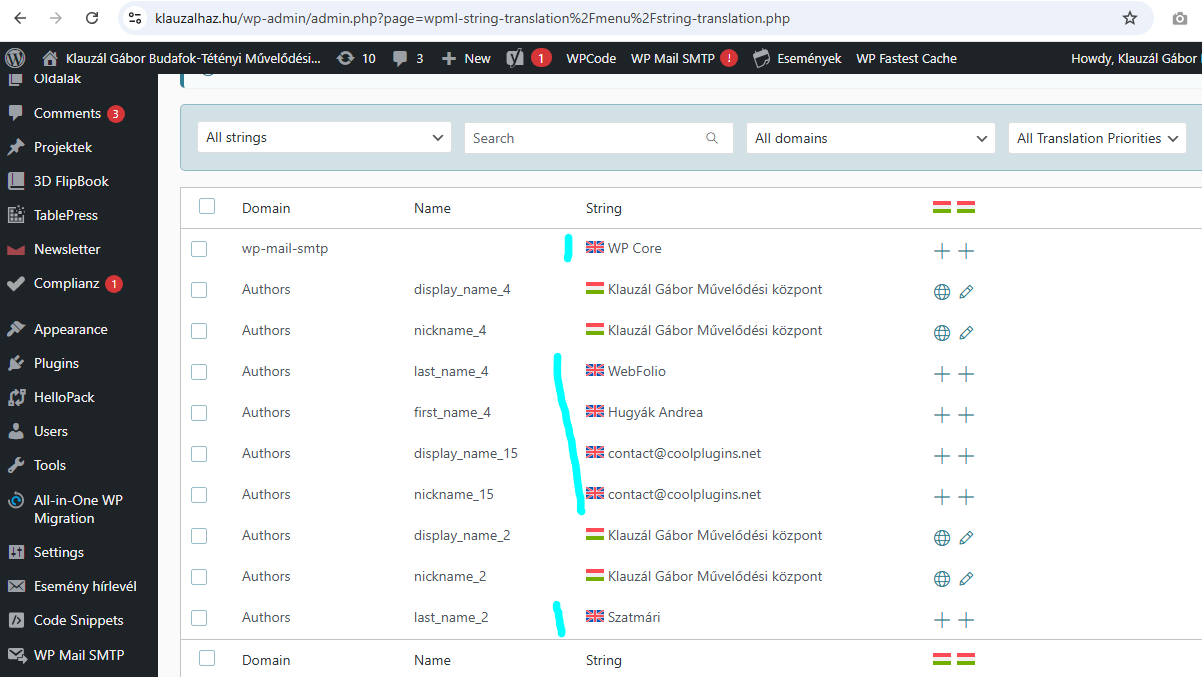
Why is also english on this setup, however, both websites are Hungarian language? Pleasee the image. And it is extremly disturbing, that you modify my text on the second windows!!!
Symptoms:
Why is also english on this setup, however, both websites are Hungarian language? Pleasee the image. And it is extremly disturbing, that you modify my text on the second windows!!!
Questions:
Why is also english on this setup, however, both websites are Hungarian language? Pleasee the image. And it is extremly disturbing, that you modify my text on the second windows!!!
String Translation tags each text snippet with a “source language” the first time it sees it.
If that first scan happened while the admin was set to another language (or the theme registered text in a different language), some snippets got tagged with the wrong language. This CAN occur and it can be fixed.
How to fix:
Go to WPML → String Translation.
Bulk-select the strings showing the wrong language.
At the bottom, open Change the language of selected strings, choose your real source language (e.g., English), and apply.
As the function/feature to fix this specific issue is already existing within WPML String Translation, I would recommend against using any SQL or code solutions as an alternative, that can be very environment depended and quite risky as it requires direct database alteration.