
This is the technical support forum for WPML - the multilingual WordPress plugin.
Everyone can read, but only WPML clients can post here. WPML team is replying on the forum 6 days per week, 22 hours per day.
| Sun | Mon | Tue | Wed | Thu | Fri | Sat |
|---|---|---|---|---|---|---|
| 10:00 – 14:00 | 10:00 – 14:00 | 10:00 – 14:00 | 10:00 – 14:00 | 10:00 – 14:00 | - | - |
| 16:00 – 20:00 | 16:00 – 20:00 | 16:00 – 20:00 | 16:00 – 20:00 | 16:00 – 20:00 | - | - |
Supporter timezone: Asia/Jerusalem (GMT+03:00)
Tagged: Compatibility
This topic contains 13 replies, has 0 voices.
Last updated by drazenD 1 month, 2 weeks ago.
Assisted by: Itamar.
| Author | Posts |
|---|---|
| February 12, 2026 at 11:27 am | |
 drazenD |
Hello Support Team, Environment: Problem Description: Additional Findings: Request: Form 56 url link : Form 73 url link : 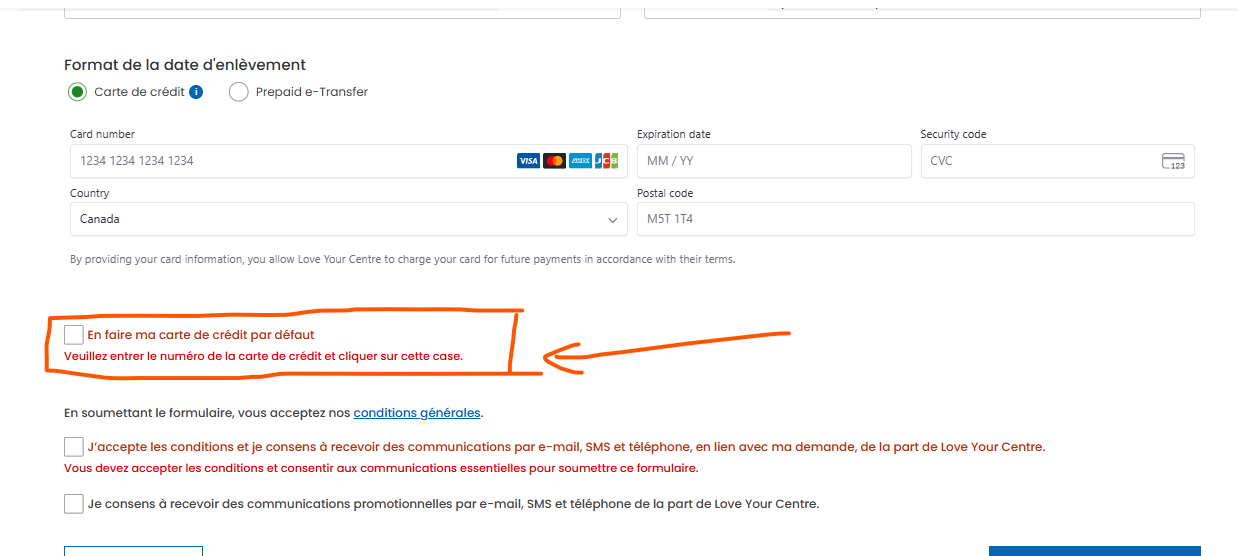 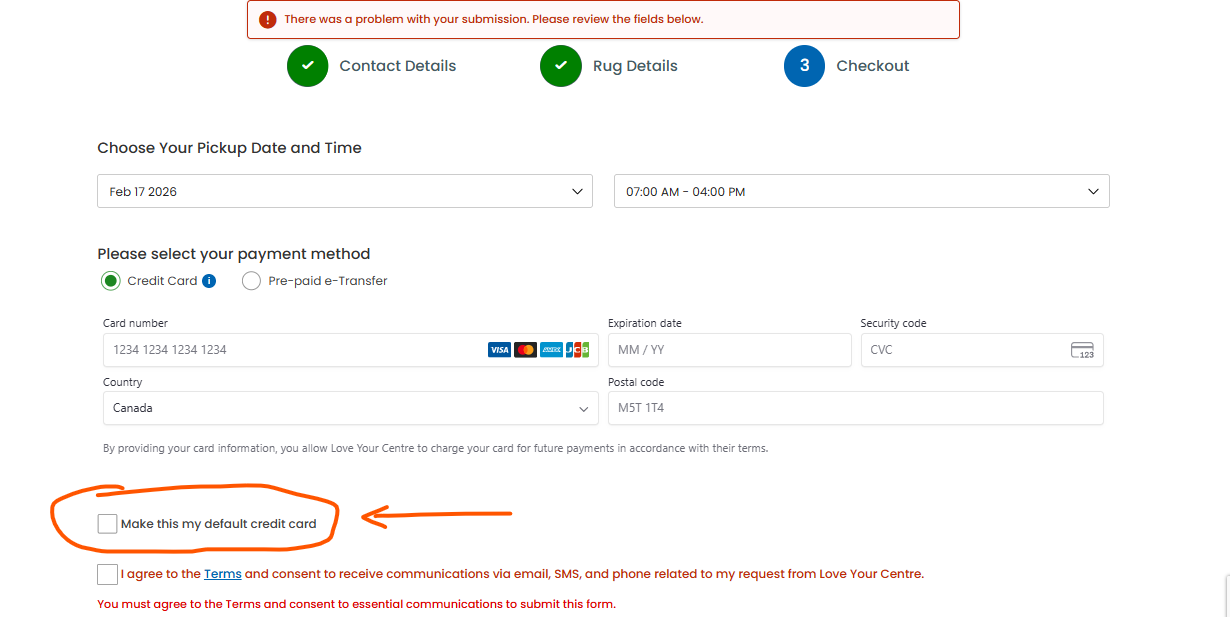 |
| February 12, 2026 at 12:44 pm #17816967 | |
 Itamar WPML Supporter since 02/2016 Languages: Hebrew (עברית ) Timezone: Asia/Jerusalem (GMT+03:00) |
Hi, Please try my suggestion from the chat. For your convenience, I'm adding it below. Please try it in minimum environment. We suspect a conflict with the theme or another plugin might be causing this problem. If possible, get your site into a minimum environment by switching to a default WordPress theme, such as TwentyTwenty-Four, and activating only Gravity Forms and WPML. First, you must check if the problem persists when just the theme is switched to TwentyTwenty-Four (for example). If it persists, deactivate all plugins except WPML and its add-ons (including Strings Translation) and Gravity Forms without any extensions. Then, please check if the problem persists. If it does not persist, start by activating the plugins individually and check whether the issue returns; then report to me which plugin was the culprit. **** Important! Please make a full site backup (files and DB) before you proceed with those steps**** *** If your site is live, you might want to try those procedures in a staging environment or a snapshot of your site on your local server or another server. *** |
| February 13, 2026 at 5:42 am #17819245 | |
|
drazenD |
Hi Team, I duplicated the site and followed the troubleshooting steps suggested by the support team. During testing, I identified a specific conflict affecting the validation message display in Gravity Forms. Issue Summary In Form ID 56, a required checkbox field (Field ID 258 – “Make this my default credit card”) is located on the final step of a multi-step form. When the Schedule Pickup button is clicked without selecting this checkbox, the validation behavior differs depending on plugin combinations: Scenario 1 - Gravity Forms Partial Entries add-on - Active Scenario 2 Scenario 3 Additional Observation In Form ID 73, the validation error message displays correctly even when both the Partial Entries add-on and WPML String Translation are active. Conclusion These tests indicate a likely compatibility conflict between: Could you guide us on this |
| February 15, 2026 at 11:01 am #17823329 | |
|
Itamar WPML Supporter since 02/2016 Languages: Hebrew (עברית ) Timezone: Asia/Jerusalem (GMT+03:00) |
Hi, Thanks for finding that the Gravity Forms Partial Entries add-on is the culprit in this case. Gravity Forms is, of course, officially compatible with WPML. However, its Gravity Forms Partial Entries add-on is unknown to us and has never been tested with WPML. We will do our best to help with this issue. We need to replicate this issue on a fresh WordPress installation. Then I'll be able to escalate it to our compatibility team. To do this, I created a test website with a clean WordPress installation. You can access it through this link: hidden link With this link, you'll be directly logged in. I already installed and configured WPML and the Gravity Forms plugin on this site. I also installed the Gravity Forms Partial Entries add-on. Can you please create a simple form and replicate this issue on the sandbox site? When everything is finished, and you can replicate the problem, please let us know. Important! Do not import your site to the test site. We must replicate the problem on a fresh, clean WordPress installation. |
| February 16, 2026 at 6:10 am #17824226 | |
|
drazenD |
Hi Team, Form ID: 1 Note: No values have been added to any fields when form is submitted. Scenario 1: I tested the form, and all required fields displayed their validation messages correctly. Scenario 2: After adding conditional logic to the First Choice checkbox in the gravity form, I tested the form again. In this case, the validation message for First Choice did not appear. When I deactivate the String Translation plugin, the validation message for First Choice appears correctly. Could you please review this conflict! Thank you   |
| February 16, 2026 at 4:03 pm #17826546 | |
|
Itamar WPML Supporter since 02/2016 Languages: Hebrew (עברית ) Timezone: Asia/Jerusalem (GMT+03:00) |
Hi, Thanks for replicating the issue on the sandbox site. Regards, |
| February 17, 2026 at 8:16 pm #17830384 | |
|
Itamar WPML Supporter since 02/2016 Languages: Hebrew (עברית ) Timezone: Asia/Jerusalem (GMT+03:00) |
Hi, This issue has been escalated to our compatibility team. Regards, |
| February 19, 2026 at 4:57 pm #17836835 | |
|
Itamar WPML Supporter since 02/2016 Languages: Hebrew (עברית ) Timezone: Asia/Jerusalem (GMT+03:00) |
Hi, Our compatibility team has provided the following explanation and workaround. The issue is related to gform_pre_render. The add-on calls GFFormDisplay::gform_pre_render() after validation. 1. Open the ...\wp-content\plugins\gravityformspartialentries\class-gf-partial-entries.php file. 2. Look for the method maybe_save_partial_entry() and on line 459. 3. Wrap this:
			if ( method_exists( 'GFFormDisplay', 'gform_pre_render' ) ) {
				$form = GFFormDisplay::gform_pre_render( $form, 'form_display', false, array() );
			} else {
				$form = gf_apply_filters( array( 'gform_pre_render', $form_id ), $form, false, array() );
			}
4. In a conditional that prevents it when WPML is active and it's a real submissions
		if ( defined('ICL_SITEPRESS_VERSION') && ! rgpost( 'is_submit_' . $form_id ) ) { // WPML - Prevent on real submission
			if ( method_exists( 'GFFormDisplay', 'gform_pre_render' ) ) {
				$form = GFFormDisplay::gform_pre_render( $form, 'form_display', false, array() );
			} else {
				$form = gf_apply_filters( array( 'gform_pre_render', $form_id ), $form, false, array() );
			}
		}
5. Save the changes. Please let us know how it goes. Regards, |
| February 23, 2026 at 4:57 am #17841618 | |
|
drazenD |
In future, If we update that plugin then this changes will be gone right...! If thats the case then, this is not the permanent solution... |
| February 23, 2026 at 10:16 am #17842234 | |
|
Itamar WPML Supporter since 02/2016 Languages: Hebrew (עברית ) Timezone: Asia/Jerusalem (GMT+03:00) |
Hi, Yes, as I mentioned in my previous reply, this is a workaround applied in the Gravity Forms Partial Entries plugin's files; hence, you will need to insert it again after an update. What we would like to know at this stage is whether this workaround fixed the issue on your site? Regards, |
| February 24, 2026 at 12:12 pm #17846440 | |
|
Itamar WPML Supporter since 02/2016 Languages: Hebrew (עברית ) Timezone: Asia/Jerusalem (GMT+03:00) |
Hi, Update This issue has been further escalated to our developers. If possible, they will try to fix this issue on our end. If not, then the fix will need to be included in the Gravity Forms Partial Entries files. We'll update you on any news regarding this issue. I appreciate your patience. |
| February 24, 2026 at 12:39 pm #17846677 | |
|
drazenD |
Hi Team, Thank you for the update - escalating it to the WPML developers team! Right now we have added it to the plugin file and it was working but it was not permanent solution. Thank you Itamar |
| February 25, 2026 at 11:24 am #17850934 | |
|
Itamar WPML Supporter since 02/2016 Languages: Hebrew (עברית ) Timezone: Asia/Jerusalem (GMT+03:00) |
Hi, I'm sorry, but it is not possible with a hook. Regards, |
| February 26, 2026 at 4:50 am #17853361 | |
|
drazenD |
Hi, Ok sure And Thank you for the update |






