Background of the issue:
I want to hide some translated content on the translated page of my site hidden link. I tried to delete translations for that part, but the translations keep coming back.
Symptoms:
Translations for the content I want to hide keep reappearing after I delete them.
Questions:
How can I hide specific content from the translated version of my site?
Thank you for contacting WPML Support. WPML’s Translation Editor is meant for translating content only, not for removing or restructuring it. The translated page will always reflect the structure of the original page.
If you need to hide or remove specific elements only from translations, you have two options:
1. Either try to hide it using custom CSS by using :lang pseudo class: hidden link
2. Or disable the WPML Translation Editor and edit the translated page in default WP Editor/Elementor page builder by following the below steps:
2.1. Open that page in the default language as Edit mode.
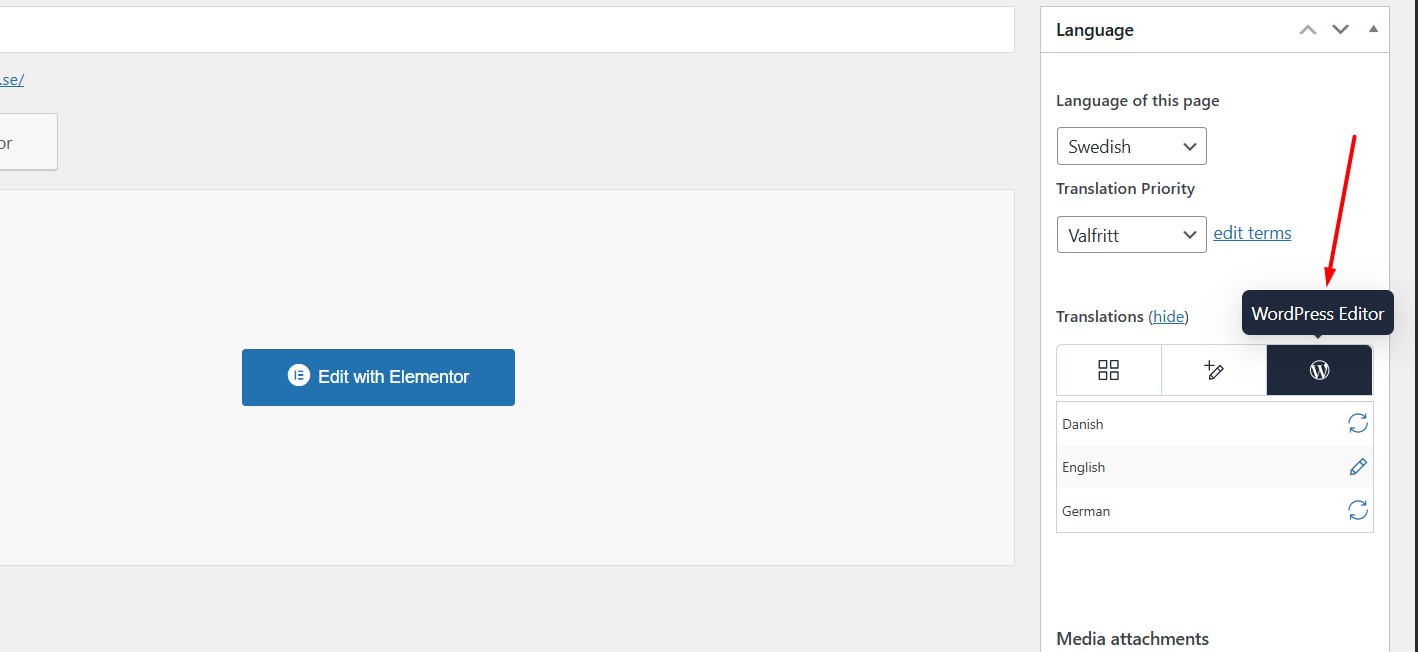
2.2. Enable the “WordPress Editor” from Languages metabox as you can see in the attached screenshot.
2.3. A popup will appear, prompting you to choose whether to apply this setting to just the current page or all pages. Select the option that best fits your needs.
2.4. Click on the translation icon for the secondary language. This will open the page in the default WordPress Editor, where you can edit your translation as you did in the default language.