Skip to content Skip to sidebar

This thread is resolved. Here is a description of the problem and solution.

Problem:
The client is experiencing issues with missing content on the homepage and products in the backend when trying to translate.
Solution:
We recommend the following steps:
1. Perform a minimal environment test by using a default theme (if applicable) and disabling all non-WPML and non-essential plugins to see if the error persists. It's advisable to make a backup of the site before doing this or to test on a staging copy.
2. Increase the WordPress memory limit as it's currently below the minimum requirements for WPML. Add the following code to your wp-config.php file right before the /* That's all, stop editing! Happy publishing. */ line:

/* Memory Memory Limit */<br />define('WP_MEMORY_LIMIT', '256M');<br />define('WP_MAX_MEMORY_LIMIT', '256M');

3. If using the '+' icon to add translations, refer to the documentation on fully flexible translating with the plus icons.
4. If your homepage content includes custom fields, follow the guidelines in this article: Translate sites built with ACF.

If these steps do not resolve the issue, or if the solution seems outdated or irrelevant to your case, we highly recommend checking related known issues at https://wpml.org/known-issues/, verifying the version of the permanent fix, and confirming that you have installed the latest versions of themes and plugins. If further assistance is needed, please open a new support ticket at WPML support forum.

This is the technical support forum for WPML - the multilingual WordPress plugin.

Everyone can read, but only WPML clients can post here. WPML team is replying on the forum 6 days per week, 22 hours per day.

Tagged: 

This topic contains 3 replies, has 3 voices.

Last updated by Andrey 1 year, 10 months ago.

Assisted by: Andrey.

Author Posts
June 1, 2024 at 6:24 pm #15694962

bruceJ-3

Most of home page missing in back end when I try and translate. Same with products. I think I have done everything right. Need help!

June 1, 2024 at 9:03 pm #15695050

Mateus Getulio
Supporter

Languages: English (English ) Portuguese (Brazil) (Português )

Timezone: America/Sao_Paulo (GMT-03:00)

Hi,

Thanks for contacting us.

Before your ticket is assigned to one of my colleagues, please allow me to walk you through some initial debugging steps. This will help speed up the support process.

Can you please test minimal, using a default theme(if applicable) and with all non-WPML and essentials plugins disabled to see if the error persists. If possible make a backup of the site before doing it or test on a staging copy.

Also, according to your Debug.info, the WP memory limit needs to be increased. PHP memory is fine, but WordPress uses 40Mb as default. The minimum requirements for WPML are 128 MB. (Kindly check this page https://wpml.org/home/minimum-requirements/)

You can increase it by adding the following code in your wp-config.php file right before the /* That's all, stop editing! Happy publishing. */ line:

/* Memory Limit */
define('WP_MEMORY_LIMIT', '256M');
define( 'WP_MAX_MEMORY_LIMIT', '256M');

If it still doesn't work, could you please elaborate a little more on this issue, so I can better understand? E.g. Is there an error message, what are the steps you've tried, etc.

Sometimes screenshots illustrating what you mean may go a long way to clarify what words fail to transmit, so if you like, make use of “upload an image” below the comment area.

Looking forward to helping you resolve this issue.
Mateus

June 3, 2024 at 10:34 am #15697412

bruceJ-3

Hi I have sorted the memory issue.

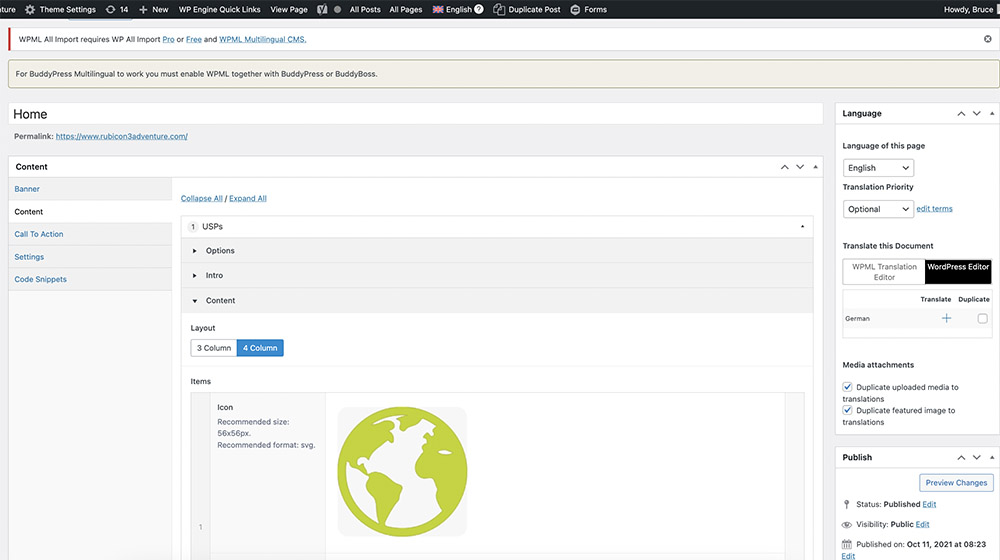
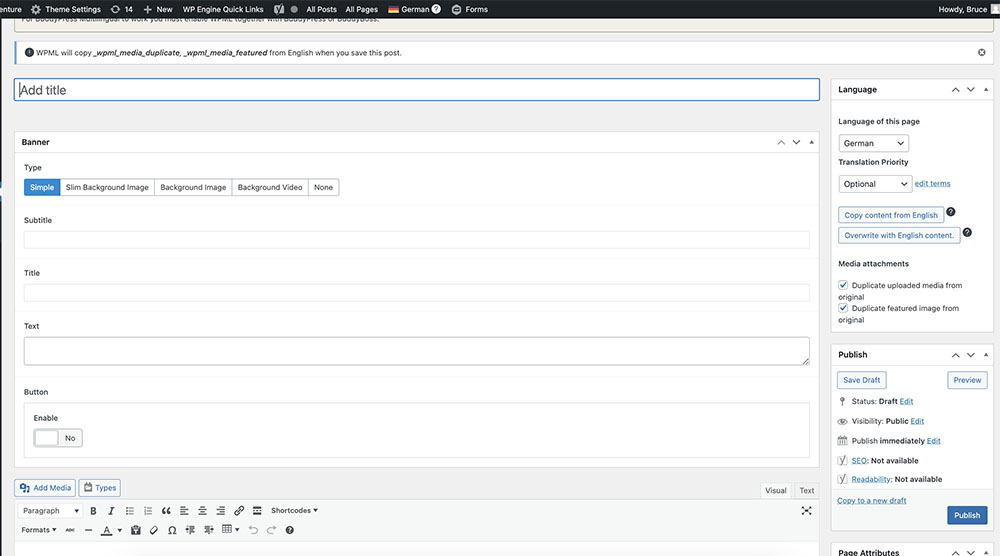
The issue we are facing is that most of the page does not seem to appear in the back end once we switch to German. Please see screenshots. Its as if WPML is not 'seeing' the content?

home page as we see it.jpg
home page as WPML sees it.jpg
June 3, 2024 at 9:23 pm #15699398

Andrey
WPML Supporter since 06/2013

Languages: English (English ) Russian (Русский )

Timezone: Europe/Kyiv (GMT+03:00)

Thank you for your feedback.

Have you tried clicking the "+" icon instead of switching to translate the page?

https://wpml.org/documentation/getting-started-guide/#fully-flexible-translating-with-the-plus-icons

How did you create the content for your homepage? Are these custom fields? If yes, I recommend following this article carefully: https://wpml.org/documentation/related-projects/translate-sites-built-with-acf/.