
This is the technical support forum for WPML - the multilingual WordPress plugin.
Everyone can read, but only WPML clients can post here. WPML team is replying on the forum 6 days per week, 22 hours per day.
| Sun | Mon | Tue | Wed | Thu | Fri | Sat |
|---|---|---|---|---|---|---|
| - | - | 9:00 – 18:00 | 9:00 – 18:00 | 9:00 – 18:00 | 9:00 – 18:00 | 9:00 – 18:00 |
| - | - | - | - | - | - | - |
Supporter timezone: America/Lima (GMT-05:00)
Tagged: Bug
This topic contains 21 replies, has 0 voices.
Last updated by Andreas W. 13 hours, 13 minutes ago.
Assisted by: Andreas W..
| Author | Posts |
|---|---|
| January 3, 2026 at 9:37 pm #17701695 | |
 johannesB-39 |
Hi there, trying to really open a support ticket, and not just get answers from the AI that do not ressolve my issue. Apparently, WPML does not change the permalinks in any widget and in the page excerpts. And if I do it manually, the sticky links does not point to the respective language. Instead, it shows always to the original languange, no matter on which language version of the site I am. I already run the sticky link script several times with the widget checkbox checked, updated the internal links in WPML -> configuration. The site uses the Classic Editor Plugin because of the outdated Edin theme. Anything else works just fine. Looking forard to your helping. Thanks |
| January 3, 2026 at 10:57 pm #17701731 | |
 Andreas W. WPML Supporter since 12/2018 Languages: English (English ) Spanish (Español ) German (Deutsch ) Timezone: America/Lima (GMT-05:00) |
Hello, I can not yet confirm the reported issues on a new test site. You can use the following link to log in to my test site: At this moment, I am unsure if your report relates only to the "Sticky Links" addon or WPML's internal link behavior. Please clarify. Note that for internal links to work as expected, these links need to remain locked on the Advanced Translation Editor. Once unlocked, the links need to be translated manually. See screenshot. Could you please confirm if your links are still locked inside the WPML Translation Editor and the linked content is translated and published? In doubt, please save the translations of the posts again. Let me know if further assistance will be needed. Best regards |
| January 5, 2026 at 12:31 am #17702591 | |
|
johannesB-39 |
Hello Andreas, thank you very much for your answer! And also for the provided test site. I tried to replicate, at least partially, my scenario. I'll come back to the results I got later. Let me first clarify some points and reply to your questions. We have a very peculiar scenario because this website project grew over many years and got through many adaptions. Its a multisite installation but ended up with just one site. As I mentioned, we use the Edin Theme with some custom code. This theme is not maintained any more by WordPress and does not support Gutenberg. So we use the Classic Editor and also the Classic Widget Plugin. The translations for three different language pairs were made in Matecat, a CAT Tool. We used the WPML - Matecat integration for that and ran into many issues on Matecat (I wouldn't recommend any more Matecat...). Somehow, we got it done, reimported all the translations back to WPML/Wordpress. But, sometimes, we had to do several exports of the same content from WPML to Matecat because of Matecat's blocking of some translation projects. So, we ended up with some little mess of exported, cancelled and re-exported and then re-imported content in WPML. But as far as we can see, this doesn't affect the final result with one exception: We think that this could be a possible cause of the fact that in some widgets the links do not point to the correct language. In other Widgets the links behave correctly. What get messed most during those export and re-import attempts were primarily some strings of the text widgets, although we fixed this later manually in the string translator of WPML. Please, note that, because of our particular scenario, we had to use the WordPress Editor in the case when translated content had to be modified after it got reimported from Matecat. We couldn't use the Advanced Translation Editor. Another reason for that were some advanced custom fields in some pages that needed individual modifications in the WordPress Editor after translation. So, what are our issues exactly at the moment: 1) Permalinks in page excerpts do not get changed into sticky links and always point, hard coded, to the original language, no matter on which language version of the site they appear. The Edin Theme has a feature to show selected page excerpts on the main page of the site. That's the reason why we'd like to fix this issue. 2) Permalinks in widgets neither get changed to sticky links, but, in some cases, point to the correct language, although still hard coded as links pointing to the original language. Here, WMPL seems to recognise these permalinks correctly and changes their link target on the fly to the correct language depending on the selected language version of the site. Sincerely, I wouldn't have expected this behaviour since they are permalinks and not sticky links. But it really works in one case, in most cases not. 3) If I change the permalinks in the page excerpts manually to sticky links, inserting the correct page ID, they neither get resolved, and always point to the original language target. As I mentioned, I tried to replicate this scenario on your test page. Obviously, I wasn't able to replicate also the export, translation and re-import of content using the WPML - Matecat integration. But the page excerpt and widget issue I got replicated. Here the results: 1) Permalinks in page excerpts do get changed into sticky links correctly, but, as on our site, do not get resolved correctly and always point to the original language, no matter which language version of the site is selected. Please, check the main page of the test site. There is a page excerpt and a footer widget at the end of the page tho show this behaviour. 2) Permalinks in widgets do not get changed to sticky links (at least under appearance -> widgets they remain unchanged as permalinks) but point to the correct language depending on the selected language version of the site. My questions are: 1) How could we fix the issue that permalinks in our page excerpts do not get changed to sticky links? 2) Why does any link in page excerpts, no matter of permalinks, manually or automatically (by WPML) created sticky link, always point to the original language? Is this a limitation of WPML? Please, check your test site. It is neither working there... 3) Do you have any idea how we could fix the widgets where the permalinks do not get resolved correctly by WPML, pointing always to the original language? The links in the text of the three penultimate "Featured page" widgets at the bottom of the main page of hidden link are affected. Whereas the link in the text of the last "featured page" widget (a link to the blog) behaves correctly. Concerning question 1 and 3, we have already tried to update the internal links under WPML -> settings and scan all posts under WPML -> sticky links several times, always in vain. Looking forward to your helping. Thanks! |
| January 6, 2026 at 10:05 am #17706100 | |
|
Andreas W. WPML Supporter since 12/2018 Languages: English (English ) Spanish (Español ) German (Deutsch ) Timezone: America/Lima (GMT-05:00) |
Hello, Could the reason be that the "Custom Permalinks" is used for such links that are not redirecting or converting correctly? I'd be happy to take a closer look at this and request temporary access (wp-admin and FTP) to the website to investigate the issue further. I may need to install a plugin called "All In One WP Migration" to create a copy of the website on which I can investigate the problem more thoroughly. I would also be very grateful if you could provide a staging site on your server for this purpose. If you have any questions about creating such a staging site, please contact your hosting provider. Please ensure that WPML is also registered on this staging site at https://wpml.org/de/account/websites/ You'll find the necessary fields below the comment section if you log in to leave the next reply. The information you provide will be private, meaning only you and I will be able to see and access it. IMPORTANT If you don't see the "wp-admin / FTP" fields, your login credentials for the post and website will be set to "PUBLIC." Do NOT publish the information unless you see the required wp-admin / FTP fields. The private reply form looks like this: hidden link When replying again, click "I still need assistance". Video: Please note that we are required to request this information individually on each ticket. We are not permitted to access any login information that was not specifically provided in the private reply form for this ticket. Best regards, |
| January 6, 2026 at 1:20 pm #17706730 | |
|
johannesB-39 |
Andreas, just a note on the ftp link a sent you: Please, disconsider all that comes after "kasserver.com/" Your ftp user account will point you directly to the correct folder, no need to use the folder path in the URL. Kind regards, |
| January 6, 2026 at 6:10 pm #17707622 | |
|
Andreas W. WPML Supporter since 12/2018 Languages: English (English ) Spanish (Español ) German (Deutsch ) Timezone: America/Lima (GMT-05:00) |
When it comes to Widgets, you will create the translations at WPML > String Translation, and I see that the links are not translated here. In this case, you will need to adjust the links in the translations, as internal linking only works for content created on the WordPress Editor. See screenshot for an example of a widget translation. I am still investigating the issue, when it comes to the internal links on the pages and their excerpts on the homepage, for I need to ask you for some more patience. 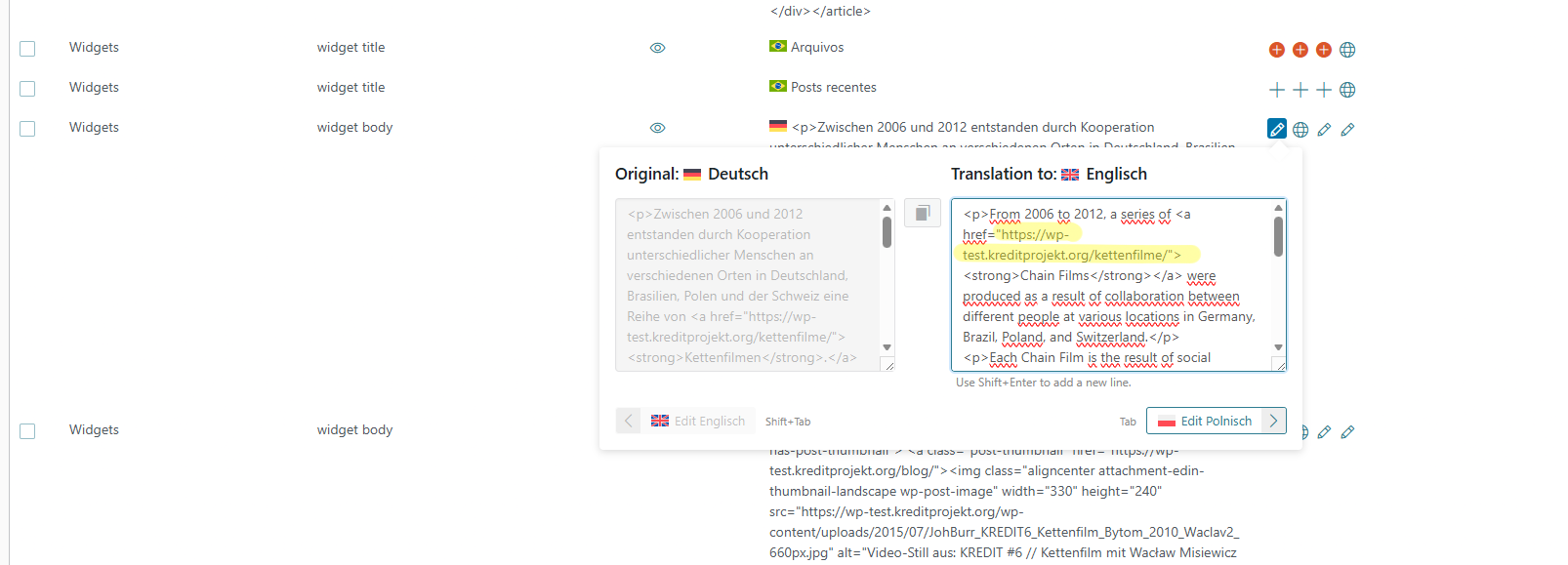 |
| January 6, 2026 at 6:43 pm #17707653 | |
|
johannesB-39 |
Hello Andreas, thanks for the quick feedback! Well, initially I thought that the links in widgets will get changed to sticky links by WPML too. But as far as I understood now, they have to be translated "hard coded", as to say... Actually, we didn't translate any link in our content, since we thought that they will get or got already changed into sticky links. But what's quite confusing to me now is that, apparently, the links in the widgets that are working correctly, those that point to the respective language correctly, got "translated", both on your test site and on our site. See the screenshots. But I do not remember that I have translated any links in any widget, neither on your test site when I tried to replicate our scenario there. Could it be that WPML injects the correct link for the respective language in case of an internal link? Or did I really translate the links in those widgets and just do not remember? Looking forward to your further investigating. Thanks.   |
| January 6, 2026 at 6:51 pm #17707687 | |
|
johannesB-39 |
Most links in text widgets on our site are internal links, as is the link to the blog in the screenshot above. But even so, fact is that just one text widgets is working correctly, or in other words, may be I just translated the link of this particular widget only and forgot the others or WPML injected the correct language specific link in just this widget only and failed on the others... What do you think? |
| January 6, 2026 at 8:51 pm #17707860 | |
|
Andreas W. WPML Supporter since 12/2018 Languages: English (English ) Spanish (Español ) German (Deutsch ) Timezone: America/Lima (GMT-05:00) |
Hi, Sticky Links will only take effect on the contents of pages or posts, but not on WPML String Translation. Source: https://wpml.org/documentation/getting-started-guide/sticky-links/ --- I ran some tests on a sandbox, and I can not confirm such issues here while using "Edin Theme", "Classic Editor", "Classic Widgets", "Sticky Links", and "Custom Permalinks". You can log into the sandbox here if you would like to revise my test: --- I ran further tests on your site: First issue: Second issue: This means we are handling various issues: 1) Custom Permalinks break internal linking 2) Edin Theme Homepage does not display translated pages (Theme issue) 3) Custom HTML Widgets are not displaying their translations in the sidebar About issue 1) Still, in the now translated witget int he sidebar, the links for "Kettenfilme" will not adapt automatically. The translated pages use a different slug: Original (altered with Custom Permalinks): Translation: The slug /project/ is expected here, but you are trying to alter the WordPress page hierarchy with Custom Permalinks. The original page usually exists at: I would not recommend doing this, as it overrides WordPress’s native permalink structure and can cause conflicts with WPML. |
| January 7, 2026 at 4:25 pm #17710209 | |
|
johannesB-39 |
Hello Andreas, I replicated the main principle of our site (with the featured pages on the front page) on your test site and also ran some test with quite interesting but confusing results. More about that later. You wrote: "Sticky Links will only take effect on the contents of pages or posts, but not on WPML String Translation." But the link you provided clearly states that But that's not exactly what is happening on our test site. May be because of Edin theme issues, as you mentioned. I don't know. You also wrote "Custom Permalinks break internal linking" (on our site?) I cannot confirm that. What I observed is that, except in Custom html Widgets and the notorious page extracts, all the internal links on any page got turned into sticky links correctly, pointing to the correct respective language depending on the selected language version of the site. The incoherency between the slugs of original content and those of translated content got fixed now. Thanks for pointing that out! I had already fixed it on the staging site, but the test site was created as a clone before that fix. So I had to fix it on the test site too. Besides me, there was also a WP developer working on this site, that's the reason why, sometimes, I'm not aware of some adjustments that were made during development. As far as I remember, the custom permalink plugin was only used to make the breadcrumb hierarchy differ from the page hierarchy due to a requirement from an earlier stage of website development. But I guess, the plugin isn't necessary any more now, so I deactivated it. About the tests I ran on your test site: 1) As you can see, the front page now has three different featured pages and, below that, three different custom html widgets (similar to our website layout). After setting this up, I updated the internal links under "WPML -> settings" and scanned all posts under "WPML -> sticky links" for several times. The results I got were quite surprising and confusing: *Links in the body text of pages* 1) All permalinks in the body text of the pages were turned into sticky links, as expected. That's great! But... So, I'm really confused about what of the three behaviours would be expected concerning links in the body text of pages. *Links in the excerpts of pages* Let's check now what happened to the links in the excerpts appearing on the front page: Conclusion: The behaviour of links in the excerpts of the German pages A and B makes sense, in the case that this would be, somehow, a limitation of WP, WPML or the Edin theme. But the behaviour of the links in the excerpt of "Test Seite C" is really confusing and not at all what I would expect. Why WPML shouldn't be able to turn permalinks in excerpts to sticky links, when it, in contrary, is able to change the ID number of a already existing sticky link (that were created manually) according to the correct language target??? *Links in widgets* When it comes to the Custom HTML Widgets, the behaviour concerning sticky links and permalinks even gets more confusing! Let me resume: I created the English widgets with its content in WP as normally. Then I went to the string translator and noticed that the third widget's content (widget C) didn't get registered as a string. So I did this in the "Admin Text Translation". Then I translated the content of all three widgets normally in the string translator. But, as I mentioned earlier, I did not translate the slug of the permalink, neither did I change the ID number of the manually created sticky link. In other words, all the links in the translated widget contents pointed to the respective English pages (the original language). As far as for this, everything was fine. But what happened now, was really strange: I refreshed my tab in the browser with the open backend to check my just concluded string translations (Note, at this point, I haven't run the "update internal links" nor the sticky link scan yet). And bum, the manually created sticky links were reverted into permalinks!!! And in addition, some stayed with the same target language (English), some got altered to German. The permalinks, in contrary, stayed permalinks, but sometimes the target language got changed to German. Here the details: 1) Widget A: The manually created sticky link with English target turned into permalink with German target. The permalink remained a permalink, but its target language was changed to German too. The behaviour of these links, when you check them in the frontend, reflects exactly their hard code in the string translations. In other words, no changes "on the fly" between backend and frontend. They appear and work on the frontend as they are hard coded in the backend... That is not at all what WPML promises in the support article quoted above! Note, Classic Editor and Classic Widget plugin are activated. I'm not familiar with the Gutenberg Editor... If you'd like to, you could try to reproduce these results. May be there are really some undiscovered bugs in WP, WPML or the no more maintained Edin theme. My own conclusion is that it's not worth spending more time on troubleshooting this, it looks so messy and contradicting, and I pretend to just adjust all the links in excerpts and widgets manually in this particular case of our project. That's what I'm thinking at the moment. But I'm curious to hear your opinion and advise... 😉 |
| January 7, 2026 at 4:59 pm #17710315 | |
|
johannesB-39 |
Andreas, just an additional point: You may have noticed that, in contrary to the links in the content of any page excerpt on the frontend, the title and the "Read more / Weiterlesen" link behave correctly! They appear as permalinks in the frontend, pointing to the correct language target. Taking this in consideration, it's more than astonishing, I think, that the links in the content of the excerpts do not behave accordingly, deviating from all logic and consistent behaviour.... |
| January 7, 2026 at 9:25 pm #17710742 | |
|
Andreas W. WPML Supporter since 12/2018 Languages: English (English ) Spanish (Español ) German (Deutsch ) Timezone: America/Lima (GMT-05:00) |
Hi, Sticky Links: On my test site, I can not confirm this for WPML String Translation or Widgets. The sandbox currently runs only with WPML, and if you go to /wp-admin/widgets.php you will see that the HTML Links inside those widgets are not converted, even after running a new scan in WPML > Sticky Links. I have confirmed this by revising the entries inside the database. I will escalate this issue now internally, so that the Second Tier Support takes a closer look at this. Custom Permalinks: Homepage's Featured Pages This said, so far I can not replicate issues 2) and 3) on the sandbox, which means that these seem to be specific issues that only occur on your production site. IMPORTANT: Further, if you currently revise the sandbox, I can see a theme related issues, that does not have anything to do with WPML. I changed the content of Page A, Page B, and Page C, but on the homepage you still see the old content. This also happens as long as WPML is disabled, which means that this seems to be a theme issue that is not caused by WPML, and it should be reported to Automattic. --- I will investigate on your site further today and get back to you about it later. |
| January 8, 2026 at 12:30 am #17710895 | |
|
Andreas W. WPML Supporter since 12/2018 Languages: English (English ) Spanish (Español ) German (Deutsch ) Timezone: America/Lima (GMT-05:00) |
Hi, I took another look at your site. Also, on your site, the "Featured Pages" section on the homepage is not updating its original content when testing the site without any further plugins. This is a theme issue and should be reported to Automattic. How to replicate: I added the word "UPDATED" at the beginning of the content and saved the page. The changes are not showing up on the homepage. As the original content is not rendering as expected, it would also be expected that translations do not show up correctly. This issue needs to be fixed first. Best regards |
| January 8, 2026 at 12:34 am #17710923 | |
|
Andreas W. WPML Supporter since 12/2018 Languages: English (English ) Spanish (Español ) German (Deutsch ) Timezone: America/Lima (GMT-05:00) |
Further, I have created a fix that will allow Sticky Links to adjust permalinks on widgets, but this will require code interaction inside the Sticky Links plugin. The plugin yet does not consider the new widget structure inside newer versions of WordPress. If you would like me to implement the fix on your site, please let me know. It solved the issue on my test site. Otherwise, it might be better to first wait for the reply from Second Tier Support and Development. |
| January 8, 2026 at 4:13 pm #17713674 | |
|
johannesB-39 |
Hello Andreas, thanks for your tests. Just let me resume: 1) The behaviour of internal links in the body text of pages is as expected, both on my site and also on the sandbox: The permalinks get changed into sticky links by WPML and point always to the correct respective target language. 2) According to your tests, links in the content of page excerpts are changed into sticky links by WPML correctly and point to the correct respective language (in the Sandbox test example: On the German front page, they link to the German subpages and not to the English ones). You wrote that you weren't able to reproduce this issue on the sandbox and, consequently, attributed it to the Edin theme or to an issue related to my development environment, custom code or what ever. Correct? 3) Also according to your testing, widgets do not get scanned by WPML, neither on my site, nor on the sandbox. Consequently, permalinks in widgets do not turn into sticky links and don't point to the correct respective language. Right? As for 1), this is what I have reported here in the chat since the beginning. My issues are related to 2) and 3). And I cannot confirm your results concerning 2) and 3), at least not fully: Concerning 2): Did you try to reproduce this on the sandbox with Edin theme? Or did you test this on any other theme? Could you show me your results, please? Where is it working correctly in your test environment? Concerning 3): Can you confirm this, please? For me, the behaviour of the internal permalink in widget A is the desired and also expected one, independently of his being changed into sticky link or not by WPML. I just want the links to point to the correct target language. Why isn't this happening in the case of widget B and C? They are all the same? Did you try to replicate this on the sandbox with Edin theme? Or did you test this on any other theme or in any other environment? I disconsidered now my testing with manually created sticky links, since you wrote that one should avoid to do this and, instead, always let WPML create them automatically. But even with permalinks, I really cannot fully confirm your results. Internal permalinks do not work correctly on your sandbox with the Edin theme and WPML plugin activated, neither in page excerpts nor in widgets. At least, they do not behave in a consistent and replicable manner in my tests! Last but not least: I neither can confirm the issue you reported about the "Featured Pages" section on the front page not getting updated when content is updated in the backend of the subpages. On the sandbox, this works just fine and normally. You just have to insert your updated text in the "excerpt" box of the Editor in backend! Only changing the body text of the page won't alter the content of the excerpt, you have to do that manually in the excerpt box. See the two screenshot attached to my post here. Looking forward to your explaining more in detail your results!   |