
This thread is resolved. Here is a description of the problem and solution.
Problem:
You are experiencing a fatal error when saving or editing a translation page in WordPress, where WPML's hook crashes due to expecting a WP_Post object but receives null. This issue persists even after updating to WPML 4.9.2.
Solution:
We have investigated the issue and found that it appears to be specific to your hosting environment rather than a bug in WPML itself. We recommend contacting your hosting provider to ensure that the REST API is not blocked and to temporarily disable any restrictive security layers that might be interfering with the save process. Additionally, consider whitelisting WPML-related requests from these protections. If the problem continues, you might need to consider changing your server.
For more details on REST API dependencies, please visit https://wpml.org/documentation/support/rest-api-dependencies/.
If this solution does not resolve your issue or seems irrelevant due to being outdated or not applicable to your case, we highly recommend checking related known issues at https://wpml.org/known-issues/, verifying the version of the permanent fix, and confirming that you have installed the latest versions of themes and plugins. If needed, please open a new support ticket for further assistance.
This is the technical support forum for WPML - the multilingual WordPress plugin.
Everyone can read, but only WPML clients can post here. WPML team is replying on the forum 6 days per week, 22 hours per day.
Tagged: Known issue
This topic contains 11 replies, has 0 voices.
Last updated by yavuzS-4 2 weeks, 1 day ago.
Assisted by: Andrey.
| Author | Posts |
|---|---|
| April 6, 2026 at 5:13 pm #17952114 | |
 yavuzS-4 |
Hi, The site migration is now complete and oss-material.ca is properly registered as an independent site. However, the original fatal error still persists even after updating to WPML 4.9.2. The error occurs when saving or editing an existing translation page in the WordPress editor. WordPress attempts to create a post revision during save, wp_insert_post returns null, and WPML's hook crashes because it expects a WP_Post object. Full error details: An error of type E_ERROR was caused in line 55 of the file: Error message: Stack trace summary: This appears to be a bug in WPML 4.9.2 where the ItemUpdateEvent hook does not handle a null $post argument gracefully. Could you please escalate this as a bug report or provide a fix? Thank you! |
| April 7, 2026 at 1:22 pm #17954460 | |
 Andrey WPML Supporter since 06/2013 Languages: English (English ) Russian (Русский ) Timezone: Europe/Kyiv (GMT+03:00) |
Thank you for contacting WPML support. Did you migrate the site using the All-in-One WP Migration plugin? If so, you may be encountering a known issue. Please follow the workaround described here to resolve it: |
| April 7, 2026 at 2:07 pm #17954536 | |
|
yavuzS-4 |
Hi Andrey, I used UpdraftPlus plugin for migration. |
| April 7, 2026 at 2:14 pm #17954556 | |
|
Andrey WPML Supporter since 06/2013 Languages: English (English ) Russian (Русский ) Timezone: Europe/Kyiv (GMT+03:00) |
Are you sure that the entire database and all files were migrated correctly? Would it be possible to perform a test migration to a local environment using an alternative method (e.g., a plugin like Duplicator or All-in-One WP Migration within the fix above) and check whether the issue still occurs? I’ve also enabled debug information for this support ticket. Please follow this guide to retrieve it from your site and share it |
| April 7, 2026 at 2:20 pm #17954562 | |
|
yavuzS-4 |
Same setup and content works fine on another server where I copied the content from. |
| April 7, 2026 at 2:25 pm #17954585 | |
|
yavuzS-4 |
added the info. |
| April 7, 2026 at 2:27 pm #17954588 | |
|
Andrey WPML Supporter since 06/2013 Languages: English (English ) Russian (Русский ) Timezone: Europe/Kyiv (GMT+03:00) |
I suspect this may be related to a server configuration issue or possibly corrupted database entries. I would need temporary access to your site (wp-admin and FTP)—preferably to a staging or test environment where the issue can be reproduced. When you submit your next reply, you will find the required fields below the comment area. Please note that this information is private and will only be visible to you and me. Additionally, please provide the exact steps to reproduce the issue, so I can follow the same process on my end. Let me know if I have your permission to temporarily install the Adminer plugin. |
| April 7, 2026 at 6:41 pm #17955066 | |
|
yavuzS-4 |
The fatal error sometimes occurs. So to create a language version of the related page I click + sign on the right of the page name (ie: please see the attached 001.png as an example to create the Portuguese version of the page). Then I copy the content from English verison and then change all the text (content) to that language (ie: Portuguese). After clicking publish, WordPress normally saves. It generally does. But sometimes I get that fatal error (did not get a screenshot but it says: "There has been a critical error on this website. Please check your site admin email inbox for instructions. If you continue to have problems, please try the support forums. Learn more about troubleshooting WordPress."). The interesting part is that, the page is saved despite that error. I'm not sure if there's been a firewall delay just about that saving process and WPML can not communicate with its servers at that exact delay period, or there's a mistake on the database itself. I'm not a code guy, just try to understand and solve the issue. 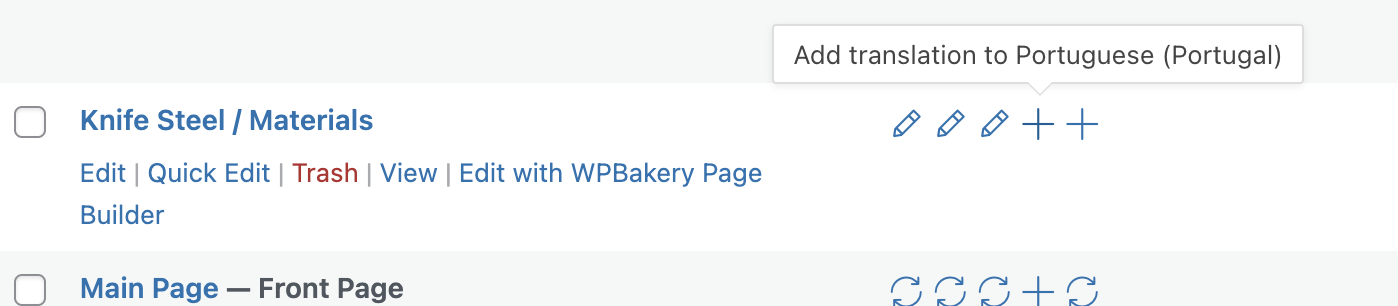 |
| April 8, 2026 at 1:58 pm #17957066 | |
|
yavuzS-4 |
Hi there, Following up on this ticket. Here is a summary of what has been done so far and the current status on hidden link : **What was done:** **Current status:** This confirms the bug is in WPML's ItemUpdateEvent hook, which does not handle a null $post argument gracefully. Any plugin that calls wp_insert_post() can trigger this crash. Full error: Call stack confirms the trigger: Could you please escalate this as a bug and provide a fix or patch? Here is the full bug report: Uncaught Error: WPML\UserInterface\Web\Infrastructure\WordPress\CompositionRoot\Config\Event\Translation\Links\ItemUpdateEvent::WPML\UserInterface\Web\Infrastructure\WordPress\CompositionRoot\Config\Event\Translation\Links\{closure}(): Argument #2 ($post) must be of type WP_Post, null given, called in /data/19/7/77/157/7077646/user/8058180/htdocs/wordpress1/wp-includes/class-wp-hook.php on line 343 in /data/19/7/77/157/7077646/user/8058180/htdocs/wordpress1/wp-content/plugins/sitepress-multilingual-cms/vendor/wpml/wpml/src/UserInterface/Web/Infrastructure/WordPress/CompositionRoot/Config/Event/Translation/Links/ItemUpdateEvent.php on line 55 Thank you! |
| April 9, 2026 at 6:56 am #17958134 | |
|
yavuzS-4 |
Hi, Following up with an update on both issues. **REST API 403 Forbidden Issue:** As a workaround, we implemented the following code via the Code Snippets plugin, which intercepts WPML's REST API status check before it reaches the server and returns a synthetic 200 OK response: add_filter( 'pre_http_request', function( $pre, $args, $url ) { After applying this, the admin panel became significantly faster and the 403 errors stopped. **ItemUpdateEvent Fatal Error:** We are sharing this in case it is useful for your team to investigate the root cause. The site is now stable. Thank you! |
| April 9, 2026 at 10:44 am #17959059 | |
|
yavuzS-4 |
Hi, Following up on the ItemUpdateEvent fatal error. The issue is still occurring. Current behavior: This is happening when editing translation pages in the WordPress classic editor. Full error: Call stack confirms: Note: The REST API 403 issue has been resolved via a pre_http_request filter workaround. This ItemUpdateEvent error is a separate, unresolved issue. Could you please provide a fix or patch for this bug? Thank you! |
| April 9, 2026 at 12:33 pm #17959397 | |
|
Andrey WPML Supporter since 06/2013 Languages: English (English ) Russian (Русский ) Timezone: Europe/Kyiv (GMT+03:00) |
Thank you for providing the additional details. I’ve taken a close look at the issue and attempted multiple times to reproduce the error by following your steps when saving a post translation, but I was unable to replicate it. I also enabled the debug.log to monitor for any related errors during the process. Based on my findings, the issue appears to be specific to your hosting environment. This is why I’m unable to escalate it further at this stage—most likely, it would not be reproducible on a local setup at all. This strongly suggests that the root cause is related to server configuration or security settings (layers), as you already mentioned, and you have already tested the same site on different servers, where everything works as expected. It’s possible that certain server-side security layers (such as firewalls, mod_security, Imunify360, or similar protections) are interfering with the save process, which could result in the fatal error you’re experiencing. Regarding the REST API, this is not a bug. The REST API should not be blocked, as WPML relies on it for core functionality, just like WordPress itself. More details here: I would recommend contacting your hosting provider again and asking them to ensure the REST API is not blocked. Temporarily disable any restrictive security layers for testing. Or whitelist/exclude WPML-related requests from those protections. If it persists, consider changing the server as well, since we are unable to fix this on our end. |
| April 9, 2026 at 6:07 pm #17960382 | |
|
yavuzS-4 |
Dear Andrey, Thank you for your patience and efforts in troubleshooting this issue. I have decided to migrate the website to a new server environment that is specifically optimized for WordPress. I’m hopeful that on this new infrastructure, I won't need to rely on the workaround we implemented to bypass the previous server's limitations. Thanks again for your support. Best regards, |





