
This is the technical support forum for WPML - the multilingual WordPress plugin.
Everyone can read, but only WPML clients can post here. WPML team is replying on the forum 6 days per week, 22 hours per day.
Tagged: Large Sites
This topic contains 43 replies, has 0 voices.
Last updated by Sumit Singh 1 month ago.
Assisted by: Sumit Singh.
| Author | Posts |
|---|---|
| November 18, 2025 at 5:44 pm #17589028 | |
 cristianS-23 |
Background of the issue: Symptoms: Questions: |
| November 19, 2025 at 1:03 am #17589910 | |
 Kor WPML Supporter since 08/2022 Languages: English (English ) Timezone: Asia/Singapore (GMT+08:00) |
Thanks for your reply. I'm sorry to hear that the suggested method did not work for you. I will require temporary access (WP-Admin and FTP) to a test site where the problem has been replicated, if possible. This will enable me to provide better assistance and determine if any configurations need to be modified. Please note that it is important to have a backup for security purposes and to prevent any potential data loss. You can use the UpdraftPlus plugin (https://wordpress.org/plugins/updraftplus/) to fulfill your backup requirements. Your upcoming reply will be treated with confidentiality and will only be visible to you and me. ✙ To resolve the issue, I may need your consent to deactivate and reactivate plugins and the theme, as well as make configuration changes on the site if necessary. This emphasizes the significance of having a backup. |
| November 20, 2025 at 9:57 am #17594782 | |
|
Kor WPML Supporter since 08/2022 Languages: English (English ) Timezone: Asia/Singapore (GMT+08:00) |
Thanks for your patience. I can confirm that I also see the issue when inspecting your Website. Could you please clone the site to a staging environment? Once that’s ready, I’ll proceed with basic troubleshooting steps such as deactivating plugins and switching themes. |
| November 21, 2025 at 12:54 pm #17599076 | |
|
cristianS-23 |
I have created stage site where you can test it - hidden link same credentials to access as before. |
| November 21, 2025 at 7:06 pm #17600433 | |
|
Kor WPML Supporter since 08/2022 Languages: English (English ) Timezone: Asia/Singapore (GMT+08:00) |
Thanks for your patience. Could you please generate a new sitekey for this domain ? hidden link then share it with me here. I'm getting "Api error missing resource: No sitekey found for this website" shown here hidden link 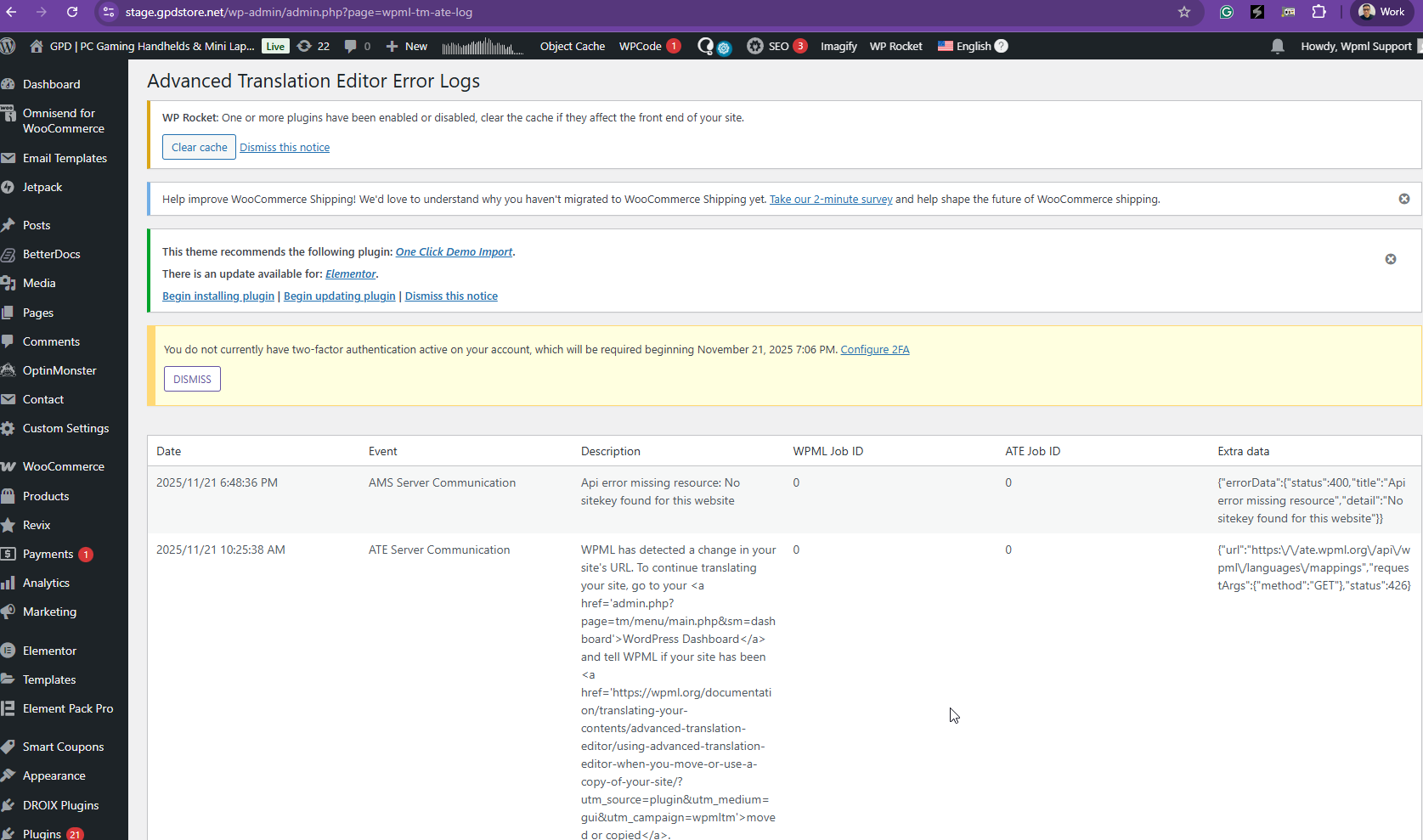 |
| November 22, 2025 at 9:23 am #17600919 | |
|
cristianS-23 |
here is the key for that site 07ab41db03 |
| November 24, 2025 at 9:15 am #17603557 | |
|
Kor WPML Supporter since 08/2022 Languages: English (English ) Timezone: Asia/Singapore (GMT+08:00) |
Thanks for your reply. Sorry, I'm getting this error now "LOGIN BLOCKED: 2FA is required to be active on your account. Please contact the site administrator." when I try to login to your Website. Could you check? |
| November 24, 2025 at 9:18 am #17603582 | |
|
Kor WPML Supporter since 08/2022 Languages: English (English ) Timezone: Asia/Singapore (GMT+08:00) |
Thanks for your reply. Sorry, I'm getting this error now "LOGIN BLOCKED: 2FA is required to be active on your account. Please contact the site administrator." when I try to login to your Website. Could you check? |
| November 24, 2025 at 2:17 pm #17605209 | |
|
cristianS-23 |
I've set grace period for 2FA Two-factor authentication will be required for user wpml.support beginning December 4, 2025 2:17 PM. |
| November 24, 2025 at 4:35 pm #17605722 | |
|
cristianS-23 |
I think issue is related to ATE not accepting jobs, because credits seem to be stuck on the website, but not synced with WPML server. see screenshots   |
| November 24, 2025 at 4:41 pm #17605786 | |
|
cristianS-23 |
what is more confusing, I've tried sending GPD WIN 5 Docking Station review: Exploring the Official Accessory post for translation, and then generated a report, so credits were used, but translation didn't update. YOUR WPML software is leaky like a sieve. constant bugs. We paid in translations more than $10K only this year and constant issues! As well as if I check reports, sometimes instead of updating translations (for minor changes) we were charged for full translations and etc...   |
| November 24, 2025 at 5:19 pm #17605846 | |
|
Kor WPML Supporter since 08/2022 Languages: English (English ) Timezone: Asia/Singapore (GMT+08:00) |
Thanks for your patience. I’ve checked your site and the translations are already available in the Advanced Translation Editor. You can see this in the screen recording hidden link . Once I manually opened the Advanced Translation Editor for the page, the translated content appeared correctly. No additional credits were used. The reason the translated posts were not visible in the Translation Dashboard is likely due to the previous stuck translation process. Now that this has been resolved, please review the translations in the Advanced Translation Editor and mark them as complete. Once done, the translated content should appear correctly on the frontend. |
| November 24, 2025 at 7:19 pm #17606061 | |
|
cristianS-23 |
Issue is not resolved.  |
| November 24, 2025 at 7:27 pm #17606081 | |
|
cristianS-23 |
this is an error I see on live in logs for WPML.  |
| November 24, 2025 at 9:25 pm #17606266 | |
| cristianS-23 |
Another bug found. And it's actually installed!!! Confirmed: This is a WPML Bug WooCommerce Multilingual IS installed and active: | What WPML Shows | Reality | Proof: Why WPML's Detection is Failing: The WPML support page checks for installed companion plugins, but its detection logic is flawed. It's likely checking: Impact: Recommendation: New threads created by Kor and linked to this one are listed below: https://wpml.org/forums/topic/support-page-wrongly-shows-plugins-not-installed/  |

