This thread is resolved. Here is a description of the problem and solution.
Problem: After setting up WPML on the production site, the client encountered a 404 error on the homepage and could not access any pages, whether draft or published. The pages section showed the correct number of pages but did not display them. Solution: We installed a local copy of the client's site and noticed that all pages were in the same language. We recommended re-importing the pages and translations following the guide on WPML export and import. After applying troubleshooting steps, we were able to retrieve the pages, posts, and products on the client's site.
If this solution does not resolve your issue or seems outdated, please check related known issues at https://wpml.org/known-issues/, verify the version of the permanent fix, and confirm that you have installed the latest versions of themes and plugins. If the problem persists, we highly recommend opening a new support ticket at WPML support forum.
This is the technical support forum for WPML - the multilingual WordPress plugin.
Everyone can read, but only WPML clients can post here. WPML team is replying on the forum 6 days per week, 22 hours per day.
Hi,
I used a staging site for my translations and I had no issues with my development site.
I couldn't move my staging site to my production site so I'm trying to move my translations manually.
The first thing I did was to activate and set up WPML on my production site but as soon as I did so, my site broke.
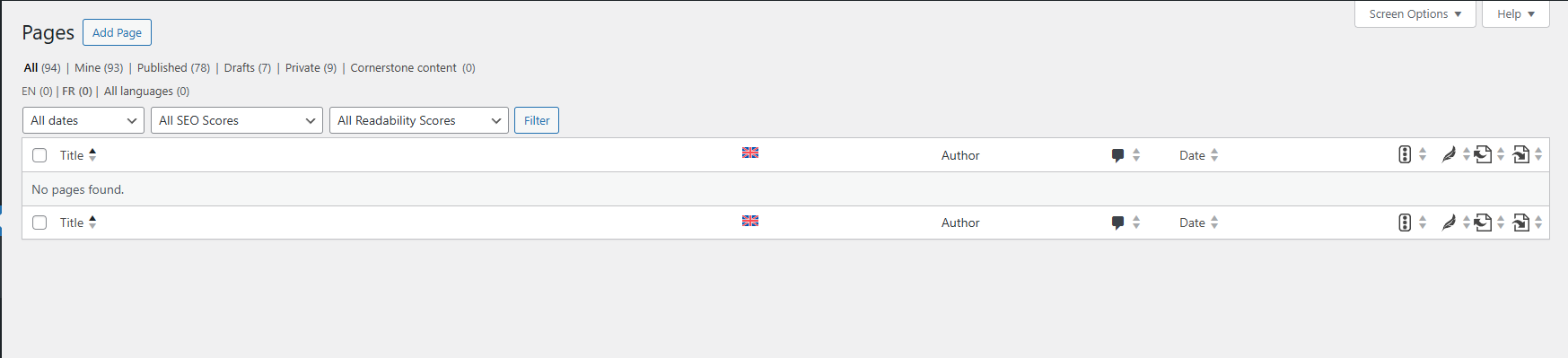
I'm seeing a 404 error on my homepage (I've had to put the site in maintenance mode) and I don't have access to any of my pages, whether draft or published, in my pages section. Do be more precise, the number of pages is reflected correctly but they're not appearing in the pages section (screenshot attached).
I tried the troubleshooting steps from the following url, but to no avail: https://wpml.org/forums/topic/all-pages-are-gone/
I need urgent help to troubleshoot the issue because my website is offline for the moment.
Thank you
Thanks for contacting WPML forums support. I'll be glad to help you today.
I would need to look closely at your site, so I would need to request temporary access (WP-Admin and FTP) Preferably to a test site where the problem has been replicated.
Your answer will be private, meaning only you and I can access it.
❌ Please back up your database and website ❌
✙ I need your permission to deactivate and reactivate the plugins and themes and change site configurations. This is also why the backup is critical.
✙ I also need your permission to take a local copy of your site to debug the issue without affecting your live site.
Thanks for the access details. I installed a local copy of your site and was able to retrieve the pages, but I noticed they are all in the same language. (Kindly check the attached screenshot)
I can do the same on your site, but you may need to re-import your pages and translations.
Please review this guide for more information on importing your content.
Kindly let me know if you would like me to run the troubleshooting steps on your site.
Thank you for taking the time to troubleshoot our website.
The pages are all in the same language (FR) because I created a staging site for the translations (staging.simine.fr). Unfortunately, due to a bug, my staging site is missing Woocommerce product information so I can't publish my translations from my staging site to my development website.
I was trying to enable WPML on my production site to be able to import my translations from the staging website when I encountered the problem of the missing pages.
I would like you to run the troubleshooting steps on our site (simine.fr) so that I can access my pages. In the next step, I'll have to import my translations from my staging site manually.
Another issue I see on our website is that our WooCommerce products seem to have the same disappearing problem as our pages. Do you think your troubleshooting will also restore our WooCommerce data?
I have done most of my translations on my staging site: staging.simine.fr
On the Translation Dashboard of my staging site, I see the following message:
"This site has moved to a new location
You or someone else moved this site to hidden link. Please keep in mind that:
Translations that you do at hidden link will not appear on this site.
You cannot edit translations on this site.
The site at hidden link is using the same credits for automatic translation as this site.
If you didn't intend to move this site to hidden link, you can indicate that this site should be at hidden link.
If you prefer not to move this site, you can mark it as a copy and enable automatic translation for it."
Which option should I choose if I want to have access to my translations in my staging site, export them to my production site, and continue the remaining translations on my production site?