This thread is resolved. Here is a description of the problem and solution.
Problem: If you're experiencing 404 errors on product category pages after activating WPML, it might be due to incorrect translation settings. Solution: We recommend checking the translation of your product categories in WPML. Specifically, ensure that the product category slug is correctly translated to match the original language setting. You can do this by navigating to WPML → String Translation and verifying that the 'product-category' is translated appropriately. If it's not, update the translation accordingly.
If this solution does not resolve your issue, or if it seems outdated or not applicable to your case, we highly recommend opening a new support ticket. Additionally, please check related known issues at https://wpml.org/known-issues/, verify the version of the permanent fix, and confirm that you have installed the latest versions of themes and plugins. For further assistance, you can also visit our support forum at https://wpml.org/forums/.
This is the technical support forum for WPML - the multilingual WordPress plugin.
Everyone can read, but only WPML clients can post here. WPML team is replying on the forum 6 days per week, 22 hours per day.
Everything works fine except product category pages throw out 404 error. I troubleshooted and it appears that problem occurs upon WPML activation, as otherwise everything works fine.
Could you please share a few specific examples (URLs or screenshots) where the issue can be observed? This will help me better understand the exact behavior you’re experiencing.
Also, does the issue still persist if you temporarily disable the WPML plugins and then visit the main category page? This test will help determine whether WPML is directly involved or if the issue may be caused by something else (for example, the theme or another plugin).
The issue goes away when WPML is disabled. I clicked through all plugins and "WPML" is at the end... heh. Also it's the same using stock theme, woo storefront theme, etc. I checked all this. Flushed the permalings, whatnot.
Here's the main Shop page: hidden link
There there's three small menus and the second one is for categories. Every of them should work, the URL shows up correct [for example: hidden link;
I need to request temporary access (wp-admin and FTP) to your site—preferably to a test site where the problem has been replicated if possible—in order to be of better help. When you log in to leave your next reply, you will find the needed fields below the comment area. The information you will enter is private, meaning only you and I can see and access it.
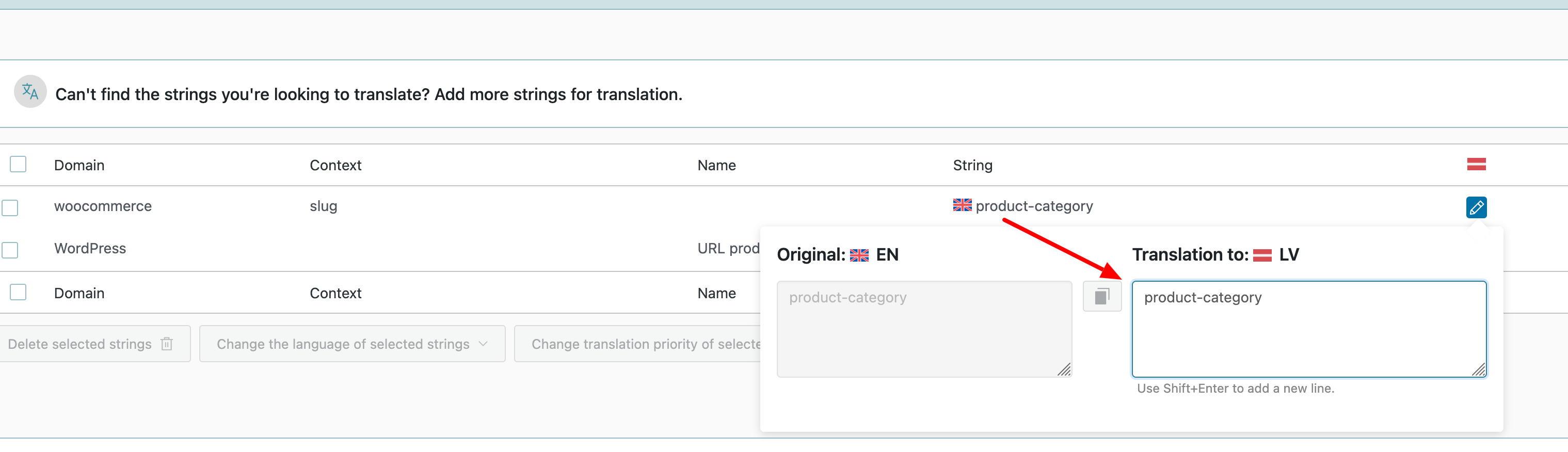
Can you please check now? I think the product-category slug was translated incorrectly. I have corrected its translations in WPML → String Translation. It looks to be working now.
It didn't work in the original language because the product category was translated into its native language. However, your site was still pointing to product-category. I have re-translated it to product-category in WPML → String Translation. I am attaching the screenshot to see how it was done.