
This is the technical support forum for WPML - the multilingual WordPress plugin.
Everyone can read, but only WPML clients can post here. WPML team is replying on the forum 6 days per week, 22 hours per day.
Tagged: WCML
Related documentation:
This topic contains 13 replies, has 0 voices.
Last updated by haraldH-5 1 week, 3 days ago.
Assisted by: Bobby.
| Author | Posts |
|---|---|
| March 23, 2026 at 1:20 pm #17918762 | |
 haraldH-5 |
The option Show custom MO files pre generation in troubleshooting does not work anymore and i know that there are some strings that need translation. When i click on it, it simply like refreshes the page, but nothing else happens. On my other website bonsai-europe.com its exactly the same. This are my WPML settings: |
| March 24, 2026 at 5:40 pm #17923694 | |
 Bobby WPML Supporter since 04/2015 Languages: English (English ) Timezone: America/Los_Angeles (GMT-07:00) |
Hi there, Please go to WPML->Support->Troubleshooting->Run the option to "Show custom MO files pre generation" -> once the page reloads go to WPML->Theme and Plugins localization and you will see the option to start the process. Let me know your results, please. |
| March 25, 2026 at 11:47 am #17926130 | |
|
haraldH-5 |
It starts generating 44 archives but gives no confirmation that they have been successfully generated. Instead the popup simply vanishes. When i repeat the process, its shows again the 44 archives that need to be generated. |
| March 25, 2026 at 5:33 pm #17927220 | |
|
Bobby WPML Supporter since 04/2015 Languages: English (English ) Timezone: America/Los_Angeles (GMT-07:00) |
I am assuming they have been generated, but let's verify. If you go to WPML->String Translation and search for any WP or WooCommerce content do you see that it has pulled the translations? If not sure, I'd be happy to take a closer look. Let me know your results, please. |
| March 25, 2026 at 5:43 pm #17927224 | |
|
haraldH-5 |
Unfortunately they have not been generated. I know this because it shows the message "44 archives need to be generated" since weeks. Do you want me to create an admin access for you to take a look at the wp admin area? |
| March 25, 2026 at 6:55 pm #17927386 | |
|
Bobby WPML Supporter since 04/2015 Languages: English (English ) Timezone: America/Los_Angeles (GMT-07:00) |
I would like to request temporary access (wp-admin and FTP) to your site to test the issue. **Before we proceed It is necessary to take FULL BACKUP of your database and your website. Providing us with access, you agree that a backup has been taken ** I often use the Duplicator plugin for this purpose: http://wordpress.org/plugins/duplicator/ NOTE: If access to the live site is not possible and the staging site does not exist please provide me with a duplicator package created with the duplicator plugin. Thank you, |
| March 27, 2026 at 7:01 pm #17933189 | |
|
Bobby WPML Supporter since 04/2015 Languages: English (English ) Timezone: America/Los_Angeles (GMT-07:00) |
Thank you for the access details! I was able to run the process and the status bar goes to green every time. The count will always show what's available, instead of being set to 0. The most accurate way of understanding if this worked or not is: 1. Status bar - green Also, please update the WPML plugins to their latest versions along with any other necessary plugins. At the moment WPML is using an outdated and no longer supported version. Let me know your results, please. |
| March 28, 2026 at 9:49 am #17933595 | |
|
haraldH-5 |
Well i still have a string (woocommerce order confirmation email heading) which is translated but for any reason does not appear in the string translation. Instead it shows up in the admin text translation and is marked as registered and locked. This is causing mixed language emails, eg. english and german mixed or english and spanish mixed. I thought the custom MO file generation would fix this. |
| March 31, 2026 at 9:06 pm #17941342 | |
|
Bobby WPML Supporter since 04/2015 Languages: English (English ) Timezone: America/Los_Angeles (GMT-07:00) |
Got it, the .mo files would not help with a string coming from admin text translation as these are different type of strings. .mo generation scans for theme and plugin .mo/.po files for existing translations coming from your theme/plugins and then imports them. Regarding the string you are having trouble with, please share it with me as it will require further investigation from my side. |
| April 1, 2026 at 6:17 am #17941767 | |
|
haraldH-5 |
Currently i see 4 strings which are translated, but for any reason not used: Woocommerce processing order email: Your {site_title} order has been received! Woocommerce completed order: Your {site_title} order is now complete |
| April 2, 2026 at 9:42 pm #17946996 | |
|
Bobby WPML Supporter since 04/2015 Languages: English (English ) Timezone: America/Los_Angeles (GMT-07:00) |
Please see the new order confirmation email I sent myself when using the Spanish version of the site. NOTE: It's important to note that the translated version of the email will only sent if the client is purchasing from the Spanish side of the site for example. Also, if their account is set to use English, the order will be sent based on their profile language set within the WP account. NOTE: bottom paragraph was translated but needed to be saved. Additionally: WPML->Theme and Plugins Localization -> Localization options I enabled Automatically load the theme's .mo file using 'load_textdomain' As well as scanned the items that were found based on the .mo files that seem to now have added the rest of the missing .mo file strings. Final item was "Thank you for your order" --> this item is a default string coming from WC and autoamtically translated via .mo files. However, the problem was that it was also manually added within WC -> Settings- > Emails. Therefore I went to WC->Settings->Emails->Processing order email and removed it then saved. Now it shows translated OK. 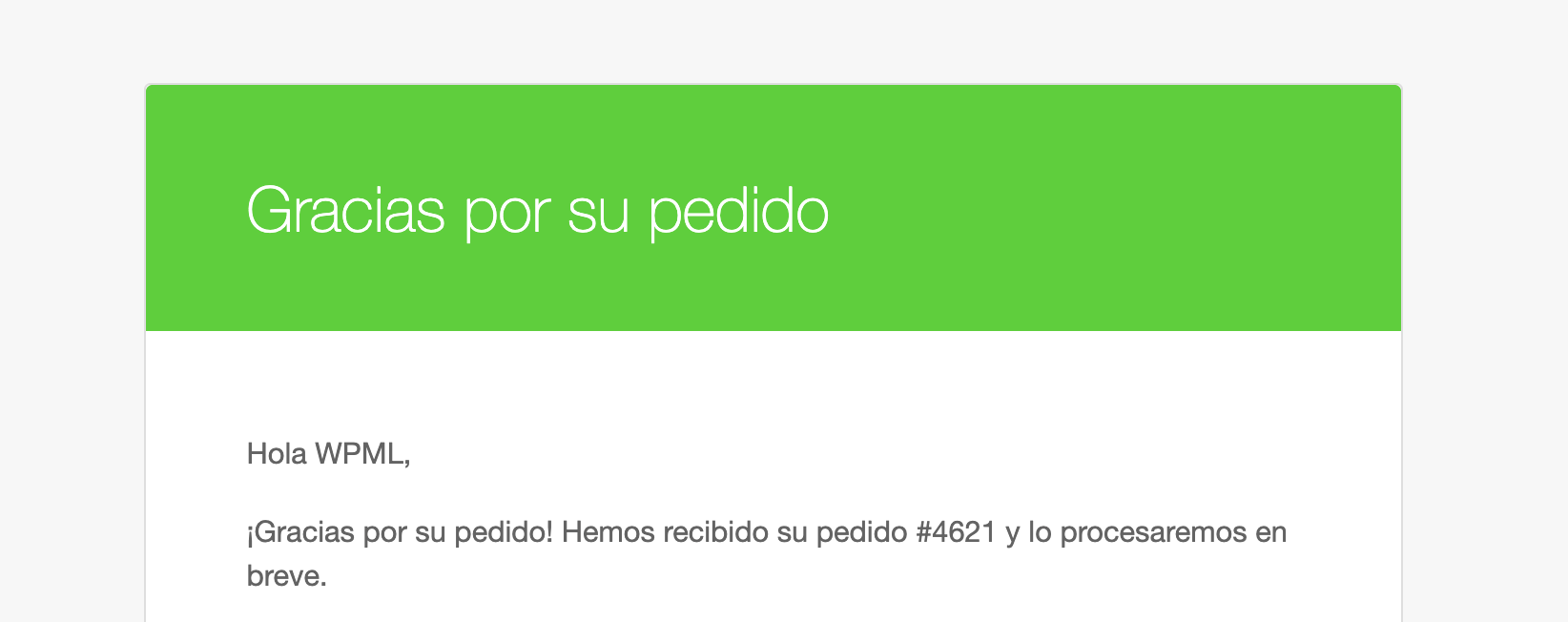    |
| April 5, 2026 at 4:53 am #17949760 | |
|
haraldH-5 |
I sent myself emails from the woocommerce emails tab. The strings Your {site_title} order has been received! are still send only in english |
| April 7, 2026 at 6:50 am #17952696 | |
|
Bobby WPML Supporter since 04/2015 Languages: English (English ) Timezone: America/Los_Angeles (GMT-07:00) |
Thank you for updating me, both strings should be translated now. Let me know your results, please. |
| April 7, 2026 at 7:43 am #17952845 | |
|
haraldH-5 |
Looks good now, no longer mixed up emails. Thanks a lot Bobby. |






