This thread is resolved. Here is a description of the problem and solution.
Problem:
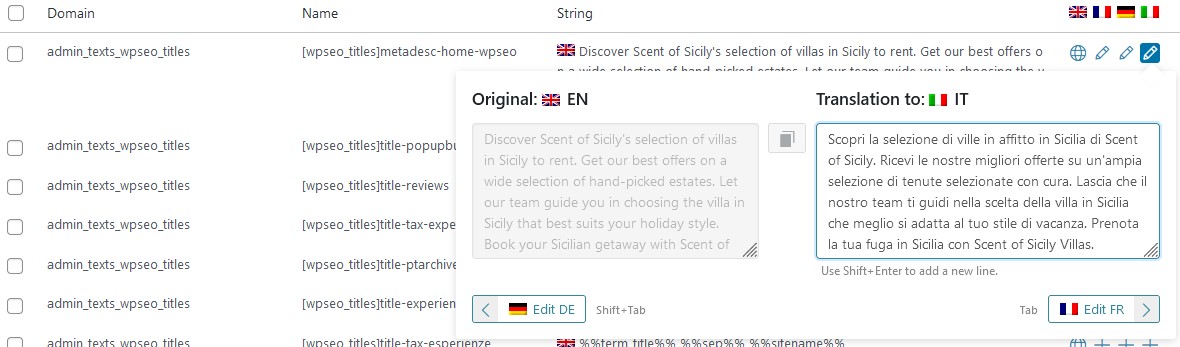
You are trying to translate the
admin_texts_wpseo_titles
string using WPML, but the translated version does not appear on the translated instance of your site. The meta title and description are displayed in the default language instead of Italian.
Solution:
We recommend activating the WPML SEO plugin after ensuring you have a full site backup. Check if the issue persists after this step. For more details on the WPML SEO plugin, please visit: WPML SEO documentation, and the changelog for Yoast SEO Multilingual can be found here: Yoast SEO Multilingual changelog.
Please note that this solution might be outdated or not applicable to your specific case. We highly recommend checking related known issues at https://wpml.org/known-issues/, verifying the version of the permanent fix, and confirming that you have installed the latest versions of themes and plugins. If the issue persists, please open a new support ticket.
This is the technical support forum for WPML - the multilingual WordPress plugin.
Everyone can read, but only WPML clients can post here. WPML team is replying on the forum 6 days per week, 22 hours per day.
Please try the following troubleshooting steps after a full site backup{mandatory} and make sure the issue exists or not.
1) Go to WPML>>Support page, click on the Troubleshooting link (blue link in the middle of the page)
2) On the Troubleshooting page, please click on the following options in the *Clean up* section. Wait for confirmation of processing after each one.
- Clear the cache in WPML
- Remove ghost entries from the translation tables
- Fix element_type collation
- Set language information
- Fix WPML tables collation
- Assign translation status to duplicated content
- Fix terms count
- Fix post type assignment
- Cleanup and optimize string tables
- Show custom MO Files Pre-generation dialog box>>Generate .Mo files
Thank you for the updates. Please fill in the private details fields after a full site backup. I would like to access the admin area of your site to check further. Refer to the following links for more details about our private information sharing policies.
Thank you for the login information. Please try the following steps after a full site backup and check if is there any difference in the result.
1) Increase the *MaxInputVars* of PHP settings to *10000*. Please check the following article for more details or contact your system admin/hosting provider for this purpose.
hidden link
2) Upgrade to the latest version of WordPress 6.7.1
3) Clear all types of caches
4) Visit Seetings>>Permalinks, resave the settings
Do you have a staging/dev site, a clone copy of the live site? Because it will help us to troubleshoot the issue without affecting your site.
Thank you for the updates. One request. We have released a new version of WPML String Translation (3.2.16). It has included the fixes for similar issues. So please upgrade to the latest version after a full site backup and clear all types of caches. Then make sure the bug exists or not.
May you have to visit Plugins>>Add New>>Commerical tab and click on the *Check for updates* button to get the WPML automatic upgrade links of the latest version. This step will help us refresh the installer caches.
Hi, I updated the plugin but nothing has changed.
I cleared the wpml cache too.
The strange thing is that it still displays translations of strings that I have already changed for days...
We need to fix this URGENTLY as it affects SEO.
Thank you for the updates. Please activate the WPML SEO plugin after a full site backup and make sure the issue exists or not. Refer to the following docs for more details.
If the bug exists, please allow me to make a duplicator copy of your site using the Duplicator plugin (https://wordpress.org/plugins/duplicator/) for debugging the issue on my local server. So we can troubleshoot the issue without affecting your live site.