
This is the technical support forum for WPML - the multilingual WordPress plugin.
Everyone can read, but only WPML clients can post here. WPML team is replying on the forum 6 days per week, 22 hours per day.
| Sun | Mon | Tue | Wed | Thu | Fri | Sat |
|---|---|---|---|---|---|---|
| - | - | 9:00 – 18:00 | 9:00 – 18:00 | 9:00 – 18:00 | 9:00 – 18:00 | 9:00 – 18:00 |
| - | - | - | - | - | - | - |
Supporter timezone: America/Lima (GMT-05:00)
This topic contains 13 replies, has 0 voices.
Last updated by Andreas W. 1 day, 9 hours ago.
Assisted by: Andreas W..
| Author | Posts |
|---|---|
| April 15, 2026 at 7:41 pm #17972260 | |
 bennyG |
One of our pages has lost most of its ATE translations: hidden link 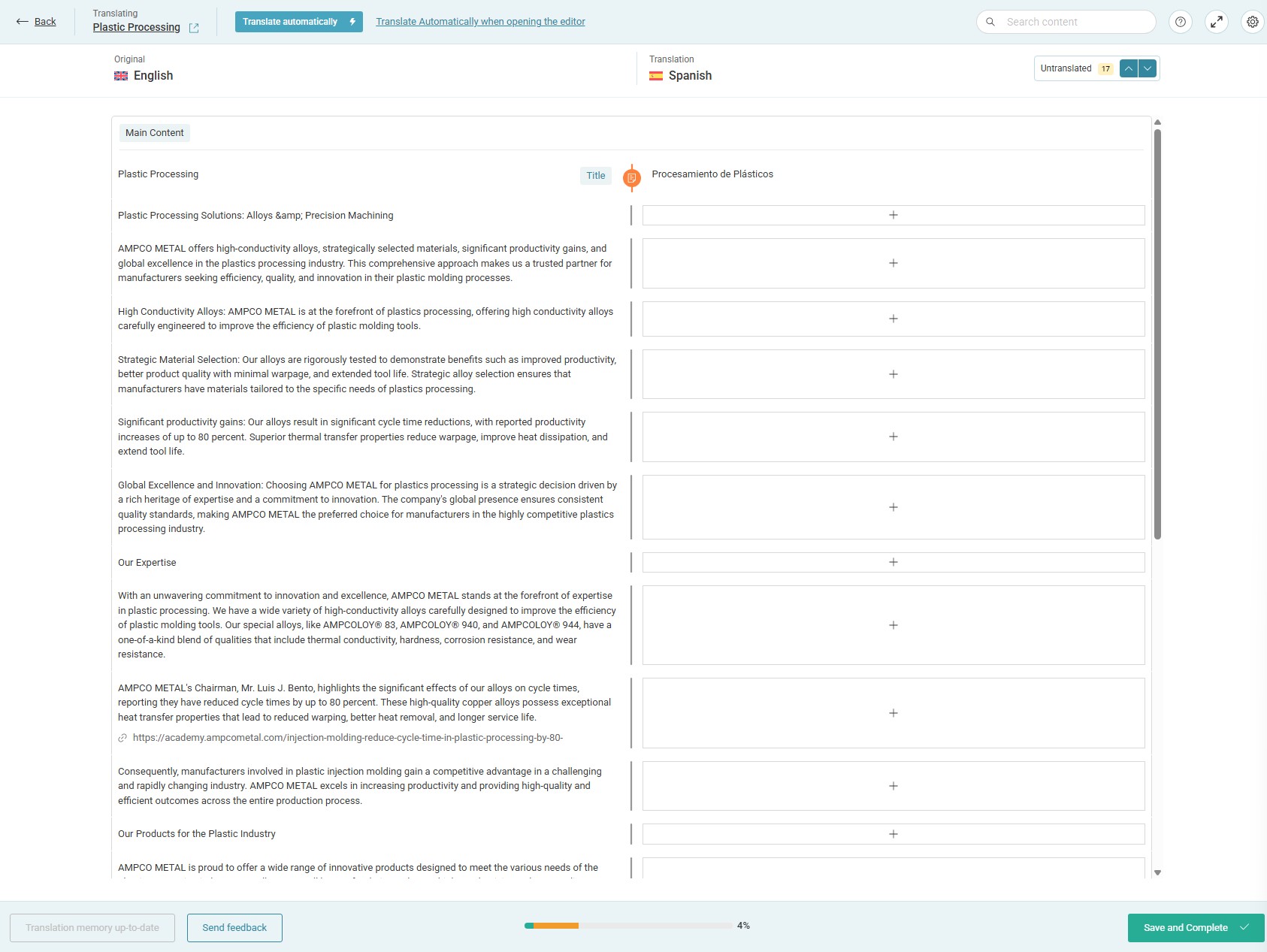 |
| April 17, 2026 at 2:59 am #17975746 | |
 Andreas W. WPML Supporter since 12/2018 Languages: English (English ) Spanish (Español ) German (Deutsch ) Timezone: America/Lima (GMT-05:00) |
Hallo, Vielen Dank für deine Nachricht! Der Advanced Translation Editor leert Segmente, zu denen der originale Inhalt verändert wurde. Hier wurden anscheinend zu viele Segmente geleert. Um zu versuchen das Problem zu replizieren, muss ich wissen, wie der originale Inhalt strukturiert ist. Befindet sich der gesamte Inhalt im gleichen Feld? Bitte sende mir einen Screenshot vom originalen Inhalt im WordPress-Editor. Mit freundlichen Grüßen |
| April 17, 2026 at 12:52 pm #17976902 | |
|
bennyG |
Can we communicate in English? If not, I'll just translate your message and reply in English. I understand the ATE clears segments that have been updated. But my point here is that it seems to be losing translated segments that haven't been updated in English. The English version of the page is here: I've tried to find our original content documents to back up the claim that the English content hasn't been changed since the original version and the input of its translations, but I haven't been able to find these yet. I did find the page versions of 2024 in Web.Archive.Org: You can compare these. They're identical word per word. Yet the ATE has cleared most of the translated content. Not just for Spanish, but for every language. I'm sure I can find more pages on our site where this is happening. Attachd is a screenshot of the content in WordPress. As you can see, it's a simple page and everything is in the main content field. This is not the first time we've seen this happen. It has cost us many hours to reconstruct lost content in recent years. I would like to find answers on why it's happening, so we can hopefully avoid it. Either ATE forgets content after some time, or our setup somehow makes WPML think that the English content is different, while it isn't. 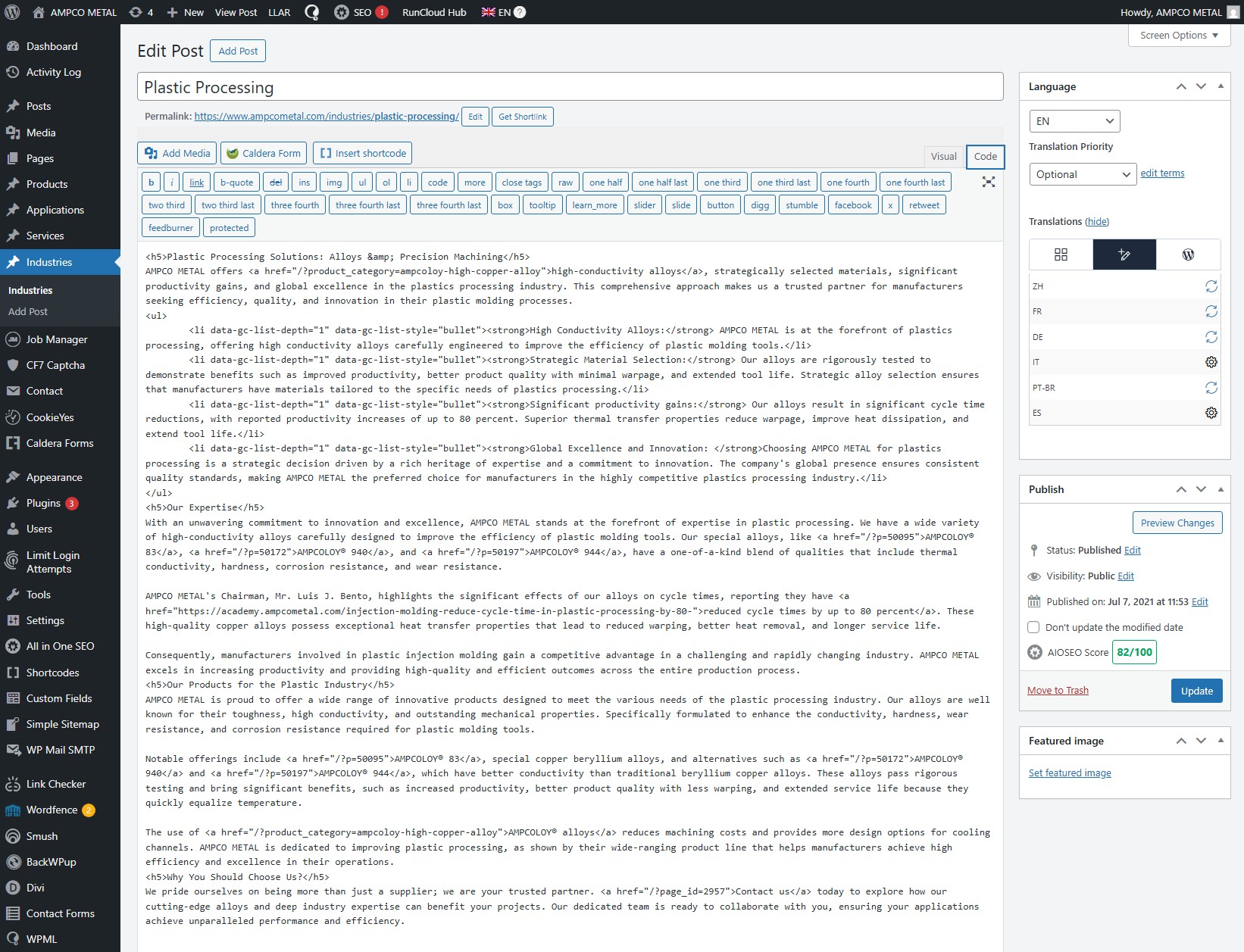 |
| April 17, 2026 at 10:28 pm #17977565 | |
|
Andreas W. WPML Supporter since 12/2018 Languages: English (English ) Spanish (Español ) German (Deutsch ) Timezone: America/Lima (GMT-05:00) |
My apologies for writing you in German. As I handle support in three languages and handle a fairly high amount of requests per day, it may occur that my brain doesn't switch from one mode to the other at the expected moment. I hope for your understanding. The problem might be that you are using the Classic Editor Widget and your entire content is one huge text field with HTML. Please add the same content to a new page on the following sandbox, so that I can run some tests. One-Click-Login: Make sure to leave me a comment once you have created a page using the same content in your example. |
| April 18, 2026 at 11:02 am #17978045 | |
|
bennyG |
I've copied the content to hidden link after installed the Classic Editor plugin. I didn't set up all the other details (child theme, advanced custom fields, AIOSEO, ...). "The problem might be that you are using the Classic Editor Widget and your entire content is one huge text field with HTML." Is that not expected to work? |
| April 18, 2026 at 8:13 pm #17978337 | |
|
Andreas W. WPML Supporter since 12/2018 Languages: English (English ) Spanish (Español ) German (Deutsch ) Timezone: America/Lima (GMT-05:00) |
At the moment, I can not confirm such an issue on the sandbox. I'd like to request temporary access (wp-admin and FTP) to the website to investigate the issue further. You'll find the necessary fields below the comment section if you log in to leave the next reply. The information you provide will be private, meaning only you and I will be able to see and access it. IMPORTANT If you don't see the "wp-admin / FTP" fields, your login credentials for the post and website will be set to "PUBLIC." Do NOT publish the information unless you see the required wp-admin / FTP fields. The private reply form looks like this: When replying again, click "I still need assistance". Video: Please note that we are required to request this information individually on each ticket. We are not permitted to access any login information that was not specifically provided in the private reply form for this ticket. |
| April 22, 2026 at 7:30 am #17986156 | |
|
Andreas W. WPML Supporter since 12/2018 Languages: English (English ) Spanish (Español ) German (Deutsch ) Timezone: America/Lima (GMT-05:00) |
This content was originally created and first translated in 2021. There can be various reasons for this issue. One reason might be that you started using WPML Sticky Links, which then converted all the links inside this content into something like: <a href="/?page_id=2957">Contact us</a> This updated the original content, and as all the content uses the same text field, this led to the need to update all the translations. Another reason might be that original content was maybe translated with the Classic Translation Editor, then later on the global translation method was changed to Advanced Translation Editor when you enabled the option WPML > Settings > Translation Editor > Advanced Translation Editor > Use also for old translations created with the classic editor. The only current fix here would be updating the translation. If the issue occurs again after that, then we would need to investigate further. |
| April 22, 2026 at 1:39 pm #17987749 | |
|
bennyG |
I'm 99% sure the content was originally entered in the Advanced Translation Editor. We started using it fairly soon after its release and haven't used the Classic one since then. If WPML Sticky Links was the cause (I don't know), wouldn't it only "reset" sentences or paragraphs with links, leaving the rest untouched? There are a few untouched lines that DO have links, so I doubt this is a valid explanation. "The only current fix here would be updating the translation." |
| April 22, 2026 at 1:47 pm #17987756 | |
|
bennyG |
** duplicate ** |
| April 22, 2026 at 8:23 pm #17988682 | |
|
Andreas W. WPML Supporter since 12/2018 Languages: English (English ) Spanish (Español ) German (Deutsch ) Timezone: America/Lima (GMT-05:00) |
The original content was somehow updated, and this clears the existing translation memory inside the Advanced Translation Editor - this is expected behavior. There is, sadly, technically no way to recover this translation memory. As it is unclear how the update on the original content occurred, the only thing I can exceptionally offer is crediting your account with sufficient credits so that you can translate it automatically. Please go to WPML > Translation Dashboard, mark the post, and then go down to the bottom of the page and let me know how many credits are needed to translate the post automatically into all languages. |
| April 23, 2026 at 6:59 am #17989182 | |
|
bennyG |
"The original content was somehow updated" hidden link I've seen this problem happen too many times to believe that it happens because of natural content edits. Either something is broken (a bug), or something is making WPML THINK that the content is different (a conflict). Either way, it's not good. "There is, sadly, technically no way to recover this translation memory." I already spent a good hour yesterday inputting the translations again. It's painstaking monkey-work where I have to copy and paste every line from the live translated page back into the ATE. I hoped I never had to do it again, but seeing how this support ticket is going doesn't give me much hope 🙁 Thanks for the credits but I have to decline. The company wants to use our own translations. I do have one question: as a software developer myself, I would expect that you have some kind of log book or change history of your translation memory that allows you to see what exactly happened to the missing lines from our ATE. The lines were there in 2024 and then they disappeared, without the actual text being updated. Are you not able to dive into that log book to see what happened? |
| April 23, 2026 at 7:20 am #17989233 | |
|
Andreas W. WPML Supporter since 12/2018 Languages: English (English ) Spanish (Español ) German (Deutsch ) Timezone: America/Lima (GMT-05:00) |
Yes, we do have a log on the translation system, and there are altogether 48 jobs for: The oldest jobs are from 2023, then there were jobs in 2024, and now in 2026. I compare the original contents, and I see that the original content seems not to have changed, but the segmentation of the Advanced Translation Editor did. This means the issue might have arisen because: 1) The ATE settings "Use bigger segments" were changed Now, if you do not use automatic translation and you might not need the translation memory and glossary of the Advanced Translation Editor, then it might be advisable to switch the translation method to "Classic Translation Editor" inside WPML's settings, as this would be the proper method to translate content that is created using the Classic Editor in WordPress. This should avoid such issues in the future. |
| April 23, 2026 at 12:34 pm #17990240 | |
|
bennyG |
I have never heard of this ATE setting called "Use bigger segments". So I surely haven't touched it. So is the conclusion that the translations were lost because you guys updated something over the years? |
| April 23, 2026 at 8:23 pm #17991252 | |
|
Andreas W. WPML Supporter since 12/2018 Languages: English (English ) Spanish (Español ) German (Deutsch ) Timezone: America/Lima (GMT-05:00) |
This could be the case, yes. I remember one situation where a major Advanced Translation Editor (ATE) update caused this, and this happened when the new ATE setting "Allow bigger segments" was introduced. For now, please complete the translation again, then duplicate one of the affected posts or pages for testing. Make a small edit to the original content and save it again. Do the translations remain saved on the Advanced Translation Editor? |






