This thread is resolved. Here is a description of the problem and solution.
Problem: You are using ATE for translations on your site. After clicking 'complete translation', the icon changes to a gear icon instead of the expected pen icon. Solution: We have applied a fix to resolve this issue. Please make a small change in the original language content and then update the translations. This method has been tested and should ensure that the pen icon appears correctly after completing a translation in ATE.
If this solution does not resolve your issue, or if it seems outdated or irrelevant to your case, we highly recommend checking related known issues at https://wpml.org/known-issues/, verifying the version of the permanent fix, and confirming that you have installed the latest versions of themes and plugins. Should you need further assistance, please do not hesitate to open a new support ticket at WPML support forum.
This is the technical support forum for WPML - the multilingual WordPress plugin.
Everyone can read, but only WPML clients can post here. WPML team is replying on the forum 6 days per week, 22 hours per day.
Background of the issue:
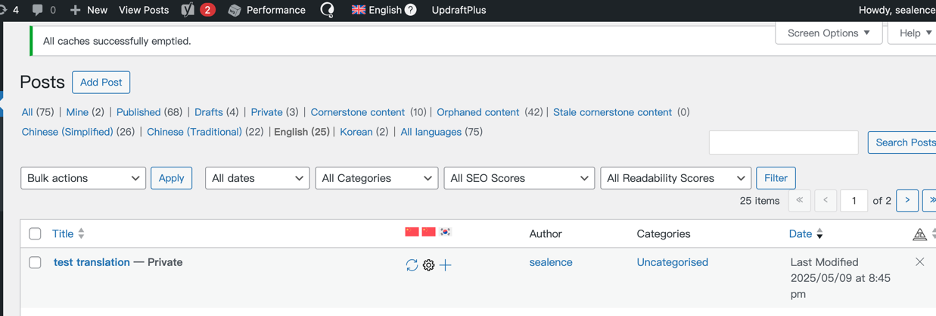
I am trying to use ATE on my site. I can open ATE, but after clicking 'complete translation', it returns to my site, and the icon changes to a gear icon instead of the pen icon. Here is the link to the page where the issue can be seen: hidden link.
Symptoms:
After completing a translation in ATE, the icon changes to a gear icon instead of the expected pen icon.
Questions:
Why does the icon change to a gear icon instead of a pen icon after completing a translation?
How can I ensure the pen icon appears after completing a translation in ATE?
Thank you for contacting WPML Support. Could you please try to follow the below steps and see if this resolves the issue:
1. Please take a backup of your site first for safety reasons.
2. Go to WPML >> Support >> Troubleshooting page and press the below buttons:
- Synchronize local job ids with ATE jobs
- Synchronize translators and translation managers with ATE
3. Open the default language page in Edit mode.
4. Make a small change, for example, add a space or + sign in your page/post title.
5. Update the page by pressing the “Update” button.
6. Now, please remove that small change that did in step #4.
7. Update the page again.
8. Now, please try to open the translated page in WPML Translation Editor and make sure the translation is 100% complete and press the Complete Translation button.
9. Clear all sorts of site/server/CDN cache and see if this resolves the issue.
If the issue persists, please go to WPML >> Support page and click on the "Error logs" under Advanced Translation Editor and provide me a screenshot of the top few entries.
Also, please let me know if this issue arises on specific page’s/post’s of your site or do all pages have the same issue.
Thanks for sharing the ATE error log screenshot. Could you please delete the existing site key and create a new one by following the below steps:
1. Please login to your WPML.org account >> Go to the Sites page: https://wpml.org/account/sites/
2. Delete the existing site key (if it exists).
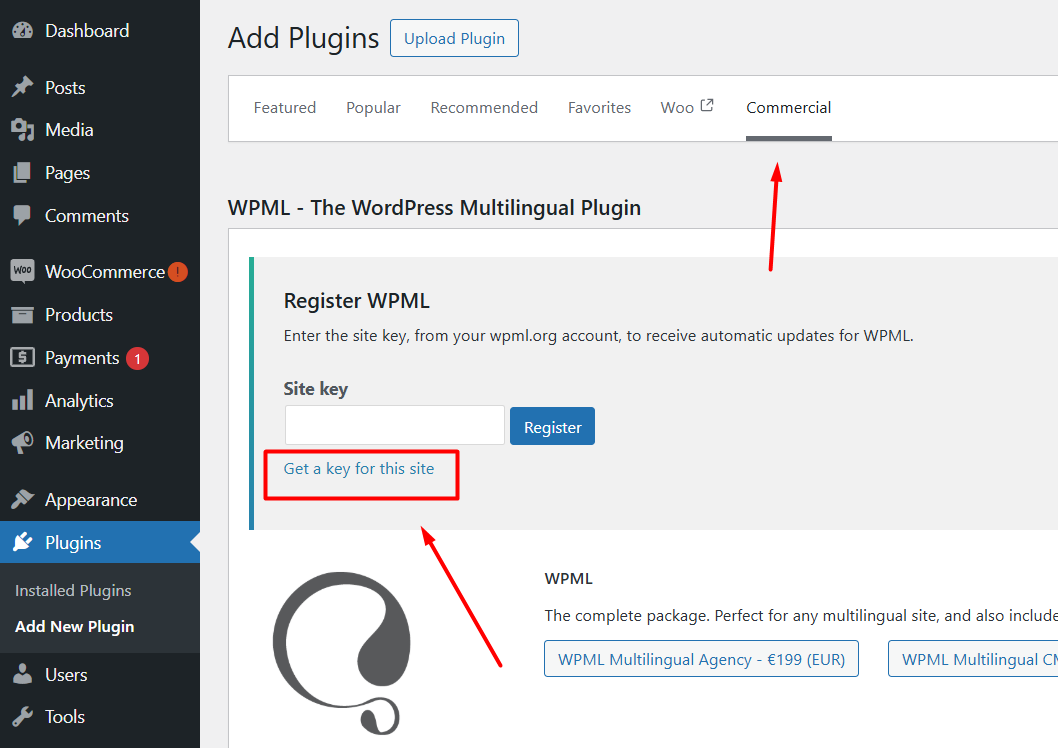
3. Please login to your site and go to the Dashboard >> Plugins >> Add new plugin > Commercial tab and click the Unregister WPML from this site link if that link exists.
4. Then please click the Register WPML link.
5. Click the Get a key for this site link.
6. It will generate the Key for your site.
7. Copy the key, and paste it back into the input box, and press the Register button and see if this resolves the issue.
Thanks for trying the above suggested steps. To take a closer look at this issue, please provide temporary access (WP-Admin and FTP Login info) to your site (preferably staging site), so that I can look into your setup and debug the issue.
Your next answer will be private which means only you and I have access to it.
=== Please backup your database and website ===
✙ I would additionally need your permission to deactivate and reactivate Plugins and the Theme and to change configurations on the site. This is also a reason the backup is really important.
Our 2nd tier team has advised that we need your permission to install a plugin on your site to help fix the issue. Could you please confirm if you have a backup before we proceed?
Thanks for the confirmation. I am afraid you cannot fix that at your own as we don't have access to those code related settings. Only our 2nd tier can help solve that issue. It was due to some sort of bad url being stored in the ATE system and such issues don't occur so often, so you should be good to move ahead with your website.