Home›Support›English Support›[Resolved] Backend is slow after migration from development to production environment
[Resolved] Backend is slow after migration from development to production environment
This thread is resolved. Here is a description of the problem and solution.
Problem: After migrating a multi-lingual site to a new production server, the backend became very slow, primarily due to frequent API calls made by the WPML Multilingual CMS plugin, resulting in '426 Upgrade Required' errors. Solution: First, ensure that all WPML plugins are updated to their latest versions. Next, within the WPML settings, switch the translation editor as this might resolve the issue temporarily. Additionally, check WPML logs for repeated API requests and review server resource usage to identify any loops or redundant external calls. If these steps do not alleviate the problem, it may be due to a bug that our developers are currently investigating. In this case, switching the translation editor as per the instructions in WPML → Settings should serve as a temporary workaround.
Please note that this solution might become outdated or may not apply to your specific situation. If the issue persists, we highly recommend checking related known issues, verifying the version of the permanent fix, and confirming that you have installed the latest versions of themes and plugins. If necessary, please do not hesitate to open a new support ticket.
This is the technical support forum for WPML - the multilingual WordPress plugin.
Everyone can read, but only WPML clients can post here. WPML team is replying on the forum 6 days per week, 22 hours per day.
Hello,
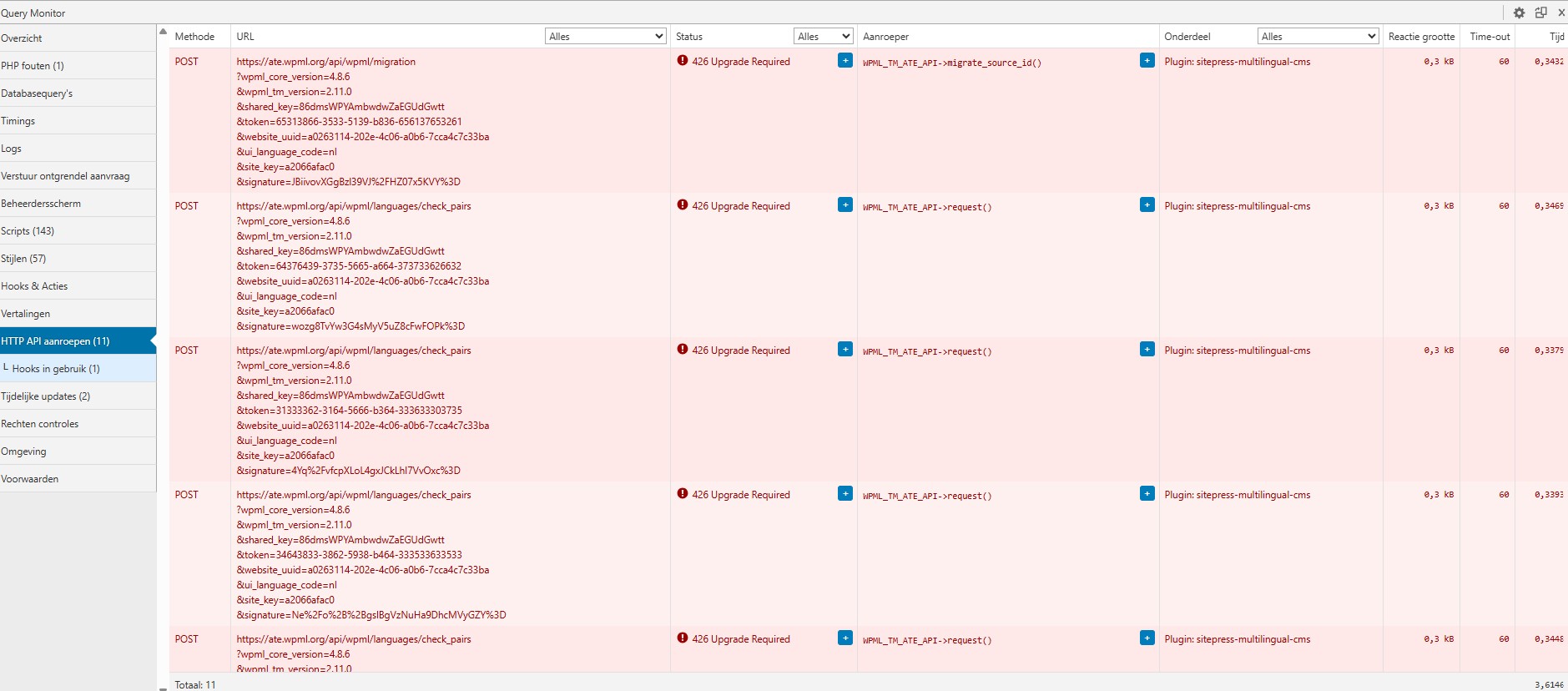
I developed a multi-lingual site with WPML on hidden link and everything worked fine. But since I migrated to the production server (hidden link), the backend is very slow. I found out that it was caused by the WPML Multilingual CMS plugin, I get these error messages: POST hidden link
?wpml_core_version=4.8.6
&wpml_tm_version=2.11.0
&shared_key=86dmsWPYAmbwdwZaEGUdGwtt
&token=36373562-3166-5239-a237-613666353862
&website_uuid=a0263114-202e-4c06-a0b6-7cca4c7c33ba
&ui_language_code=nl
&site_key=a2066afac0
&signature=22CHgiXONzwAYAfimaoaywZ8IhA%3D 426 Upgrade Required
WPML_TM_ATE_API->migrate_source_id()
Plugin: sitepress-multilingual-cms 0,3 kB 60 0,3390
POST hidden link
?wpml_core_version=4.8.6
&wpml_tm_version=2.11.0
&shared_key=86dmsWPYAmbwdwZaEGUdGwtt
&token=64323866-6662-5265-b062-363764323835
&website_uuid=a0263114-202e-4c06-a0b6-7cca4c7c33ba
&ui_language_code=nl
&site_key=a2066afac0
&signature=kF086RJr26TdtV0LAmkoFtGJERs%3D 426 Upgrade Required
WPML_TM_ATE_API->request()
Plugin: sitepress-multilingual-cms 0,3 kB 60 0,3409
POST hidden link
?wpml_core_version=4.8.6
&wpml_tm_version=2.11.0
&shared_key=86dmsWPYAmbwdwZaEGUdGwtt
&token=39373032-3733-5232-b431-353864633437
&website_uuid=a0263114-202e-4c06-a0b6-7cca4c7c33ba
&ui_language_code=nl
&site_key=a2066afac0
&signature=8c3NSHUo8B6F%2BBEQQYgq56KV4J0%3D 426 Upgrade Required
WPML_TM_ATE_API->request()
Plugin: sitepress-multilingual-cms 0,3 kB 60 0,3378
Once completed, kindly share the requested data in your next reply. Alternatively, if possible, I may need temporary access (WP-Admin and FTP) to a test or staging site where the issue can be reproduced. This will allow me to investigate further and determine whether any configuration changes are required.
Please ensure that a full backup of the site is created beforehand to avoid any potential data loss. You can use the UpdraftPlus plugin for this purpose: https://wordpress.org/plugins/updraftplus/
Rest assured that any information you share will be kept confidential and will only be visible to you and me.
✙ To help resolve the issue, I may need your permission to temporarily deactivate and reactivate plugins and the active theme, as well as adjust site configurations if necessary. This is why having a backup in place is essential.
I made a backup with Updraftplus of my production site hidden link and restored it on my test environment hidden link
I don't experience any problems on my public site but only on the WordPress admin part when I click on "Pages" in ls-housekeeping.be > this page doesn't load
The strange thing is that I don't experience this problem on my test site ikandittest.be, there the "pages" page loads correctly
Do you want me to give you access to my production site then?
I managed to install the Debug Bar and download the Sort Queries file, but I don't know how to install it?
Where I'm stuck now is that I created a custom post type "regions". I was able to create 1 page per local city in Dutch, but now I want to translate them into FR and ENG as well, but since I cannot open the "pages" page, I cannot create my translations.
Thanks for your reply. Please proceed with creating a backup and sharing access to your production site. I’ll review it and let you know the next steps.
Thanks for your reply. I've checked and I cannot see any misconfiguration. But I'm able to see the issue when I try to access the pages. It works fine when I deactivated the WPML plugin. I will escalate this further to our 2nd Tier Support for further investigation.
Before I do that, may I have your permission to create a snapshot of the site for troubleshooting? Alternatively, with your permission, I can create one myself. For this purpose, I typically recommend using the free plugin "Duplicator." If you're already familiar with Duplicator (https://wordpress.org/plugins/duplicator/), please skip the following steps and simply send me the archive file you downloaded. https://wpml.org/de/faq/provide-supporters-copy-site/
To guide you further, please adhere to these instructions:
1. View the Duplicator instructions video: hidden link
2. If the archive file exceeds 400MB, please use Duplicator's file filters to exclude cache, wp-uploads directory, media, and archive files.
Once you have the archive file ready, kindly share the link with us. You can utilize platforms like Google Drive, Dropbox, or similar for file sharing, as the snapshot file might be large.
Please note that your next reply will be private, visible only to you and me. You can paste the file link there. Rest assured that once the issue is resolved, I will delete the local site.
Thanks for your patience. I can replicate the issue locally and I will escalate this further to our 2nd Tier Support for further investigation. I will come back to you once I've feedback.
Thanks for your patience. Our 2nd Tier Support has investigated the issue and confirmed that this is a bug on our side, which has now been reported to our developers.
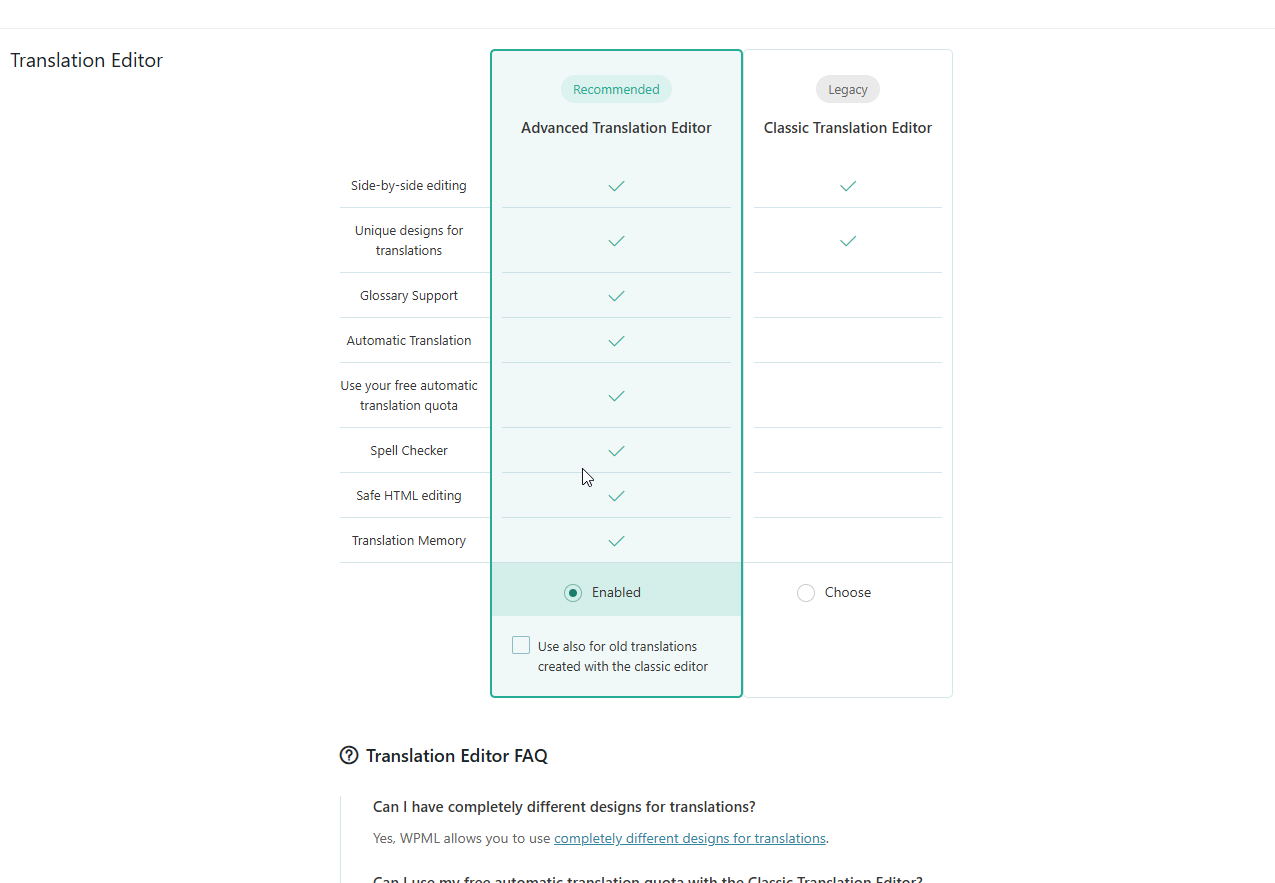
As a workaround, switching the translation editor in WPML → Settings, as shown in the attached screenshot, should resolve the issue for now. Could you check?